
If you love travel and take photos, you may like to search for an SSD that can be used in a harsh environment. SD820, launched by ADATA in September 2025, may be suitable for your needs. It is a rugged, military-grade external solid-state drive.
Do you want to know more about this portable SSD? If so, this post provides a comprehensive guide to the ADATA SD820 SSD.
ADATA SD820 SSD
In this section, I will introduce this SSD from these aspects: specifications, compatibility, price, durability, storage, and target audience.
ADATA SD820 SSD Specifications
| Interface | USB 3.2 Gen2 x2 (USB 20Gbps) (backward compatible with USB 2.0) |
| Read/Write Speeds | Up to 2,000 MB/s |
| Weight | 26.5g / 0.93oz |
| Dimensions | 71.3 x 39 x 13.65mm / 2.81 x 1.54 x 0.54inch |
| Colors | Blue and Grey |
| Warranty | 5-year limited warranty |
| Op. Temperature | 5°C(41°F) to 50°C (122°F) |
| Op. Voltage | DC 5V, 900mA |
ADATA SD820 SSD Compatibility
The ADATA SD820 external SSD offers wide compatibility across multiple operating systems and device types due to its USB Type-C interface and backward compatibility with older USB standards. It is compatible with:
- Windows 8 / 8.1/ 10 / 11
- macOS 10.6 or later (Formatting required for use)
- Linux Kernel 2.6 or later
- Android 13 or later
- The latest iPhones
- The latest generation game consoles
ADATA SD820 SSD Price
Lately, you can pre-order the ADATA SD820 external solid-state drive from the official ADATA website: $116.99 USD for 1TB and $213.99 USD for 2TB. Then, the product will be delivered in mid-November. The price of the 4TB version has not yet been determined.
ADATA SD820 SSD Durability
- Rugged design: This SSD is tough and portable, featuring a classic design from the HD710 Pro in a smaller size.
- Water and dust resistance: It is certified to the IP68 standard, which means it can prevent dust intrusion and survive immersion in water over 1 meter deep for 60 minutes.
- Drop resistance: It meets the MIL-STD-810G 516.6 military-grade standard for drop resistance, able to withstand accidental drops from up to 1.22 meters.
ADATA SD820 SSD Storage
By now, the ADATA SD20 SSD offers three capacity options: 1TB, 2TB, and 4TB. The following are its product number and EAN Code:
| Capacity | Product Number | EAN Code |
| 1TB | Blue: SD820-1000G-CBU | 4711658152671 |
| Grey: SD820-1000G-CGY | 4711658152909 | |
| 2TB | Blue: SD820-2000G-CBU | 4711658152688 |
| Grey: SD820-2000G-CGY | 4711658152916 | |
| 4TB | Blue: SD820-4000G-CBU | 4711658152695 |
| Grey: SD820-4000G-CGY | 4711658152923 |
ADATA SD820 SSD Target Audience
The ADATA SD820 SSD is designed to withstand harsh environments, making it ideal for outdoor creators and photographers. It is also excellent in transfer speed, durability, and capacity, enabling it suitable for gamers who need durable, high-speed storage.
ADATA SD820 SSD Pros and Cons
To have a clearer idea of the ADATA SD820 SSD, let’s see what its pros and cons are.
Pros of ADATA SD820 SSD
- High-speed transfer: It offers up to 2000 MB/s read/write speeds with a compatible USB 3.2 Gen 2×2 port, perfect for large files (such as 4K videos).
- Extreme durability: It offers water, dust, and drop-resistance that makes the SSD’s extreme durability.
- Lightweight and compact: It weighs just 26.5 grams, making it highly portable and easy to carry.
- Broad compatibility: It works with Windows, macOS, and compatible Android devices via USB-C.
- Large capacity: ADATA SD820 SSD is available in high capacities, including up to 4TB, to store large game libraries and creative projects.
Cons of ADATA SD820 SSD
- Sustained write speed drop: If excessive data is written to this SSD simultaneously, the drive will deplete its secondary cache and experience a slowdown to approximately 130Mbps.
- Requires specific hardware for top speed: To reach its maximum speed of 2000 MB/s, your device requires a USB 3.2 Gen 2×2 port.
- Mac performance limitations: When using an ADATA SD820 SSD on a Mac, performance can be capped at 10Gbps speeds due to most Macs featuring USB3.2 Gen 2 ports or Thunderbolt ports.
Bonus Tip: How to Back Up Data to an ADATA SD820 SSD
If you choose to back up your data to an ADATA SD820 external SSD, you can use MiniTool ShadowMaker to assist you. This Windows backup software offers data protection services and disaster recovery solutions for PCs, servers, and workstations.
Here’s how to use it:
Step 1. Download and install MiniTool ShadowMaker on your computer. Then, launch it to enter the main interface.
MiniTool ShadowMaker TrialClick to Download100%Clean & Safe
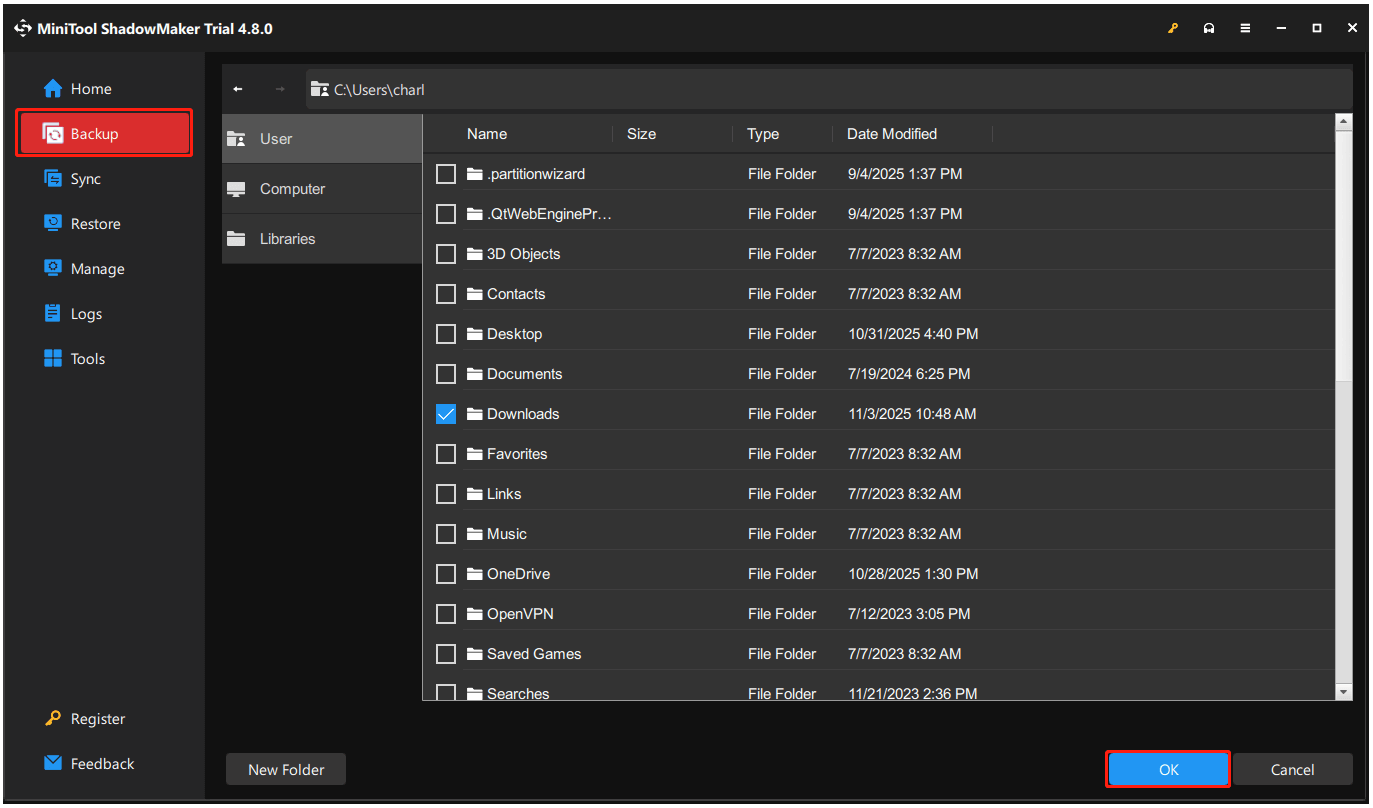
Step 2. Select Backup from the left panel. Then, go to SOURCE to select the data that you want to back up, and then click OK.
Step 3. Go to DESTINATION, select the ADATA SD820 portable SSD’s partition, and then click OK.
Step 4. Click Back Up Now at the bottom right corner. Then, click OK in the pop-up Confirmation window.
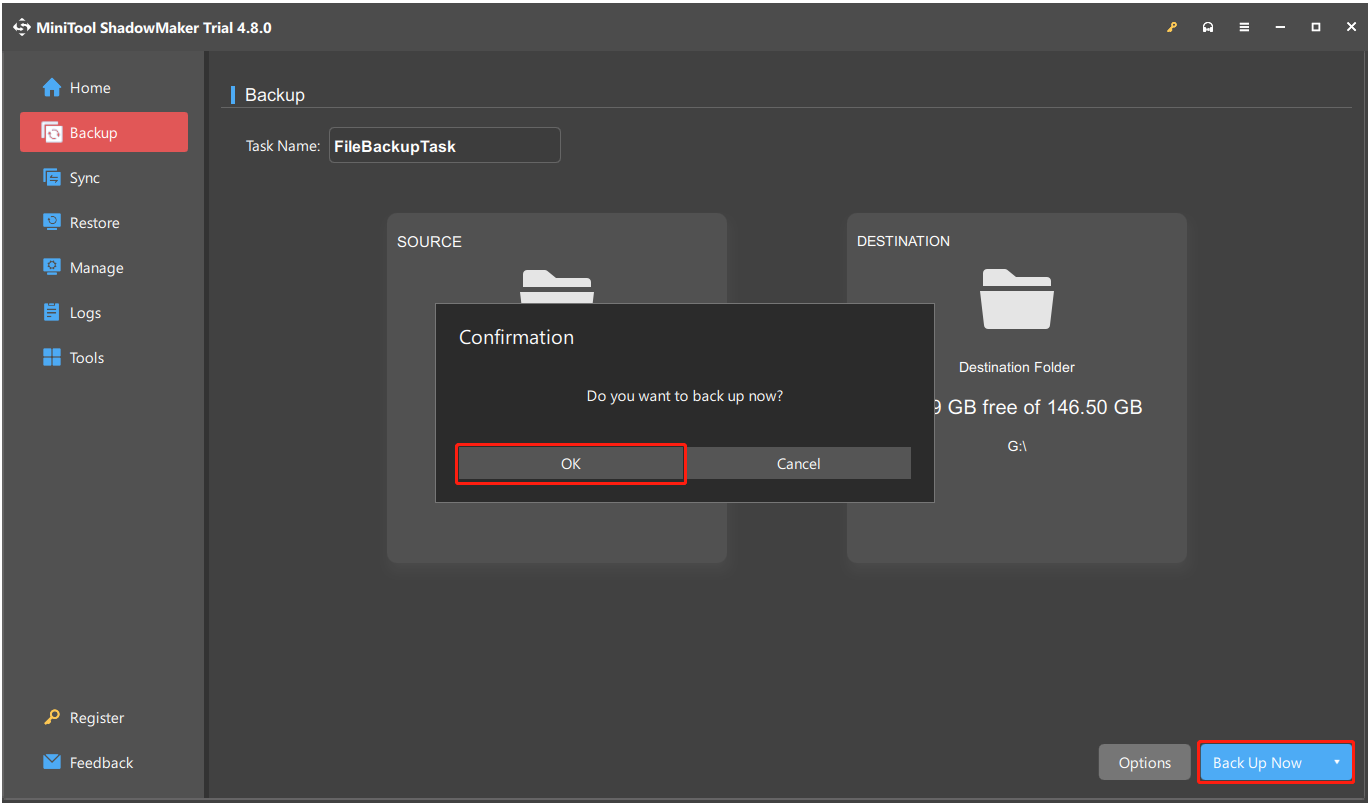
Once the process is complete, your data can be backed up to the ADATA SD820 portable SSD successfully.
In Conclusion
This post gives a comprehensive guide on the ADATA SD820 external SSD. Also, it introduces MiniTool ShadowMaker to help you back up your data. If you have trouble with this software, you can contact us at [email protected].
ADATA SD820 SSD FAQ
They also offer high-performance external SSDs such as the SE920, which delivers speeds up to 3,800/3,700 MB/s.
About The Author

Position: Columnist
Charlotte is a technology columnist with a strong focus on the Windows operating system, specializing in disk management, backup, and data recovery. She is passionate about analyzing computer errors, identifying root causes, and delivering practical solutions. In her free time, she stays updated on the latest developments in computer systems and hardware while continuously learning new technologies to broaden her expertise. Her writing style is clear and easy to understand, making complex technical topics accessible even to users with limited computer knowledge.
User Comments :