
Users can install different Beat Saber mods on their PC easily with the help of the Mod Assistant. However, some Beat Saber game players complained about the Beat Saber mods not working problem after an update. They want to solve the problem themselves, but don’t know how. This post on MiniTool offers several effective methods for fixing it.
What is Beat Saber?
In short, Beat Saber is a virtual reality rhythm game (VR rhythm game) released and maintained by Beat Games. The players need to use a pair of contrasting colored sabers to slash the beats of adrenaline-pumping music which are flying towards them. The Beat Saber game features a surreal neon environment and characteristics.
There’s a Beat Saber Mod Assistant, which helps users download & install Beat Saber mods (including the best Beat Saber mods) on a computer easily.
A Common Problem: Beat Saber Mods Not Working
According to users’ feedback, Beat Saber mods not working occurs now and then on different computers and devices. A common reason for causing Beat Saber mod issue is update: many players said their mods not working or showing up after an update; some even said their Beat Saber custom songs not working. Besides, even if they have done a clean install of the game and Mod Assistant Beat Saber, errors may be detected on Beat Saber mod. Other causes for mod Beat Saber issues could be antivirus restrictions, firewall restrictions, installation problems, and even corrupt files.
MiniTool Power Data Recovery TrialClick to Download100%Clean & Safe
How to Fix When Your Mods Not Working
How to fix Beat Saber mods not working? Please follow the methods and steps below.
Method 1: Allow Beat Saber Related Traffic via Firewall/Antivirus
Step 1: Temporarily Disable Windows Firewall & Check
- Press Windows+S.
- Type firewall into the text box and press Enter to open Windows Defender Firewall.
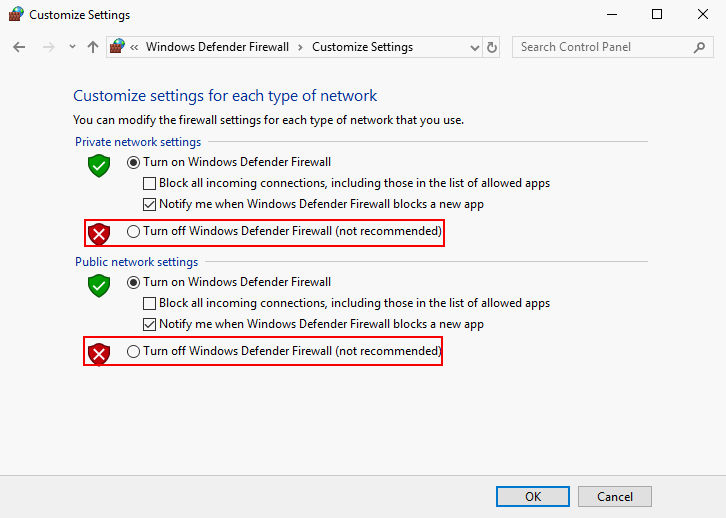
- Select Turn Windows Defender Firewall on or off.
- Check Turn off Windows Defender Firewall (not recommended) under both Private network settings and Public network settings.
- Click OK.
- Launch Beat Saber to check whether the Beat Saber mod issue is fixed.
Step 2: Allow Access to Beat Saber File or Modify Beat Saber
If the problem is fixed after step 1, please follow this:
- Open Windows Defender Firewall.
- Select Allow an app or feature through Windows Defender Firewall.
- Click on the Change Settings button.
- Choose the Beat Saber file. (If the file isn’t in the list, please click Allow another app and select the Beat Saber file.)
- Click on the OK button to confirm.
- Launch the game again to see whether the problem is fixed.
If the problem is not fixed after step 1, please follow this:
- Go to the Beat Saber directory on your device.
- Find the exe file and right click on it.
- Choose Run as administrator to launch Beat Saber.
- Close the game manually.
- Open Mod Assistant and use it to install all the mods needed.
How to install Beat Saber mods and new custom songs?
Method 2: Check the Integrity of the Beat Saber Game Files
- Launch Steam on your device.
- Look for Beat Saber in the Library section.
- Right click on it and choose Properties.
- Shift to the LOCAL FILES tab.
- Click on the VERIFY INTEGRITY OF GAME FILES button.
- Wait for the verifying process to complete.
- Close and launch Steam again to see whether Beat Saber is working.
- Go to the Mod Assistant website to download the latest version.
- Launch the assistant to install the mods needed.
- Launch Beat Saber, exit it, and then launch it again to see whether it works.
If not, please follow this:
- Close Beat Saber completely.
- Go to the Beat Saber directory.
- Double click on the Beat Saber (Patch & Launch).
- Open Steam and launch Beat Saber to check.
If it’s still not working, please follow this:
- Close Beat Saber and Steam completely.
- Download and install Beat Saber IPA.
- Find exe, drag & drop it to BSIPA.exe.
- Open Steam and Beat Saber to check.
If the Beat Saber custom songs mod problem still exits, you should also try these methods:
Method 3: reinstall Beat Saber.
Method 4: reinstall the Mod Assistant for Beat Saber.
Method 5: re-patch Beat Saber.
User Comments :