
Brothers: A Tale of Two Sons Remake Not Launching/Crashes
Brothers: A Tale of Two Sons Remake is a popular adventure and casual game that is a remastered version of the original game released in 2013, allowing gamers to play as two brothers on a journey filled with discovery, loss, adventure, and mystery.
However, searching on Reddit and related forums, you will find that many players are unable to launch Brothers: A Tale of Two Sons Remake. This article strives to eliminate this problem.
How to Fix if Brothers: A Tale of Two Sons Remake Won’t Launch
Fix 1. Check if Your Device Meets the System Requirements
If Brothers: A Tale of Two Sons Remake crashes, you need to consider if your computer meets the system requirements. Although this game has minimum system requirements, it is better to meet the recommended requirements.
Minimum:
- OS version: Windows 10 with 64-bit processor
- Processor: Intel Core i7-6700 (4 * 3400), AMD Ryzen 5 1500X (4 * 3500)
- Memory: 8 GB
- Graphics: Nvidia GTX1650 GPU with 8 GB Dedicated RAM
- DirectX: DirectX 11
- Storage: 35 GB available space
Recommended:
- OS version: Windows 10 with 64-bit processor
- Processor: Intel Core i7-10700 (8 * 2900), AMD Ryzen 7 3700X (8 * 3600) or equivalent
- Memory: 16 GB
- Graphics: GeForce RTX 2060 Super (6144 MB), Radeon RX 5700 (8192 MB)
- DirectX: DirectX 12
- Storage: 35 GB available space
Fix 2. Run Brothers: A Tale of Two Sons Remake as Administrator
Running the game with administrative permissions can help you avoid many game startup issues like Brothers: A Tale of Two Sons Remake not launching.
Step 1. Go to Steam Library, then right-click Brothers: A Tale of Two Sons Remake to select Manage > Browse local files.
Step 2. In Windows Explorer, right-click the .exe file of Brothers: A Tale of Two Sons Remake to select Properties.
Step 3. Move on to the Compatibility tab, and tick Run this program as an administrator. After that, click Apply > OK.
After these operations, you can try to launch the game again.
Fix 3. Verify the Integrity of Game Files
Brothers: A Tale of Two Sons Remake game files may get corrupted or missing due to various reasons, resulting in startup or operation issues. To rule out this cause, you can verify the integrity of the game files.
On Steam Library, right-click Brothers: A Tale of Two Sons Remake and select Properties.
Under the Installed Files tab, click Verify integrity of game files.
MiniTool Power Data Recovery FreeClick to Download100%Clean & Safe
Fix 4. Update the Graphics Driver
Outdated or corrupted graphics driver is a common cause of game failure. To fix this issue, you can update the graphics driver via Device Manager.
Step 1. Right-click the Start button and click Device Manager.
Step 2. Expand Display adapters, then right-click the target device and select Update driver.
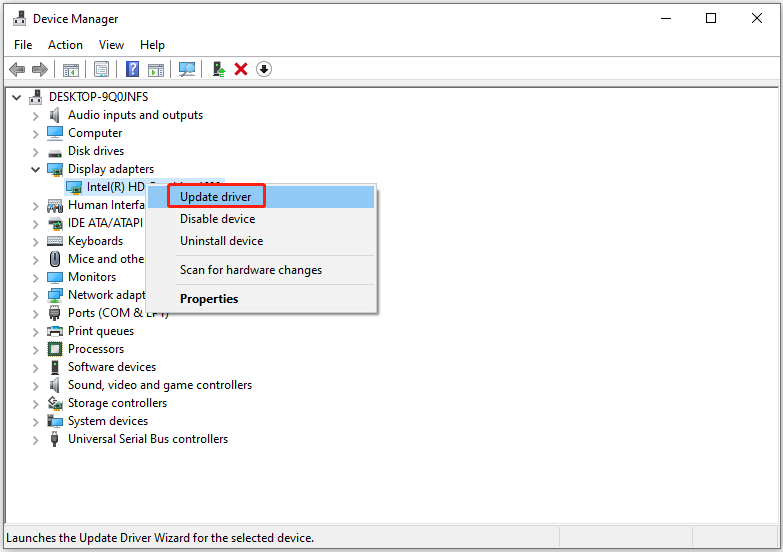
Step 3. Choose a preferred update method to install the latest driver.
Fix 5. Turn off the Steam Overlay
Enabled Steam overlay may also cause Brothers: A Tale of Two Sons Remake to crash. To eliminate the impact of Steam overlay on your game, you can disable it. To complete this task, you can refer to this post: How to Enable or Disable Steam Overlay on Windows 10/11.
Conclusion
With the workable solutions listed above, we believe you can resolve the “Brothers: A Tale of Two Sons Remake not launching/loading” issue on Windows.
For any help with MiniTool software, please contact [email protected].
About The Author

Position: Columnist
Shirley holds a bachelor’s degree in English and has been an editor at the MiniTool Team for many years. She specializes in IT-related content, with a focus on data recovery, file backup, disk management, and other technical topics. She is committed to delivering clear, accurate, and practical solutions to help users resolve common computer issues.
User Comments :