
Are you troubled by the CLR Error 80004005 issue? This is not a new issue, but it still troubles people from time to time. If you get this issue as well, read this MiniTool post to get some useful troubleshoots.
CLR Error 80004005 is a common error that happens when launching applications. Common Language Runtime (CLR) is a crucial component of the .NET Framework. The CLR error can be triggered by various reasons, such as corruption, a missing .NET Framework, incomplete installation, software conflicts, etc.
You may get an error prompt window saying “CLR error 80004005. The program will now terminate”. In this case, keep reading to resolve this error with the following methods.

Method 1. Update Windows
If you are running an outdated Windows operating system, it is time to check and update your Windows. Simply work with the next steps.
Step 1. Press Win + I to open Windows Settings.
Step 2. Choose Update & Security > Windows Update. On the right pane, click Check for updates to discover any available updates on your computer.
Step 3. Click Download and install to install all those updates.
Afterward, restart your computer and try to launch the application to see if the CLR error is resolved.
Method 2. Run Microsoft .NET Framework Repair Tool
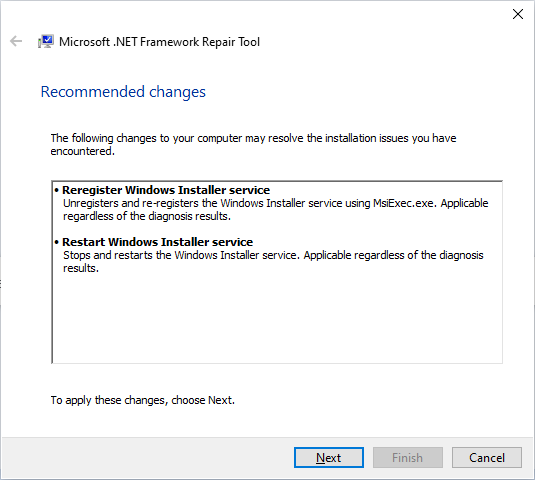
You can resolve CLR Error 80004005 by running the Microsoft .NET Framework Repair tool when this issue is caused by a corrupted .NET framework. According to several users, this method handles their CLR error effectively. Here is how to do it.
Step 1. Search and download the Microsoft .NET Framework Repair Tool from the Microsoft Download Center.
Step 2. After installation, double-click on the EXE file to launch this tool. Follow the on-screen instructions to check the problems and repair them.
Method 3. Update .NET Framework
To update or reinstall the .NET Framework on your device, the following instructions are what you need.
Step 1. Press Win + S and type Turn Windows features on or off into the search box. Hit Enter to open the Windows Features directly.
Step 2. Locate the .NET Framework options and uncheck all of them.
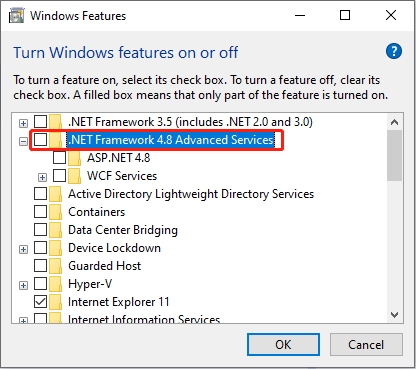
Step 3. Click OK to confirm. Wait for the computer application process to complete.
Afterward, you can download the .NET Framework feature either via the official Microsoft website or by ticking all the .NET Framework options in Windows Features.
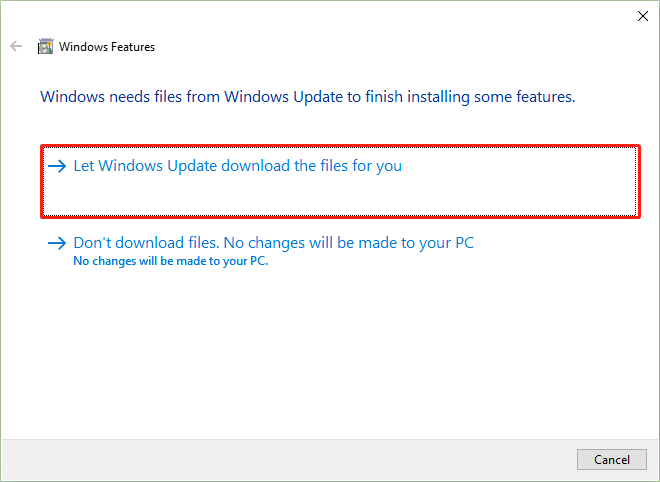
If you download the .NET Framework feature via the Windows Features utility, choose Let Windows Update download the files for you in the prompt window, which will let the computer download the latest required files.
Method 4. Reinstall the Problematic Application
As explained above, the incomplete installation of an application can cause the CLR Error 80004005. If this is the reason in your case, just uninstall the application and reinstall it completely.
Step 1. Type Control Panel into the Windows search box and hit Enter to open the utility.
Step 2. Click Uninstall a program and browse the program list to find the target application.
Step 3. Right-click on it and choose Uninstall.
Then, you just need to reinstall it. During this process, ensure your device is connected to a stable internet connection and has sufficient free storage capacity. MiniTool System Booster is an excellent tool to satisfy the two conditions.
This comprehensive computer tune-up tool can speed up the internet, clean up junk files, free up RAM, and complete other operations. You can click the download button below to have a try.
MiniTool System Booster TrialClick to Download100%Clean & Safe
Final Words
Don’t worry when encountering the CLR Error 80004005 on your computer. Read and try the four methods explained in this post. Hope one of them can handle the issue in your case.
User Comments :