
If you are searching for a budget-friendly PCIe Gen 5 SSD on the internet, Crucial P510 is what you want.
This post provides a comprehensive review of this kind of SSD and shows a step-by-step guide to back up your data to the Crucial P510 SSD.
Crucial P510 SSD Review
The Crucial P510 SSD was released in the spring of 2025. In this section, I introduce this SSD from specs, prices, and the target audience.
Crucial P510 SSD Specs
Product dimensions:
| Length x Height x Width | Weight | |
| Including heatsink | 3.15 x 0.38 x 0.92 in | 1.23 oz |
| No heatsink | 3.15 x 0.09 x0.86 in | 0.86 oz |
Performance and endurance:
| Capacity | Sequential Read | Sequential Write | Random Read | Random Write | Endurance (TBW) |
| 1TB | 11,000MB/s | 9,500MB/s | 1.5M IOPS | 1.5M IOPS | 600 |
| 2TB | 10,000MB/s | 8,700MB/s | 1.4M IOPS | 1.5M IOPS | 1200 |
Physical and technical specifications:
- Form Factor: M.2 2280
- Warranty: 5-year limited warranty
- Cooling: An optional heatsink is available
- Interface: PCIe Gen 5.0 x4
- NAND Storage Memory: Micron G9 276-layer 3D NAND
- Cache: DRAM-less design using Host Memory Buffer (HMB)
- Controller: Phison PS5031-E31T
- Backward Compatibility: Yes
Crucial P510 SSD Price
At the time of writing, the price of the Crucial P510 SSD 1TB on Amazon is $104.99, while the 2TB is $179.44. As for the with Heatsink version, the price of 1TB is $114.99, 2TB is $199.95.
Crucial P510 SSD Software Support
This SSD is supported by Crucial Storage Executive. It is a free software tool designed to help users monitor, manage, and optimize their SSDs, such as viewing drive health, tracking operating temperature, checking storage space, and updating firmware.
Crucial P510 SSD Target Audience
The Crucial P510 SSD is primarily targeted at mainstream PC users and gamers. Additionally, the following are the key target audiences:
- PC builders and upgraders on a budget
- Laptop users
- Computer gamers
- General productivity and everyday PC users
- Mid-tier content creators
Crucial P510 SSD Pros and Cons
In this section, I summarize the main pros and cons of the Crucial P510 SSD:
Pros
- Fast sequential performance: This Crucial SSD offers high sequential read speeds of up to 11,000 MB/s and write speeds of 9,500 MB/s. It surpasses PCIe 4.0 SSDs. This makes it excellent for tasks like transferring large files and loading game assets.
- Excellent endurance: This SSD features high endurance, which makes it perform well in long-term use.
- Budget-friendly Gen 5: Its price is more affordable than other high-end Gen 5 drives. It is recommended for those who want Gen5 speeds but have a tight budget.
- Compact form factor: Crucial P510 SSD’s single-sided design makes it suitable for tight spaces like laptops and mini-PCs.
- Power efficiency: Crucial P510 SSD features an energy-efficient architecture, which can consume nearly 25% less power than the previous Gen 5 SSD. So, it can extend battery life for portable devices.
Cons
- DRAM-less design: Its performance can drop significantly in certain scenarios, such as small file transfers, compared to SSDs with a DRAM cache.
- Mixed real-world performance: In certain PCMark and 3DMark storage tests, Crucial P510 SSD lags behind more expensive Gen 5 drives and even some high-end Gen 4 drives.
- Limited capacity: This SSD does not have a variety of capacities. Users can only choose between 1TB and 2TB.
- Requires cooling: This SSD runs hotter than many Gen 4 drives. Therefore, it is recommended to use a motherboard heatsink or purchase the version with a heatsink to avoid performance throttling during intense use.
How to Back Up Your Data to a Crucial P510 SSD?
If you have already installed the Crucial P510 SSD in your PC and want to back up your data to it, it is recommended to use MiniTool ShadowMaker. This PC backup software can help you back up your files, folders, or system with ease.
Here’s how to perform that:
Step 1. Download and install MiniTool ShadowMaker. Then, launch this software to enter its main interface.
MiniTool ShadowMaker TrialClick to Download100%Clean & Safe
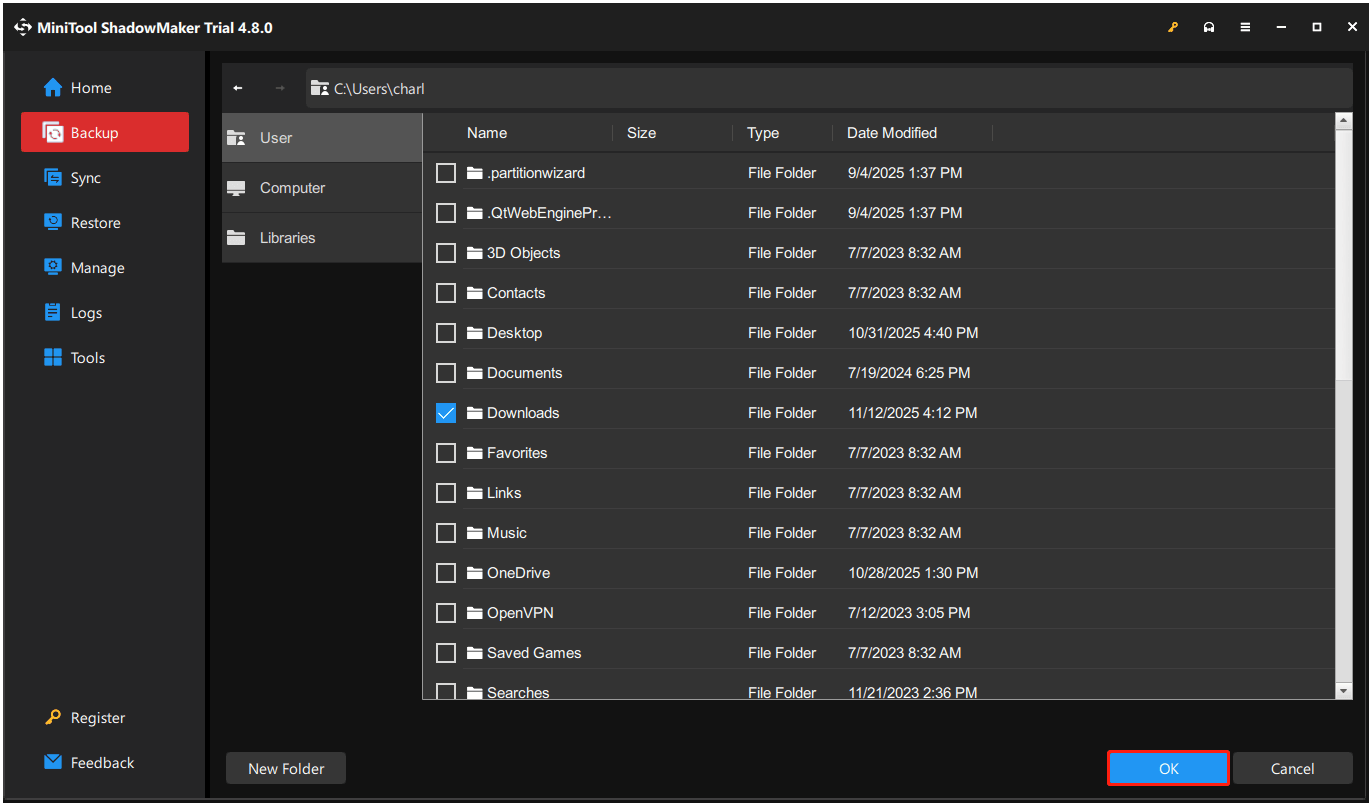
Step 2. Select Backup from the left panel, go to SOURCE, and select Folders and Files. Then, check the files that you want to back up and click OK.
Step 3. Go to the DESTINATION section, choose a destination, and click OK.
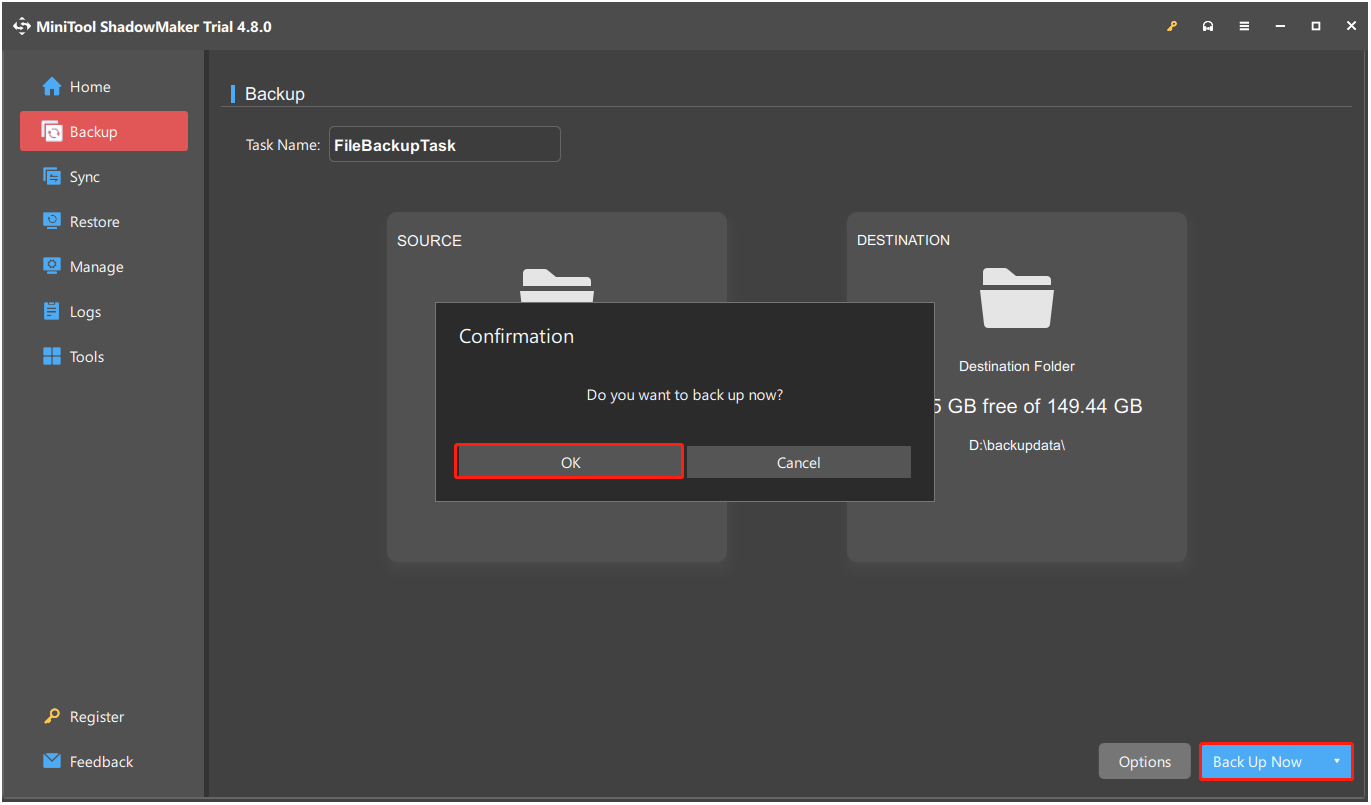
Step 4. Click Back Up Now and OK sequentially to start the backup process.
Step 5. Once the process is complete, your data has been backed up to the Crucial P510 SSD successfully.
To Sum Up
This post introduces a detailed Crucial P510 SSD review, including Crucial P510 specs, prices, target audience, and performance. Additionally, it offers a powerful backup tool, MiniTool ShadowMaker, to help you back up your data easily.
What’s more, if you encounter issues while using our software, contact us by sending an email to [email protected].
Crucial P510 SSD FAQ
What’s more, they offer solid performance and robust endurance, especially in their higher-end models.
About The Author

Position: Columnist
Charlotte is a technology columnist with a strong focus on the Windows operating system, specializing in disk management, backup, and data recovery. She is passionate about analyzing computer errors, identifying root causes, and delivering practical solutions. In her free time, she stays updated on the latest developments in computer systems and hardware while continuously learning new technologies to broaden her expertise. Her writing style is clear and easy to understand, making complex technical topics accessible even to users with limited computer knowledge.
User Comments :