
Like many other games, it is common to encounter various game errors after its new release. Delta Force: Black Hawk Down players may experience crashing, stuck on loading, and even the downloading error. How to resolve the Delta Force: Black Hawk Down stuck on downloading or not downloading issues? Keep reading to find solutions.
Black Hawk Down Campaign Stuck on Downloading for hours now. what should I do? The expansion pack is just downloading for hours now. I have a 500mbps internet speed. How big is the file? – reddit.com
If you have waited for hours to complete the download process, please check your internet speed first. Sometimes, slow internet speed can be the culprit of your slow download task. In this case, you can run MiniTool System Booster to speed up the internet. Additionally, this utility can free up RAM, clean junk files, and monitor the computer status for better game experience.
MiniTool System Booster TrialClick to Download100%Clean & Safe
Suppose your internet runs at an ideal speed, please go to the next methods to resolve the Black Hawk Down download issue.
Way 1. Download Black Hawk Down via Steam
Some of you may download Delta Force: Black Hawk Down through other game platforms, such as Garena. You can try to download it via the Steam version. This method helps to resolve the Download Black Hawk Down Expansion Pack error as well.
Way 2. Run Steam as Administrator
According to several game players, who cannot download Black Hawk Download, they successfully fixed the problem by running Steam as administrator.
Step 1. If you are downloading the Black Hawk Down game right now, please stop the process and close Steam.
Step 2. Open the Task Manager to find and end the Steam process. Then, you should go to the game download folder to clear all the downloaded files.
Step 3. If there is a Steam icon on the desktop, right-click on it to choose Run as administrator from the context menu. Otherwise, you need to find the EXE file of Steam in File Explorer to run it as administrator.
Afterward, you can try to download Delta Force: Black Hawk Down again.
Way 3. Disable the Integrated Graphics Card
As the name indicates, the integrated graphics card is integrated with the system. If your computer is compatible with a dedicated graphics card, you should disable the integrated graphics card, avoiding the device conflicts.
Running with a dedicated graphics card can improve the program performance as well as resolve some problems, such as Delta Force: Black Hawk Down stuck on downloading. Here is how to disable the integrated graphics card on your computer.
Step 1. Right-click on the Windows icon and choose Device Manager from the WinX menu.
Step 2. Expand the Display adapters option and find the integrated graphics card.
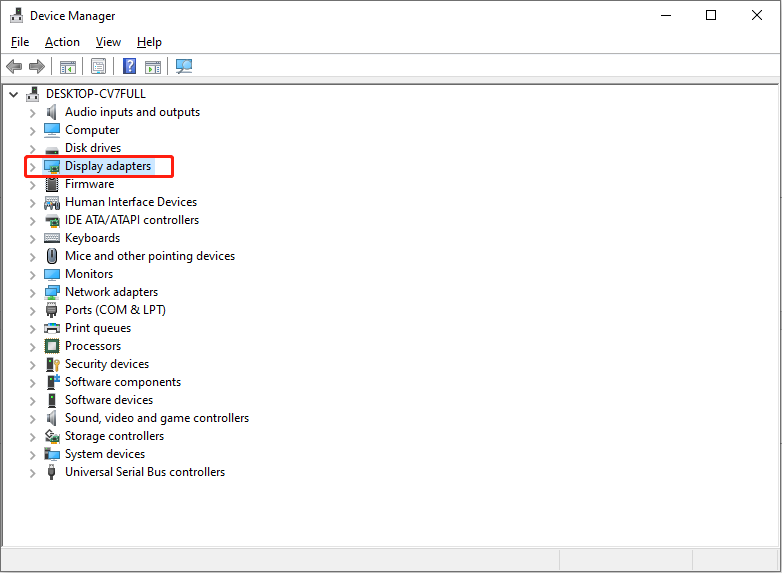
Step 3. Right-click on it and choose Disable device from the context menu. Click OK to confirm.
Afterward, your computer will run with the dedicated graphics card. You can try to download the game.
Final Words
This is the end of this post. Hope the above three methods resolve the Delta Force: Black Hawk Down stuck on downloading error on your case. Hope you can enjoy your game!
User Comments :