
Device Manager Not Showing Anything
Device Manager is a Windows utility that enables you to manage and configure hardware devices on your computer. It’s an important tool for controlling installed hardware devices, checking a device’s status, troubleshooting issues, configuring hardware settings, etc.
At the same time, it’s common to run into various issues in Device Manager, such as not responding/opening/working or displaying nothing. Speaking of blank Device Manager, this can occur when one of the significant Windows services is disabled or when the permissions in the registry for Device Manager have corrupted.
This error can lead to some potential problems like unidentified network issues, Bluetooth not working, mouse pointer disappearing, and more. Solving this issue is necessary. Let’s see how to do it.
Solutions on Device Manager Is Blank
Solution 1. Enable Plug and Play Windows Service
Plug and Play is a Windows service that enables the computer to recognize hardware devices and make driver changes take effect. When this service is disabled or stopped running, Device Manager is likely to fail to start devices and not display any content. Here’s how to check it:
Step 1. Type services.msc in the search box and hit Enter to bring up Windows Services.
Step 2. Navigate to find Plug and Play > double-click on it > check if the Startup type section is set to Automatic and hit Start if the Service status is not running.
Step 3. Click Apply & OK to save the changes you made.
Solution 2. Register DLL Files
The unregistered .dll file can cause the Device Manager is blank/empty problem. So re-registering the .dll file may make Device Manager available again. To do that:
Step 1. In Windows Search, type command prompt and open it as an administrator.
Step 2. Input the following commands and hit Enter after each command.
regsvr32 vbscript.dll
regsvr32 jscript.dll
regsvr32 mshtml.dll
Step 3. Then you can launch Device Manager and see if it still displays nothing.
Solution 3. Get Full Permission in Registry
Device Manager is blank in Windows 11/10 could arise from the register key not being given proper security permissions. This way, modifying the registry is a good idea to get your Device Manager back on track. Follow the steps:
Step 1. Open the Run window by pressing Win + R.
Step 2. Type regedit and press Enter to access Registry Editor.
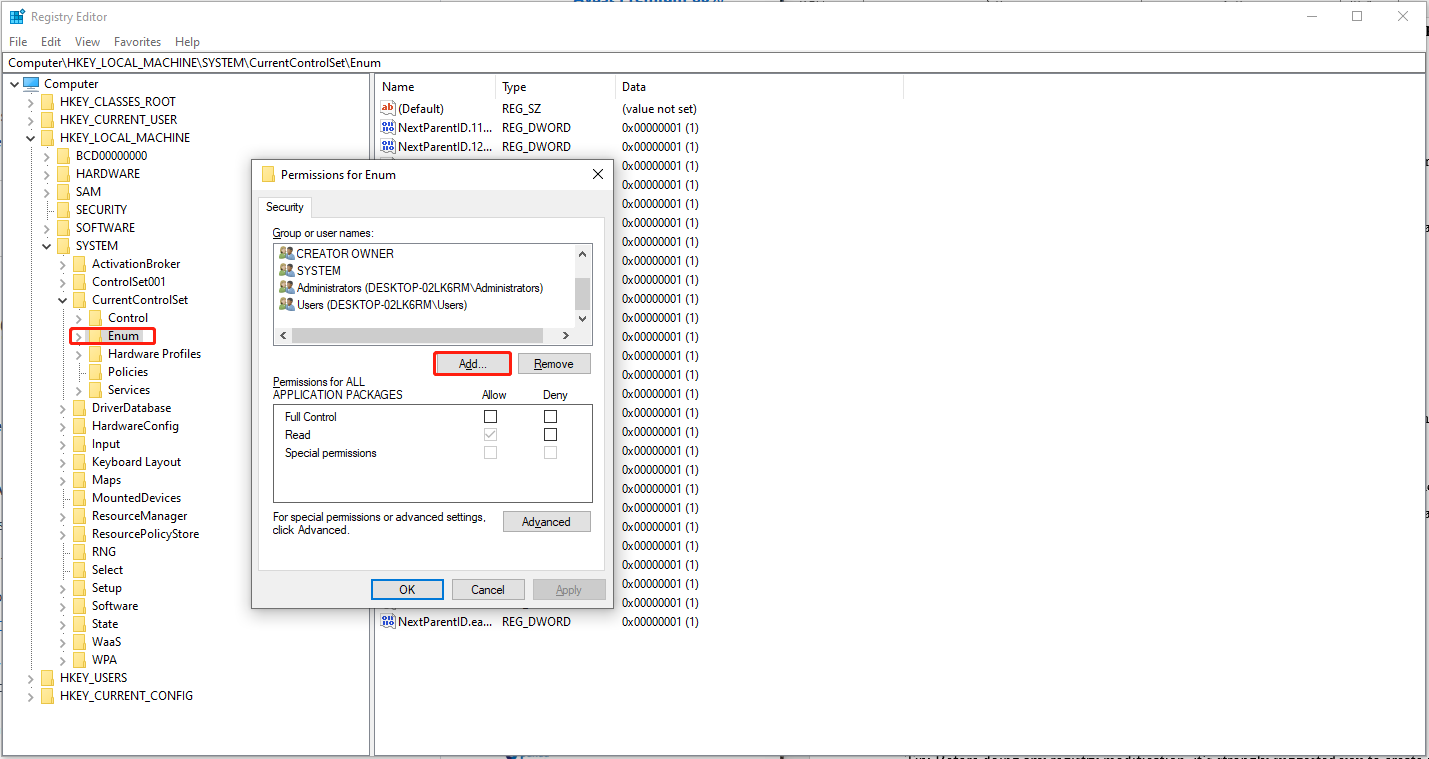
Step 3. Navigate to the following path: HKEY_LOCAL_MACHINE\SYSTEM\CurrentControlSet\Enum
Step 4. Right-click on Enum and choose Permissions.
Step 5. Under the Group or user names box, click on Add to add Everyone > tick mark Allow next to Read.
Click Add again to add System > check Allow for Read and Full Control > hit Apply & OK.
Once done, restart your PC and now Device Manager not showing anything should be solved.
When it comes to data backup, MiniTool ShadowMaker stands out in a sea of backup software. It allows you to sync files, clone disks, backup files & folders, disk & partitions, and even the whole system. Have a try!
MiniTool ShadowMaker TrialClick to Download100%Clean & Safe
In the End
After trying these methods in this post, now you should be free from the Device Manager is blank problem. Don’t forget to protect your system and important data before any modifications. Appreciate your support!
User Comments :