
As Dune Awakening enters its public beta, more and more players are looking forward to immersing themselves in this sci-fi world full of dust and political intrigue. However, some users are encountering a frustrating DirectX error message when launching the game, causing the game to run improperly.
Dune Awakening DirectX Error
Dune Awakening error DirectX 12 is usually caused by your system or hardware not being compatible with the version or feature level of DirectX required by the game. This error is essentially telling you, “I need more powerful graphics support, but your current setup can’t give it to me.”
Common error messages include: Dune Awakening error DirectX 12 is not supported on your system and the game crashes or displays a black screen after launching. Here are some common reasons.
- DirectX version mismatch: Dune Awakening requires a feature level of DirectX 12_2. If your graphics card or driver doesn’t support this level, an error message will appear.
- Outdated graphics driver: Make sure you have the latest NVIDIA or AMD graphics card drivers installed. Some versions (such as NVIDIA’s 576.66 hotfix) specifically fix stability issues related to Dune Awakening.
- Incomplete Windows update: Some features of DirectX require the latest Windows 10 or 11 update. Make sure your system is fully updated.
- Integrated graphics card interference: If you are using a desktop, it is recommended to turn off the CPU’s integrated graphics card in the BIOS to avoid conflicts with the discrete graphics card.
- Game installation problem: Some players have found that the DLL file is missing from the game folder, causing it to fail to launch. You can try to verify the integrity of the game file through Steam to fix this.

Fix 1: Run Dune Awakening as an Administrator
Insufficient permissions can lead to Dune Awakening DirectX error. In this case, you can try running this game as an administrator to grant more permissions. Here are the steps.
Step 1: Type Dune Awakening in the Windows search box, right-click it, and choose Open file location.
Step 2: Right-click the .exe file and choose Properties.
Step 3: Switch to the Compatibility tab and tick the box for Run this program as an administrator.
Step 4: Finally, click Apply > OK to confirm the change.
Fix 2: Run Dune Awakening on Dedicated Graphics Driver
Discrete graphics cards (such as NVIDIA or AMD) have dedicated GPUs and video memory that can handle complex graphics effects and higher resolutions. Running Dune Awakening on a discrete graphics card can improve game performance and stability.
Step 1: Press the Win + I keys to open the Settings app.
Step 2: Click System > Display > Graphics settings.
Step 3: Under Choose an app to set preference, click Browse to select the game.
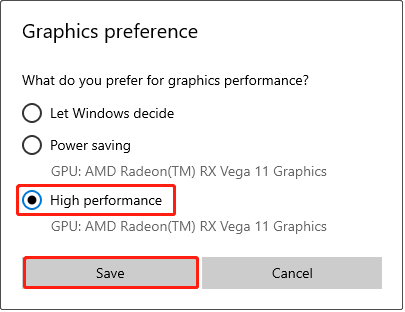
Step 4: Click the game option and hit the Options button.
Step 5: In the pop-up window, tick High performance, and then click Save.
Fix 3: Allow Dune Awakening Through the Firewall
The firewall may mistake the game for a virus and restrict its operation, causing this error. So, to fix it, you need to allow the game through the Firewall. Here is how to do it.
Step 1: Open Control Panel and change the view to Large icons.
Step 2: Click Windows Defender Firewall > Allow an app or feature through Windows Defender Firewall.
Step 3: Click Change Settings > Allow another app to add the DuneSandbox-Win64-Shipping exe file to the list.
Step 4: Find the game and tick the boxes under the Private and Public columns.

Fix 4: Install Visual C++ Files
Some large-scale games were developed using Microsoft’s Visual C++ development environment. This software relies on specific versions of C++ runtime libraries to run correctly.
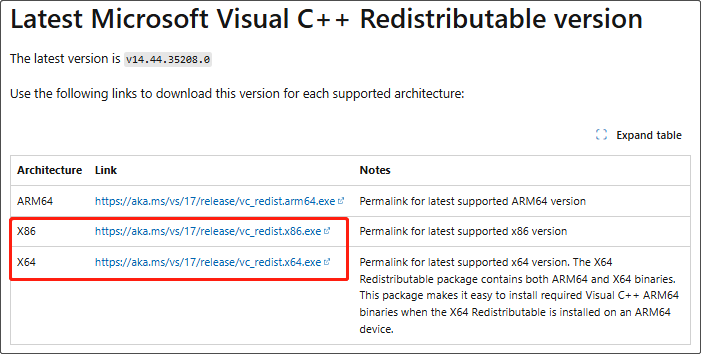
Step 1: Visit this site and scroll down the list to find the Latest Microsoft Visual C++ Redistributable version section.
Step 2: Download and install both X86 and X64 Visual C++ Files and install them.
Step 3: Restart your PC. Launch the game and see if the problem is solved or not.
MiniTool Power Data Recovery FreeClick to Download100%Clean & Safe
In a Word
Whether you are a novice who has just played this game or a senior strategist who is ready to dominate the dunes, technical problems should not be an obstacle for you to experience this game. Fortunately, you know how to fix Dune Awakening Playtest DirectX error. Hope these solutions work for you.
User Comments :