
This comprehensive guide from MiniTool explores the key factors impacting data recovery success rate and offers practical strategies to enhance the chance of a successful recovery. Continue reading to get detailed information.
In the digital age, data loss is a common issue that can seriously affect work efficiency. There are many possible causes of data loss, but successful recovery is not always guaranteed. In this guide, I will walk you through the key factors affecting file recovery and explain how you can increase the possibility of getting your files back.
Common Factors Impacting Data Recovery Success Rate
Types of Data Loss & File Status
Many reasons can cause files to be lost, including accidental deletion, disk formatting, file system corruption, virus infection, power failures during file transfer, system crashes, partition loss, physical damage, and so on.
Typically, data loss caused by logical problems, such as accidental deletion or formatting, is easier to recover. In such cases, though the files are no longer visible to you, they still exist on the disk. However, if the file is lost or becomes inaccessible due to physical damage, recovery becomes difficult or even impossible.
In addition, whether the file has been overwritten also affects the chances of recovery. Files that have been overwritten by new data are almost impossible to recover, even with professional data recovery software or services.
Condition/Type of File Storage Device
The condition of the file storage device plays a crucial role in affecting the success rate of data recovery. If the drive is working properly and has no severely bad sectors, data can be easily recovered. However, if the device has physical damage, recovery becomes much more difficult.
In addition, SSD data recovery is usually harder than HDD data recovery. This is because most SSDs have a TRIM function. If TRIM is enabled, deleted data may be automatically overwritten, making recovery impossible.
Quality of Recovery Software or Service
The data recovery software or service you choose also affects the success rate.
Professional recovery software can usually perform a deep scan of the storage device to recover various types of lost or deleted files. In contrast, low-quality tools may fail to find the lost files effectively and could even cause further data loss or disk corruption.
How to Increase Data Recovery Success Rate
1. Avoid Overwriting Lost Files
As mentioned above, overwritten files cannot be restored. Therefore, it is crucial to prevent this from happening. How? Once you notice that your files are missing, stop writing new data to the disk immediately. This will minimize the risk of your lost files being overwritten.
2. Use Reliable Data Recovery Software
A reliable and professional data restore tool plays a vital role in restoring files when no backups are available. When you discover your files are missing, downloading and installing a robust recovery tool should be your first step. The longer you wait, the higher the risk to your files.
For Windows 11/10/8/8.1, MiniTool Power Data Recovery is highly recommended. It supports recovering all types of files from HDDs, SSDs, external hard disks, USB flash drives, SD cards, CDs/DVDs, and other file storage media.
Download the free edition of this recovery tool on another drive and launch it to start file recovery.
MiniTool Power Data Recovery FreeClick to Download100%Clean & Safe
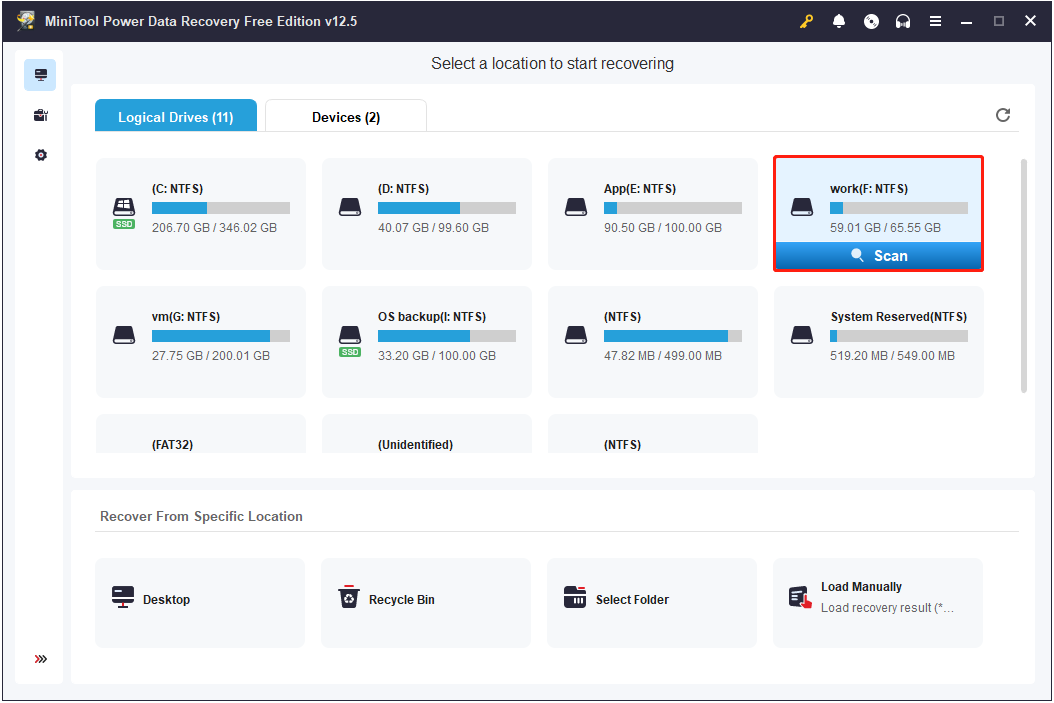
Step 1. On the main interface of this tool, select the target partition and click Scan.
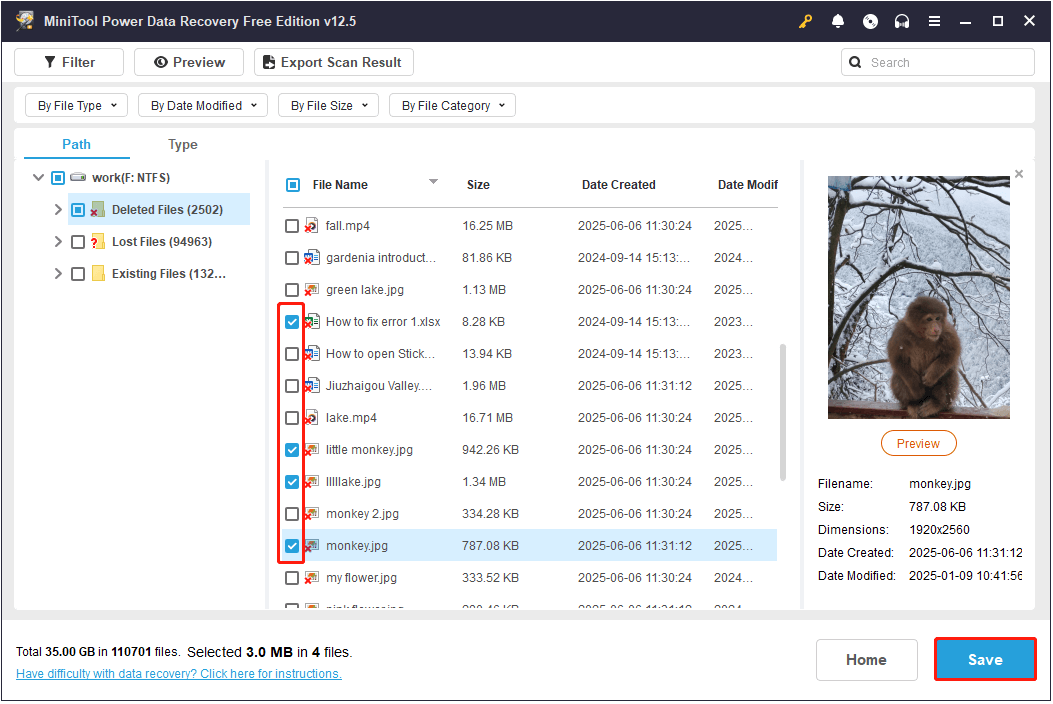
Step 2. Once the scan is completed, browse the listed files under Path or Type. Besides, you can use Filter or Search to filter out unwanted files.
Step 3. Double-click on the files to preview them. Then, tick all required files and click Save to store them.
Read More:
If you do not want to go through the process of recovering lost files with recovery software, regularly backing up your data is important. You can store important files on multiple storage devices or cloud services. Alternatively, using MiniTool ShadowMaker to create file images is also a good option.
MiniTool ShadowMaker TrialClick to Download100%Clean & Safe

Conclusion
Now you should know the basic factors impacting data recovery success rate and how to minimize the risk of failing to recover your files. Hope the information above is clear and thorough.
About The Author

Position: Columnist
Shirley holds a bachelor’s degree in English and has been an editor at the MiniTool Team for many years. She specializes in IT-related content, with a focus on data recovery, file backup, disk management, and other technical topics. She is committed to delivering clear, accurate, and practical solutions to help users resolve common computer issues.
User Comments :