
When installing programs in Windows, you might encounter the installation error 0x80040c01, which tells you the installation has failed. How to troubleshoot the 0x80040c01 installation error? This MiniTool post collects several methods to help you resolve it.
What Is Error Code 0x80040c01?
The installation error 0x80040c01 usually occurs when you try to download a program through software, such as Edge and Chrome. When you receive this error message, it might indicate the damaged setup files, incompatibility errors, or other reasons.
It's almost impossible for me to run Edge on my PC currently. I disable any third-party apps to start so a problem that I was having could be fixed, but it wasn't. Now, after a restart of disabling third-party apps, my PC cannot run Edge. Even the installer cannot start. It just opens for like a second and closes afterward. After closing, it either shows an error saying "Microsoft Edge installer failed to start" or with an error code 0x80040c01. The error code only opens on the second opening, The first time opening after starting up says "Microsoft Edge installer failed to start", after that it shows 0x80040c01. How do I fix this? -Xehaaanswers.microsoft
However, due to the simple error message, like “Microsoft Edge installer failed to start”, it is difficult for common users to figure out the specific reasons; thus, fixing this error becomes difficult. But don’t worry, you can find several useful methods in the following content. You can try them one by one to find which works best for your problem.
How to Fix the Error 0x80040c01?
Fix 1: Run the Program Install and Uninstall Troubleshooter
The Program Install and Uninstall Troubleshooter can repair issues when your installation or uninstallation programs are blocked. You can run this troubleshooter to fix the installation error 0x80040c01.
Step 1: Download the Program Install and Uninstall Troubleshooter from the Microsoft support page.
Step 2: Double-click on the file to open the troubleshooter.
Step 3: Click on the Next button to start the detecting process.
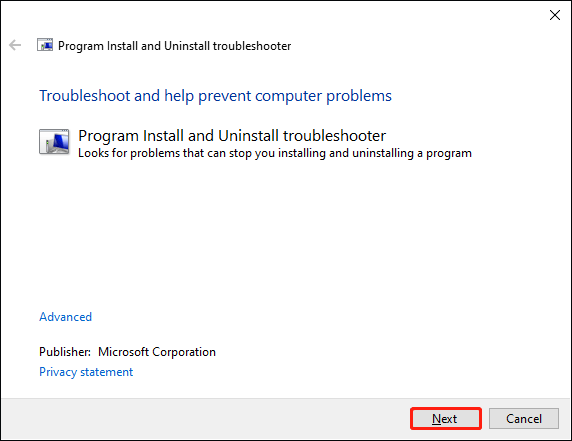
Step 4: In the following window, you should choose Installing or Uninstalling according to your problem.
Step 5: Choose the program you want to install from the list, then click Next. The troubleshooter will start to detect problems.

When the process is finished, you can complete the reset steps with the instructions on the window.
Fix 2: Disable Antivirus Software
If you are installing programs from software, the process might be interrupted due to security reasons by antivirus software on your computer. You can temporarily disable your antivirus software and try to install it again.
Step 1: Press Win + I to open Windows Settings.
Step 2: Select Update & Security, then shift to the Windows Security tab.
Step 3: Choose Firewall & network protection on the right pane.

Step 4: Click on Public network and scroll down to find Microsoft Defender Firewall. You need to turn off this switch.

After this, you can try to install programs to see whether the problem is fixed.
Fix 3: Clear the App Folder
When you use Edge or Chrome to install or uninstall programs, the 0x80040c01 error on Edge/Chrome might appear to prevent the process. This may be caused by the folder conflict. You can delete the corresponding folders to fix the problem.
Step 1: Press Win + R to open the Run window.
Step 2: Type %localappdata% and hit Enter.
Step 3: Look through the folder list to find the aimed one. For example, I meet this error when installing programs in Chrome so the Google folder is the target. Find and delete it.
If you delete files or folders wrong by accident, you can recover them from the Recycle Bin. But if you delete them permanently, you need to seek help from professional data recovery software, such as MiniTool Power Data Recovery.
This best file recovery software can restore deleted/lost files under various situations, like mistaken deletion, virus attack, operating system crash, and so on. Besides, it contains some practical features to shorten the scan time. For instance, you can choose to scan from a Desktop, Recycle Bin, or a selected folder if you want to recover files from a specific location.
You can use the MiniTool Power Data Recovery free edition to scan and recover up to 1GB of files for free. You can try this software if needed.
MiniTool Power Data Recovery FreeClick to Download100%Clean & Safe
Bottom Line
Installation error 0x80040c01 is not rare when you install programs from software. You can try the above methods to fix the problem. If you encounter any problems when using MiniTool software, please feel free to contact us via [email protected].
User Comments :