
What’s new in KB5055642? What can you do if you fail to install this update? This guide from MiniTool can help you out and it will walk you through how to address KB5055642 not installing on Windows 11.
KB5055642 Not Installing
On April 21, 2025, Microsoft releases Windows 11 Insider Preview Build 26200.5562 (KB5055642) to the Dev Channel.
This update contains two new text actions in Click to Do – Practice in Reading Coach and Read with Immersive Reader.
- Practice in Reading Coach: This feature is to enhance users’ reading fluency and pronunciation.
- Read with Immersive Reader: This feature provides a reading environment without interruption, supporting to customize the text style and read out loud.
Microsoft has also enhanced Voice Access, enabling users to add custom words to the dictionary to improve recognition accuracy. Additionally, a new immersive experience interface has been added to help users quickly understand new features. These improvements are currently available in Chinese, English, French, German and Spanish.
There’s a slim chance that KB5055642 not installing will occur on your computer, but it’s better to master the possible solutions in case anything goes wrong unexpectedly.
MiniTool ShadowMaker TrialClick to Download100%Clean & Safe
Solution 1: Redownload the Update
When confronted KB5055642 not installing, the first solution that comes to your mind might be to perform a fresh download and install. To do so:
Step 1. Press Windows + I to open Windows Settings.
Step 2. In the left pane, choose Windows Update.
Step 3. In the right section, click on Advanced options and then scroll down to locate Optional updates.
Step 4. Look for KB5055642 and then download and install it from scratch.
Solution 2: Reset Windows Update Components
In Windows 11/10, some update issues like KB5055642 fails to install can be solved by resetting Windows update components that need it. Follow the steps to reset Windows Update components:
Step 1. Right-click on the Windows icon in the left bottom and choose Settings from the context menu.
Step 2. Go to System > Troubleshoot > Other troubleshooters.
Step 3. Find Windows Update and click on Run beside it.
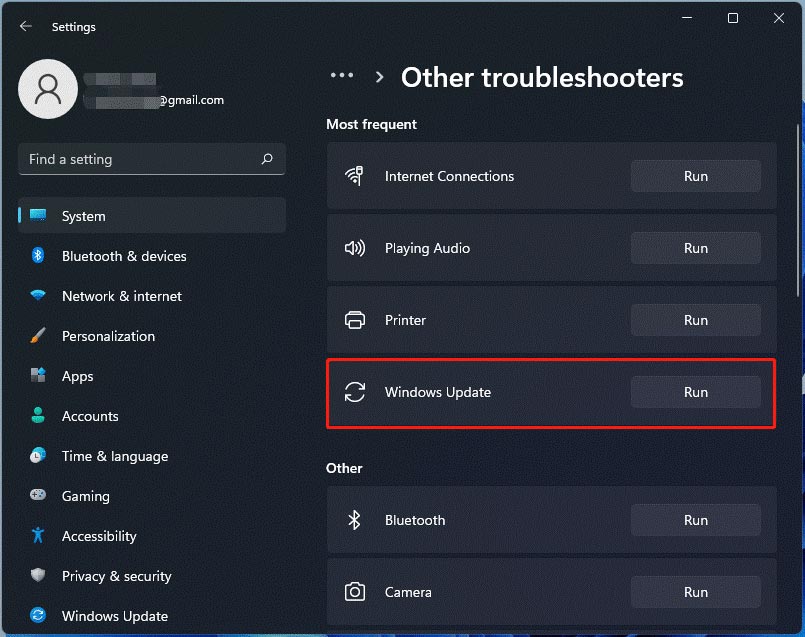
This troubleshooter will start scanning for any issues and fix them. Meanwhile, you should keep in mind that this way only resets Windows Update components when needed.
Solution 3: Restart Related Services
To download and install Windows updates without any errors, some services (including core service and supporting services) are of necessity. If they are not running properly, it’s no wonder that KB5055642 installation failure crops up.
Step 1. Press Win + R to open the Run dialog box.
Step 2. Type services.msc and hit Enter.
Step 3. In the service list, scroll down to locate the services below:
Windows Update
Background Intelligent Transfer Service
Cryptographic Services
Windows Management Instrumentation
Step 4. Right-click on them one by one to select Properties > set the Startup type to Automatic > hit Start > tap on Apply & OK to save the changes.
Other Potential Solutions
- Flush DNS caches
- Run Windows Update Troubleshooter
- Switch to a stable internet connection
- Perform a SFC/DISM scan
Bottom Line
By now, you might be not bothered by the KB5055642 not installing issue anymore. In addition, we sincerely hope you can always keep your Windows up-to-date for more improvements in security, stability, and performance. Appreciate your support!
User Comments :