
What is Modern Setup Host? If the Modern Setup host CPU/memory/disk usage is too high, which affects your normal usage of your computer, do you know how to fix it? In this post, MiniTool Software will show the information you want to know.
What Is Modern Setup Host?
Microsoft always releases updates to bring new features and bug fixes. These updates are downloaded on your PC and then installed by some components that are built-in on your device. Modern Setup Host is just one of such components. It will run in the background while you are installing a Windows update. It is responsible for triggering the upgrade to Windows 10 or Windows 11. You can find it in the $Windows.~BT folder in the C drive. This is a hidden folder. You need to unhide
During a Windows update process, you might find that your computer runs slowly or even gets stuck. If so, you can open Task Manager to see which application is taking up a high CPU/memory/disk usage on your computer. The result might show that Modern Setup Host is using too much CPU/memory/disk usage.
Well then, what should you do if you encounter Modern Setup Host High CPU/memory/disk usage on Windows 11/10? This post gives you some suggestions.

How to Fix Modern Setup Host High CPU/Memory/Disk Usage?
Modern Setup Host will run when you are performing a Windows Update. After the update is installed, it will automatically. Due to this, you can just wait for 3-4 hours and check if it disappears automatically. However, if waiting does solve issues, you can try the methods mentioned in this post to solve the issue. You can try these fixes whether you’re using Windows 10 or Windows 11.
- How to Fix Windows 11 High Memory Usage?
- Workable Solutions to Windows 11 High CPU Usage
- Fix: Windows 11 High Disk Usage | 100% Disk Usage on Windows 11
Fix 1: Force End the Task in Task Manager
If Modern Setup Host is always on and taking too much CPU or memory, or disk usage, you can access Task Manager and force end it. It is easy to do this:
Step 1: Right-click on Start and select Task Manager.
Step 2: Find Modern Setup Host and click it, then select End task.
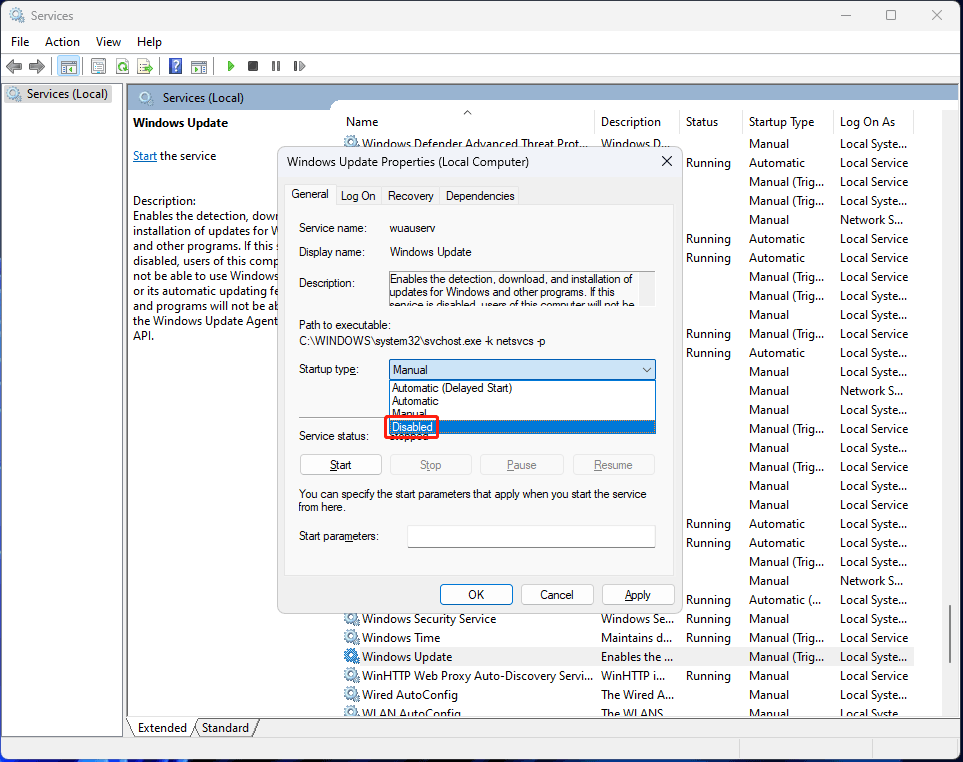
Fix 2: Disable the Windows Update Service
If you don’t want to be disturbed by Windows Update, you can temporarily turn off the Windows Update service on your PC.
Step 1: Click the search icon in the taskbar and search for services.
Step 2: Select Services to open it.
Step 3: Scroll down to find Windows Update and double-click it to open it.
Step 4: Expand the options next to Startup type and select Disabled.
Step 5: Click Apply.
Step 6: Click OK.
Fix 3: Delete the Contents in the SoftwareDistribution Folder
The SoftwareDistribution folder is a folder that saves all the Windows Update related temporary files. If the Modern Setup Host encounter issues like Modern Setup Host high CPU usage, Modern Setup Host high memory usage, or Modern Setup Host high disk usage, you should clear all the contents in this folder to have a try.
Fix 4: Clean Boot Your PC
If you encounter this issue while you are using a Windows 10/11 Insider preview build, you can also clean boot your device to see if the issue disappears. This can help you check if the issue is caused by a conflict software or driver. If the issue disappears after you clean boot your device, you should consider if you have installed a new app recently. That app could be the cause. You can uninstall it to have a try. However, if the issue persists, the system itself should be the cause.
Windows Insider preview builds are not stable. They might have all kinds of bugs. Modern Setup Host high CPU usage, Modern Setup Host high memory usage, or Modern Setup Host high disk usage might be among them. If you don’t want to live with these bugs, you can switch to a stable Windows 11 build.
Fix 5: Run the Windows Update Troubleshooter
Windows has a built-in tool that can help you solve Windows update related issues: it is Windows Update troubleshooter. You can try this tool when the Modern Setup Host CPU/memory/disk usage is too high.
On Windows 11:
Step 1: Click Start and go to Settings > System > Troubleshoot > Other troubleshooters.
Step 2: Click the Run button next to Windows Update to run it.
Step 3: Wait until the troubleshooting process ends.

On Windows 10:
Step 1: Go to Start > Settings > Update & Security > Troubleshoot.
Step 2: Click Additional troubleshooters from the right panel.
Step 3: Find Windows Update under the Get up and running section, and click it.
Step 4: Click the Run the troubleshooter button to run this tool.

Bottom Line
Bothered by Modern Setup Host high CPU usage/Modern Setup Host high memory usage/Modern Setup Host high disk usage? You should not worry too much about it. You can try out the methods here to solve the problem. Should you have any other related issues, you can let us know in the comments.
About The Author

Position: Columnist
Stella has been working in MiniTool Software as an English Editor for more than 8 years. Her articles mainly cover the fields of data recovery including storage media data recovery, phone data recovery, and photo recovery, videos download, partition management, and video & audio format conversions.
User Comments :