
About Nvidia GeForce RTX 2070
Nvidia GeForce RTX 2070 (Super) is one of the most popular graphics cards. This high-end graphics card is built on the 12 nm process and is based on the TU106 graphics processor.
Nvidia GeForce RTX 2070 (Super) is powered by the Nvidia Turing architecture. It has a very fast CPU with more cores and faster clocks. Its memory speed is 14Gbps and the boost clock is 1770 MHz.
This graphics card supports DirectX 12 Ultimate. DirectX 12 Ultimate is the new standard for next-gen games. With Nvidia GeForce RTX 2070 and other GeForce RTX series, you can play the most advanced and intensive PC games with great performance on your computer.
Nvidia GeForce RTX 2070 Price
GeForce RTX 2070 (Super) price is $499. You can buy it from Nvidia’s official website, Amazon, Best Buy, etc.
How to Download and Update Nvidia GeForce RTX 2070 Driver
You should always keep the graphics card driver up-to-date in order to get the best performance of the graphics card. If your computer equips an Nvidia GeForce RTX 2070 graphics card, you can check below for how to download and update Nvidia GeForce RTX 2070 driver in Windows 10/11. You have several ways to go.
Way 1. Press Windows + X and select Device Manager to open Device Manager on your Windows computer. Expand Display adapters, right-click your Nvidia GeForce RTX 2070 graphics card, and select Update driver. Then select Search automatically for updated driver software. It will automatically download and install the latest driver for your PC.
Way 2. Some graphics card driver updates will also come with Windows updates. You can update GeForce RTX 2070 (Super) driver by doing a Windows Update. You can click Start -> Settings -> Update & Security -> Windows Update -> Check for updates. Download and install the newer Windows Update if it detects some available new Windows Updates.
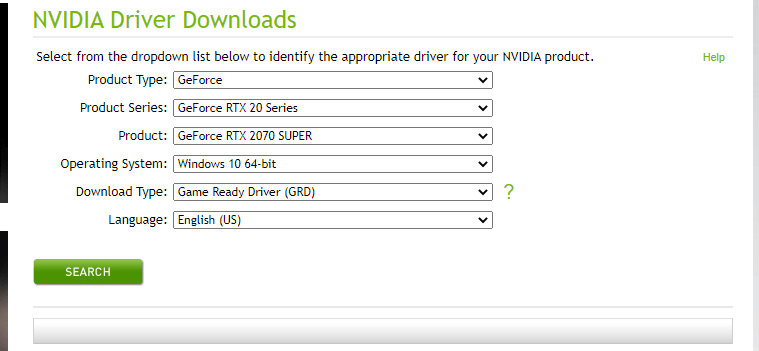
Way 3. Manually download GeForce RTX 2070 graphics card driver from Nvidia driver download website. Select from the dropdown list to identify the appropriate driver for your RTX 2070 graphics card. You can select GeForce -> GeForce RTX 20 Series -> GeForce RTX 2070 or Super -> Windows 10 64-bit system -> Game Ready Driver (GRD) -> English, and click Search button to available driver. Click Download button to download the GeForce RTX 2070 or Super game driver for your Windows 10/11 computer.
After you manually download the graphics card driver, you can go to Device Manager to update the driver. You should select Browse my computer for driver software and select the GeForce RTX 2070 (Super) driver file you downloaded to install it for your Windows 10/11 computer.
Verdict
This post introduces Nvidia GeForce RTX 2070 (Super) graphics card and how to download and update Nvidia GeForce RTX 2070 driver for Windows 10/11 PC or laptop, hope it helps.
If you are troubled with other computer problems, you may find solutions from MiniTool News Center. As a top software company, MiniTool Software also provides you free tools like MiniTool Power Data Recovery, MiniTool Partition Wizard, MiniTool Video Repair, etc.
User Comments :