
The Oblivion Remastered low FPS/stuttering/lagging issue caused frustration for many players. This article on MiniTool outlines a couple of practical solutions to address the problem and improve gameplay performance.
Oblivion Remastered Low FPS, Lagging, Stuttering
The Elder Scrolls IV: Oblivion Remastered is a long-awaited game that is popular among many fans. However, when it was finally released, lots of players had problems with low FPS or stuttering, making the game slow and hard to play.
This article collects some helpful tips from various forum posts to fix this issue and make the game run better. You can try the solutions listed below one by one and check which one works for you.
Oblivion Remastered Performance Fixes
Fix 1. Rename or Delete the sc.pcl.dll File
Many players who experienced the Oblivion Remastered low FPS issue have shared this workaround, stating that it greatly improves the game performance or eliminates lag. Deleting or renaming the sc.pcl.dll file stops the game from loading the file, which helps avoid potential conflicts.
First, open File Explorer and go to this location:
C: > Program Files (x86) > Steam > steamapps > common > Oblivion Remastered > Engine > Plugins > Marketplace > nvidia > DLSSS > Streamline > Binaries > ThirdParty > Win64
Second, copy and paste the sc.pcl.dll file to another location for backup. After that, you can rename or delete the file. Finally, relaunch the game and check if it runs smoothly.
Fix 2. Use Game Mod
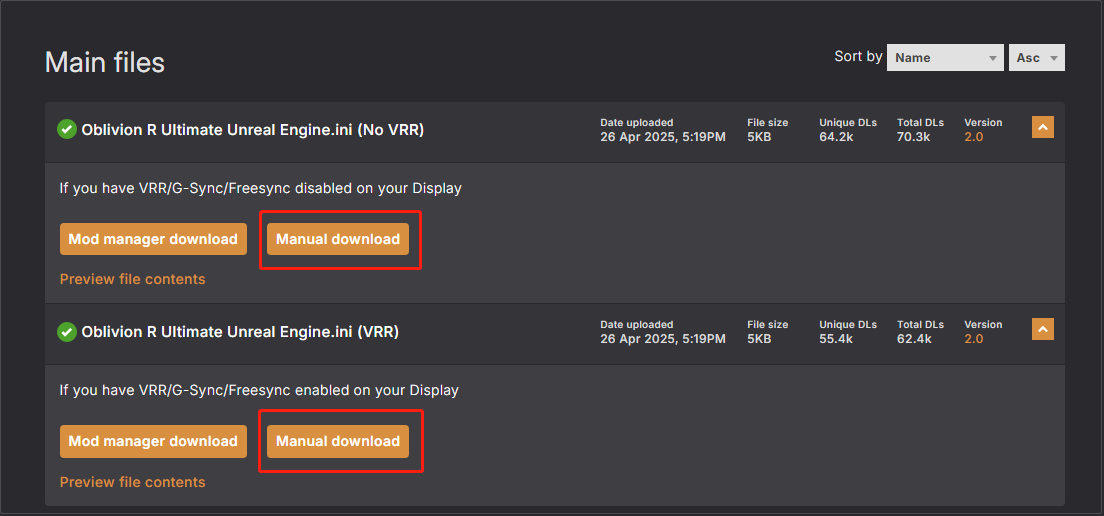
Another effective solution to fix the Oblivion Remastered lagging issue is to use the game mod from Nexus Mod to optimize the game performance without significantly degrading visuals.
Go to the ultimate engine tweaks download page and click the Manual download button to download the appropriate mod: https://www.nexusmods.com/oblivionremastered/mods/35?tab=files.
Next, you need to replace the engine.ini file with the downloaded file.
For Windows, place it in:
%USERPROFILE%\Documents\My Games\Oblivion Remastered\Saved\Config\Windows
For Game Pass, place it in:
%USERPROFILE%\Documents\My Games\Oblivion Remastered\Saved\Config\WinGDK
Finally, you need to set the file to read-only:
Right-click the file and choose Properties, tick the Read-only option, and click OK.
Fix 3. Roll Back/Reinstall the Graphics Card Driver
Sometimes, the Oblivion Remastered stuttering issue can be caused by problems with the graphics card driver. According to user experience, rolling back to an earlier version or reinstalling the driver can resolve the problem and restore smooth gameplay.
To roll back the graphics card driver:
- Right-click the Start button and choose Device Manager.
- Expand Display adapters, right-click your display card, and choose Properties.
- Go to the Driver tab and choose Roll Back Driver.
If you want to reinstall the driver, download and install DDU and use it to completely uninstall the current driver. After that, go to the official website of your graphics card manufacturer to download the latest driver, and then install it on your computer.
Fix 4. Make the Game Use GPU Instead of CPU
Another reason for Oblivion Remastered low FPS could be that the game is not properly using the more powerful dedicated graphics card and is running on the integrated graphics card instead. In this case, you can change the graphics settings to make the game use the correct GPU.
Step 1. Open Settings and go to System > Display > Graphics.
Step 2. Check if Oblivion Remastered is displayed in the app list. If not, click Browse to add the game app to the list. After that, click it and choose Options.
Step 3. In the new window, choose the High performance option and click Save.
This is all the information about how to fix the Oblivion Remastered low FPS issue.
Read More:
If you are looking for backup software to protect your game files, you can use MiniTool ShadowMaker. It is 100% secure and can help back up all types of files on Windows automatically or manually.
MiniTool ShadowMaker TrialClick to Download100%Clean & Safe
If you have the demand for game data recovery, MiniTool Power Data Recovery is worth trying. It supports recovering game data, documents, photos, videos, emails, and other types of files on your computer. You can recover 1 GB of files for free.
MiniTool Power Data Recovery FreeClick to Download100%Clean & Safe
Bottom Line
I believe you can enjoy Oblivion Remastered without any lagging or stuttering issues after trying the methods listed above.
About The Author

Position: Columnist
Shirley holds a bachelor’s degree in English and has been an editor at the MiniTool Team for many years. She specializes in IT-related content, with a focus on data recovery, file backup, disk management, and other technical topics. She is committed to delivering clear, accurate, and practical solutions to help users resolve common computer issues.
User Comments :