
If you are wondering about obsolete memory card formats, this post is what you need. Here, MiniTool introduces SmartMedia, xD-Picture Card, Sony Memory Stick, MMC, miniSD, and CompatFlash.
Obsolete Memory Card Formats
With the standardization of SD and microSD, many types of memory cards are basically a thing of the past now. Below are some examples of these old memory card types.
SmartMedia
SmartMedia is an outdated flash memory card standard that was owned by Toshiba. This format was primarily used in the early 2000s for digital cameras and audio production.
SmartMedia memory cards have capacities ranging from 0.5 MB to 128 MB, which is insufficient for today’s storage needs. As a result, this kind of card is no longer produced.
Here are the main features:
- Very thin card used in the late 1990s and early 2000s
- No built-in controller (relied on host device)
- Limited capacity (typically up to 128MB)
- Phased out in the mid-2000s
xD-Picture Card
xD-Picture Card is an obsolete flash memory card format, developed by Olympus and Fujifilm in 2002, replacing SmartMedia. It is primarily used in their digital cameras. xD-Picture Cards are also adopted in some Kodak camera models.
It offers capacities from 16 MB to 2 GB. By the late 2000s, it became less favorable than SD cards due to lower capacity, slower speeds, and higher costs, leading to its phase-out in 2009.
Here are the main features:
- Developed by Olympus & Fujifilm
- Small and compact
- Limited maximum capacity (2GB typical)
- Discontinued as SD became dominant
Memory Stick (Sony)
The Memory Stick is a removable flash memory card format originally launched by Sony in late 1998. It was primarily used in Sony devices like Cyber-shot cameras, Handycams, and PlayStation Portables (PSPs).
It is known for its reliability and portability. It comes in various formats, including Memory Stick Duo, PRO, and Micro (M2). Capacities range from 4 MB in early models to a maximum of 32 GB for the PRO series.
However, like many other items in this post, it becomes unpopular due to compatibility issues.
Here are its main features:
- Proprietary format by Sony
- Used in Sony cameras, camcorders, and PSPs
- Variants: PRO, Duo, Micro (M2)
- Declined as Sony adopted SD
MMC (MultiMediaCard)
The MultiMediaCard (MMC) is a compact, flash-based memory card standard. It was introduced in 1997 for use in portable devices such as cameras and phones.
Its dimensions are 32 × 24 × 1.4 mm. It features a 7-pin serial interface and is often compatible with SD card slots.
Although MMC technology has largely been replaced by faster SD cards, it continues to play an important role through embedded MMC (eMMC) in modern electronics.
Here are key features:
- Predecessor to SD
- Physically similar to SD but less advanced
- Eventually replaced by SD
- Evolved into several variants like SD card, eMMC, RS-MMC (a smaller variant of MMC), etc.
miniSD
miniSD is a smaller version of the standard SD card, which is designed for early mobile phones and cameras.
It supports capacities up to 2GB. For some special 4GB miniSDHC versions, an adapter with standard SD slots is required.
However, the format was largely phased out by 2008 after the introduction of the smaller microSD card.
Here are the key features:
- Smaller than SD, larger than microSD
- Popular in early mobile phones
- Quickly replaced by microSD
CompactFlash
CompactFlash (CF) is a durable and high-performance flash memory card format that was introduced by SanDisk in 1994. It is primarily used in professional photography, videography, and industrial applications.
CF cards provide high-speed, reliable solid-state storage with capacities typically ranging from 32 MB to over 128 GB. They are physically larger than SD cards.
CompactFlash became one of the most successful early memory card formats, surpassing both Miniature Cards and SmartMedia. However, its popularity is declining as CFexpress technology takes over the market.
Key features of CompactFlash:
- Introduced in 1994
- Widely used in early digital cameras and industrial devices
- Larger and more durable than SD
- Replaced by SD and later CFexpress
Other Niche or Vendor-Specific Cards
In addition to the above memory card formats, some other niche or vendor-specific cards are now forgotten by the market. Here are some legacy gaming & personal audio storage cards:
- PlayStation Memory Cards
- Nintendo 64 Controller Pak
- Sega Dreamcast VMU
Further Reading: Why Did Old Memory Card Types Become Obsolete
These memory cards become obsolete due to the following reasons:
- Limited storage capacity
- Slower speeds
- Proprietary restrictions
- Market consolidation around SD/microSD
- Cost and compatibility advantages of SD
What to Do with Your Old Cards
If you find a stash of old memory cards in a junk drawer, don’t toss them out just yet. Buy an old memory card reader to help you read the data on them. Here are two options for you to handle them.
Option 1. Try to Return Data on It
To recover the data from your old card, use a data recovery tool, such as MiniTool Power Data Recovery.
This software is professional in memory card recovery, SD card recovery, external hard drive recovery, and SSD data recovery. Follow these steps:
Step 1. Connect the old card to your computer via a corresponding card reader.
Step 2. Download and install MiniTool Power Data Recovery on your PC. Then, launch it to enter its main interface.
MiniTool Power Data Recovery FreeClick to Download100%Clean & Safe
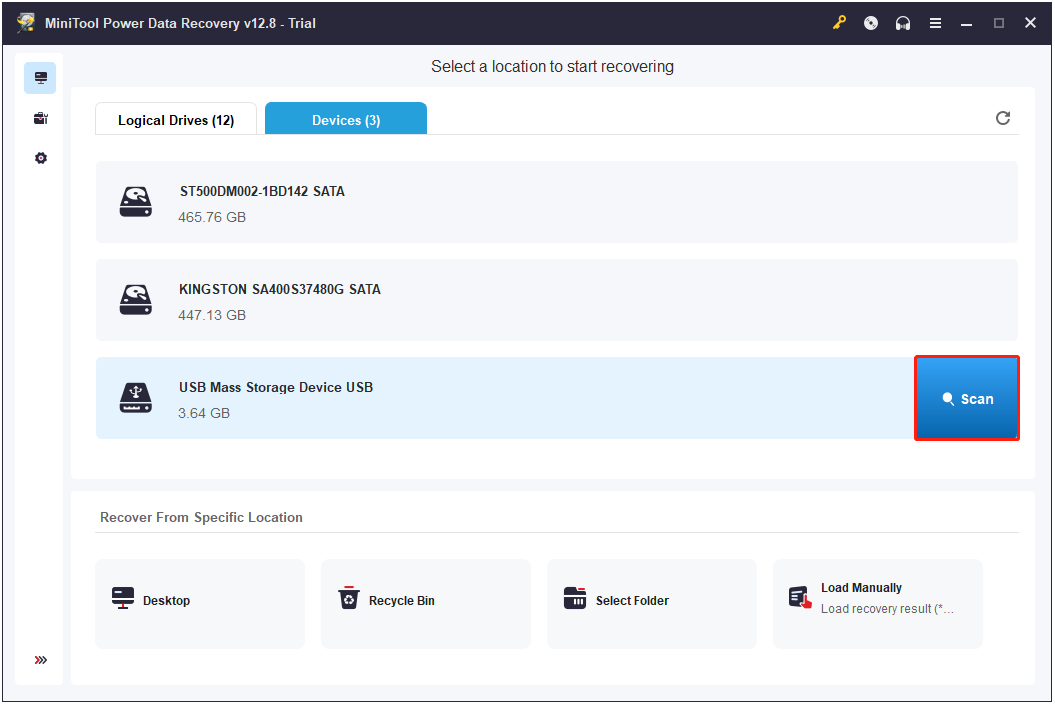
Step 3. Navigate to the Devices tab, locate the old card, and click Scan.
Step 4. Check the file content with the Preview feature.
Step 5. Select all the files that you want to recover and click Save.
Step 6. Choose a location to store the recovered files and click OK.
Option 2. Erase all Data on It
Some people like to collect early 2000s digital cameras as they think the photos of these old cameras are authentic, raw, and artistic.
However, these older devices may not offer the high capacities of modern memory cards. Therefore, sell your old card to them if you don’t want to keep it.
Before the sale, it’s better to use a tool to erase all your data on it for personal data security. To do that, it is highly recommended to use MiniTool Partition Wizard.
It offers the Wipe Disk feature that is effective to securely erase all data, including partitions and file systems, making the card usable again. Run it with the following steps:
Step 1. Connect the old card to your PC.
Step 2. Download and install MiniTool Partition Wizard. Then, launch this software.
MiniTool Partition Wizard FreeClick to Download100%Clean & Safe
Step 3. Choose your old card from the disk map and select Wipe Disk from the left panel.
Step 4. Choose a wiping method and click OK.
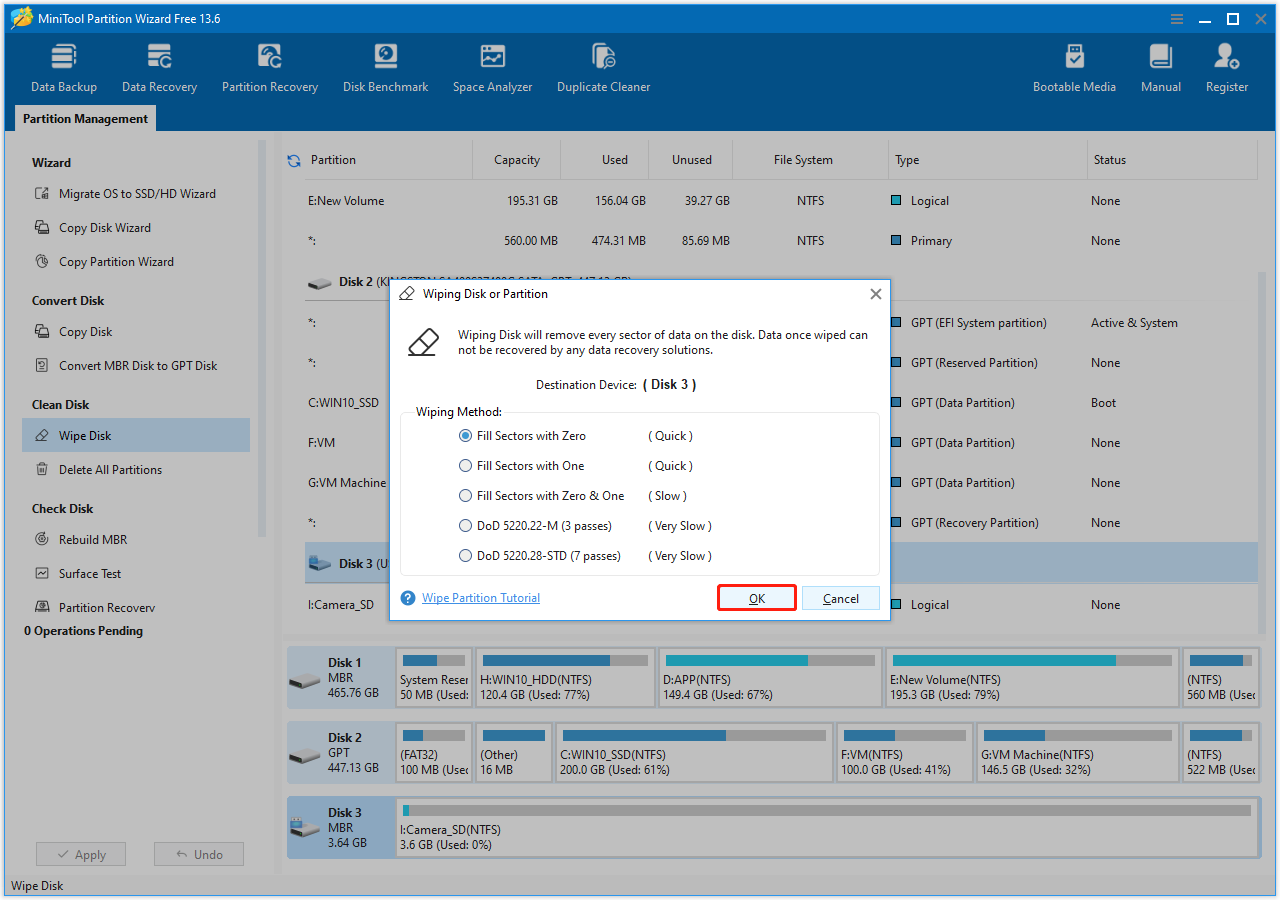
Step 5. Click Apply and Yes to execute the pending operation.
Bottom Line
The article looks back at many obsolete storage media that were once common but have mostly disappeared. Additionally, it introduces a powerful data recovery tool, MiniTool Power Data Recovery, to help you recover lost files from them.
What’s more, if you encounter issues while using this MiniTool software, contact us via [email protected].
Obsolete Memory Card Formats FAQ
For more details, plug it into a computer and check properties, or use tools like MiniTool Partition Wizard or CrystalDiskMark to test speed.
About The Author

Position: Columnist
Charlotte is a technology columnist with a strong focus on the Windows operating system, specializing in disk management, backup, and data recovery. She is passionate about analyzing computer errors, identifying root causes, and delivering practical solutions. In her free time, she stays updated on the latest developments in computer systems and hardware while continuously learning new technologies to broaden her expertise. Her writing style is clear and easy to understand, making complex technical topics accessible even to users with limited computer knowledge.
User Comments :