
When talking about data recovery, you may think you cannot complete this task by yourself. Generally, whether you are a computer novice or a professional, you can try DIY methods to recover lost or deleted M3U files under certain common data loss scenarios. Fortunately, if you are looking for methods to carry out M3U file recovery, you are in the right place.
Overview of M3U Files
Before discussing the solutions to recover lost or deleted M3U files, you are recommended to learn what the M3U file is.
The M3U (Moving Picture Experts Group Audio Layer 3 Uniform Resource Locator) file format is essentially not an audio file. It lacks audio content that can be accessed offline. Rather, it serves as a playlist file that enumerates audio files and is formatted as plain text.
M3U files are frequently used for managing and playing media streams. They can reference both local files and online streaming sources. These files are lightweight and can easily be created using a basic text editor.

Why Are M3U Files Lost?
There are some possible causes that may trigger the M3U file loss:
- Accidental deletion
- Storage device formatting
- Storage device corruption
- Library corruption
- …
After learning what the M3U file is and the causes of M3U file loss, let’s dive into the methods of how to recover M3U files on Windows effectively.

How to Recover Lost or Deleted M3U Files on Windows
#1. From the Recycle Bin
When you delete a M3U file on Windows, it usually goes to the Recycle Bin first. The Recycle Bin acts as a safety net against accidental deletions and keeps your files recoverable until you either clear the Bin or the files surpass the storage limit specified in the Recycle Bin settings.
To recover lost or deleted M3U files from the Recycle Bin:
- Double-click the Recycle Bin icon on your desktop.
- Once you are in the window, locate your deleted M3U files by typing m3u in the search box.
- Right-click the desired file and select Restore.
#2. From Windows File History
If you keep backups of your files, you can try to recover lost or deleted M3U files through cloud storage or an external drive. Creating such backups is wise, as they can be helpful during unforeseen data-loss events like device formatting or storage failures.
However, if you lack any backups but enabled the File History on Windows, your computer systems come equipped with built-in backup features that can assist in restoring your files.
To recover lost or deleted M3U files using Windows File History:
- Press the Win + S keys together to open the Search window, type file history in the search box, and click Restore your files with File History from the search results.
- In the pop-up File History interface, go to the M3U file folder and click the Previous version button to find the backup version that contains the M3U files you want to recover.
- Select all the M3U files that you want to recover and click the Restore button.
#3. Use M3U File Recovery Software
When M3U files don’t end up in the Recycle Bin or you do not enable the File History and have any backups, you can use a professional data recovery tool to scan the storage device where these files are located to recover them. MiniTool Power Data Recovery is preferred.
MiniTool Power Data Recovery is a top choice, known for its comprehensive features, high compatibility, and user-friendly operation. It supports various storage media, including HDDs, SSDs, USB drives, SD cards, and CDs/DVDs, as well as multiple file systems like FAT, NTFS, and exFAT.
Fully compatible with popular Windows operating systems (Windows 11, 10, 8.1, and 8), it requires no system updates for installation. The software features an intuitive interface, straightforward disk scanning, and an easy recovery process, making it accessible for all users.
Download MiniTool Power Data Recovery Free to recover 1 GB of M3U files at no cost.
MiniTool Power Data Recovery FreeClick to Download100%Clean & Safe
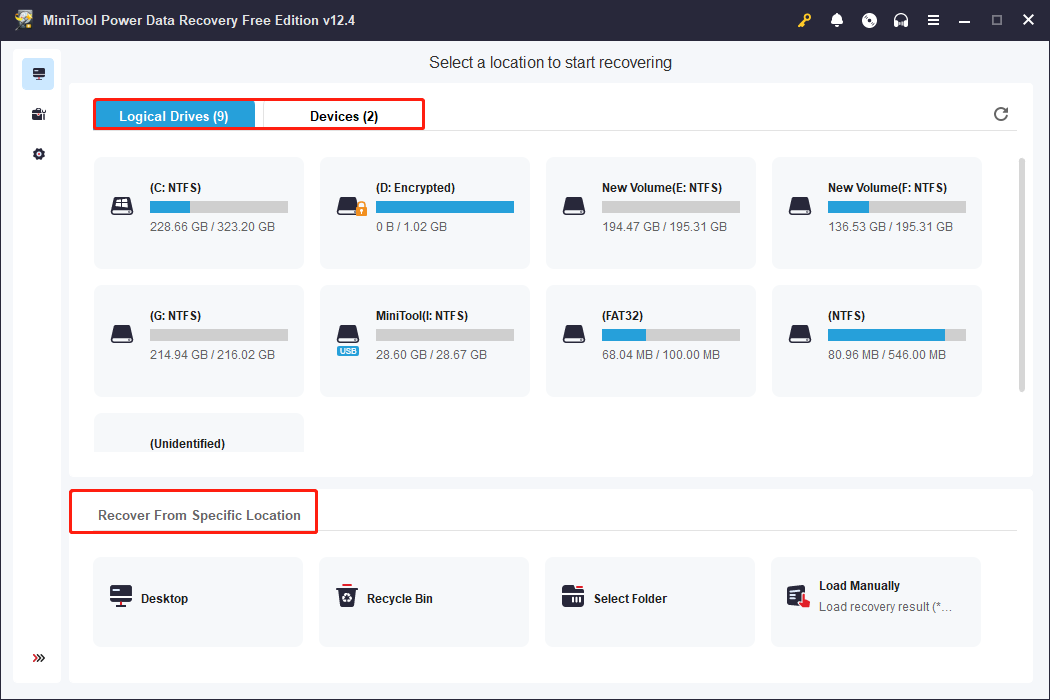
Step 1. Open this data recovery tool to enter its main interface. There are three scanning options you can choose to find your M3U files:
- Logical Drives: This section displays all existing and lost partitions on your disks, showing details like file system, size, and drive letter. Hover over the target partition and click Scan.
- Devices: This module lists all internal and external disks, ideal for recovering files from multiple partitions or when you’re unsure of their location.
- Recover From Specific Location: Quickly scan and recover data from the desktop, Recycle Bin, or a specific folder to save time.
Here, I choose a target partition where my lost M3U files are stored to scan.
Step 2. After scanning, you use the Path, Type, Filter, and Search features to locate your M3U files. What’s more, you can preview the files to check whether the selected files are needed.
Step 3. Check the boxes of wanted M3U files and click the Save button.

Conclusion
Now, you must know how to recover lost or deleted M3U files on Windows after reading this tutorial. Hope you can successfully get them back.
User Comments :