
As people pay more and more attention to the data security, lots of manufactures spare no effort in producing products with high security. For instance, the encrypted flash drive is popular with the public.
Sentry K300 Encrypted Portable SSD Comes Out
Recently, the famous data encryption solutions provider DataLocker has announced its new product – Sentry K300, which is an encrypted micro SSD drive with keypad. The military-grade security service provided by this encrypted drive is affordable; in addition, you can easily get access to 256-bit AES hardware-based encryption in XTS mode.
Key features of Sentry K300 encrypted portable SSD:
- AES encryption
- Alpha numeric keypad
- A large capacity: up to 256GB
- FIPS 197 and IP 57 certifications
- High speed uSSD SATA III memory
- …
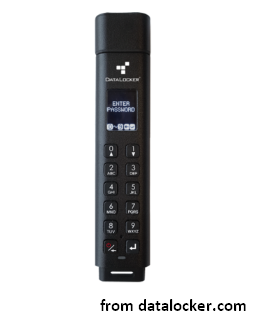
The most obvious advantage of Sentry K300 is that it is the only platform-independent and OS agnostic encrypted flash drive with keypad. Integrating the OLED display, the DataLocker Sentry K300 is the representative of the next generation of encrypted file storage devices. The Sentry K300 provides you with unparalleled speed and performance by utilizing micro SSD flash memory.
Want to know about BitLocker drive encryption recovery?
Besides, the full featured and visual based menu driven system will allow users to do a lot of things easily, in addition to the true alpha-numeric password-based authentication of display.
- Change password anytime and anywhere.
- Set password policy in a few steps.
- Enable other security features available.
- …
All of those can be done independently, without resorting to the user manual.
Sentry K300: User-friendly Micro SSD
Compatibility
This new micro SSD drive – Sentry K300 – enjoys high compatibility (can be used on different systems and devices that give support to USB mass storage); and more importantly, no software or special drivers is needed.
- Operating systems: Windows, Mac, and Linux.
- Storage devices: Chromebooks, Android phones, tablets, and embedded systems that allow USB connection.
Having an independent power supply, the Sentry K300 can serve as a bootable device to run Windows to Go, Ubuntu Linux, or local operating systems.
Security
Sentry K300 encrypted portable SSD takes a lot of measures to prevent the drive from lost or stolen.
- Offer different roles – User and Admin.
- Provide read only mode.
- Support admin configurable password policy.
- Embed auto-lock feature and rapid secure wipe.
- Provide brute force hack defense
- …
The Sentry K300 is developed to be manipulated by SafeConsole – the flagship central management platform of DataLocker (which will be available in Q4 2018).
Importance of Secure USB Drive
It is estimated that about 20 million unprotected USB drives went missing every year. This is a horrible thing. Imagine that if the files stored on those drives ends up in the wrong hands, how terrible the results would be?
- You will lose public trust.
- You may put citizens at risk.
- You have to suffer from huge economic loss and mental
- You may also find yourself involved in a PR scandal all of a sudden.
- …
That’s why secure USB flash drives come into being to form an essential component of comprehensive data loss prevention (DLP) strategy. It’s a better choice to implement the security in the hardware (than software); in this way, we can combat the evolving threat landscape. As a result, to protect your data from unauthorized access, you’d better get the hardware-encrypted Sentry K300 to store them. Please remember, be sure to backup important data and update the backup regularly.
User Comments :