
The Last of Us Part II Remastered is a highly anticipated remastered version of the game that was recently released on the PC platform. This game is a sequel to the The Last of Us series. It not only continues the emotional depth of the original but also brings players a richer experience through technical improvements and new content.
And no matter which platform you play the game on, knowing The Last of Us Part II Remastered save file location is helpful for operations such as restoring and editing game files.

Where Are The Last of Us Part II Remastered Save Game Files
The save file is stored in different locations on different platforms. Here I take Steam as an example for your reference.
For the Steam, you can find your save files in the following location:
C:\Users\Username\Documents\The Last of Us Part II\76561197960271872\savedata
Alternatively, here is another way you can use to access the The Last of Us Part II Remastered save files. The operations are as follows.
Step 1: Press the Win + R keys to open the Run dialog.
Step 2: Enter %USERPROFILE%\Documents\The Last of Us Part II in the box and press Enter.

How to Recover The Last of Us Part II Remastered Save Files
Way 1: Recover Lost Save Files from Recycle Bin
If you find the The Last of Us Part II Remastered save file missing, how can you recover it? Firstly, you can check the Recycle Bin to see if the lost data is in it. If yes, here are the steps to restore them from the Recycle Bin.
Step 1: Find the Recycle Bin and double-click on it to launch it.
Step 2: Scroll the list or type the file name in the box to locate the required files.
Step 3: After finding the target file, select and right-click on it to choose Restore.
Then, the save files will be restored to the original location.
Way 2: Recover Lost Save Files via MiniTool Power Data Recovery
If you cannot find any files in the Recycle Bin, don’t worry, MiniTool Power Data Recovery will help you recover The Last of Us Part II Remastered save files successfully. As a professional and robust recovery tool, it is capable of recovering all kinds of file types, such as documents, pictures, audio, videos, and more.
In addition, it functions well on SD card recovery, USB flash drive recovery, hard drive recovery, etc. If you have other lost files, you can also use it to do a recovery. By the way, this free file recovery software supports restoring 1 GB of files for free. Download and install it on your computer to get started.
MiniTool Power Data Recovery FreeClick to Download100%Clean & Safe
Step 1: Launch the MiniTool Power Data Recovery software. Under Recover From Specific Location, click on Select Folder > Browse to add the folder where your game files are stored.
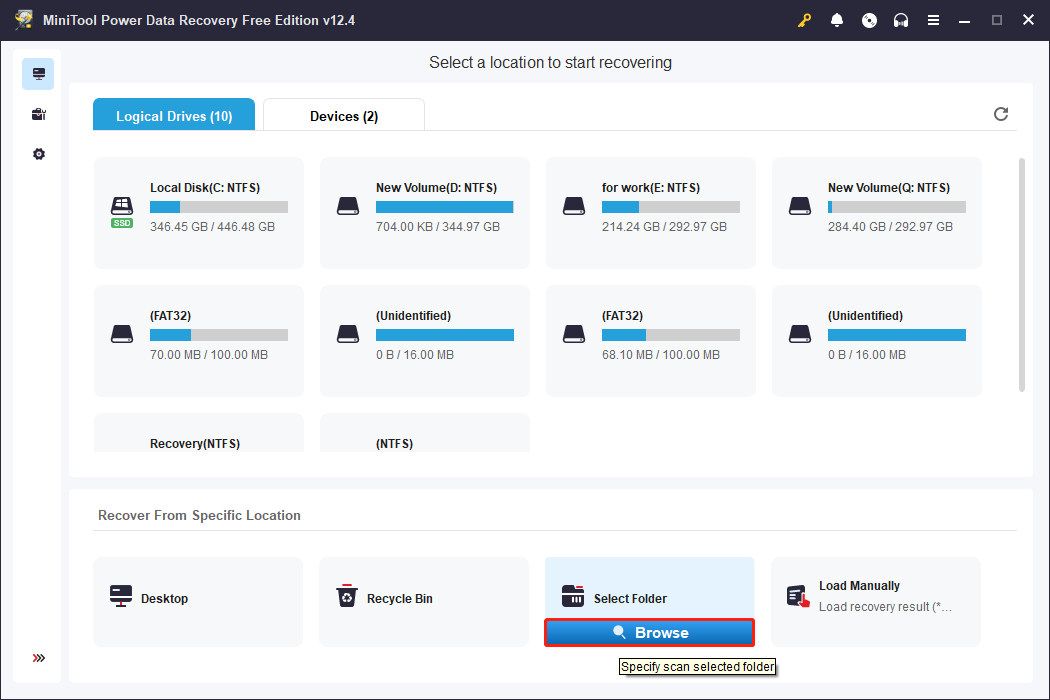
Step 2: The scan will take some time; please wait patiently for the process to complete. When it ends, all the files will be listed under the Path tab according to their paths. You can expand the list to find the required files based on the original folder structure.
Step 3: When you locate the target files, tick them and click on the Save button. There will be a window prompting you to choose a location to store the recovered files. It is best to choose a new location to prevent overwriting. After selecting, click on OK to start saving.
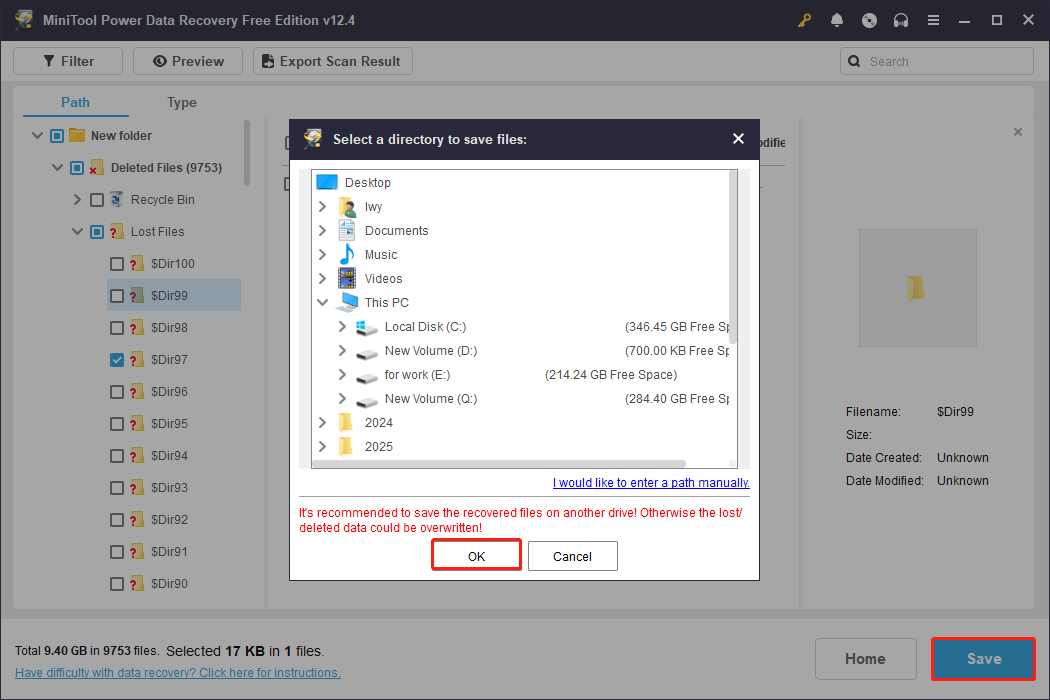
When the Recovery Complete window pops up, your files have been restored to the specified location.

Verdict
After reading this article, you know where the The Last of Us Part II Remastered save file location is and how to recover lost game files. When the Recycle Bin cannot do you a favor, remember to use MiniTool Power Data Recovery to recover lost saved data.
If you have any questions about MiniTool products, feel free to contact us via [email protected]
User Comments :