
What is the error that the service cannot accept control messages at this time? How to fix the sql error 1061? This post from MiniTool covers several solutions. In addition, you can visit MiniTool to find more Windows tips and solutions.
What Is the Error That the Service Cannot Accept Control Messages at This Time?
The error that the service cannot accept control messages at this time may occur when the service is being used by another process. Each Windows service contains a message pump. For example, there is a loop that waits for message from Windows or other sources, dispatches them and acts upon them.
So, if you are also a victim of the sql error 1061, you can keep on your reading to find solutions. The following part will cover the solutions to the error cannot control service on computer.
3 Ways – The Service Cannot Accept Control Messages at This Time
In this part, we will show you how to fix the error that the service cannot accept control messages at this time.
Way 1. Restart the Credential Manager Service
To fix the error that the service cannot accept control messages at this time, you can choose to restart the Credential Manager service first.
Now, here is the tutorial.
- Press Windows key and R key together to open Run dialog.
- Type services.msc in the box and click OK to continue.
- Then locate the Credential Manager service and double-click it.
- Change the Startup type to Automatic, and change the Service status to Running.
- Then click Apply and OK to save the changes.
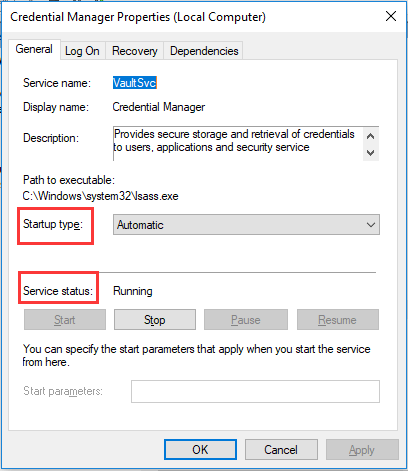
When all steps are finished, reboot your computer and check whether the error that the service cannot accept control messages at this time is fixed.
Way 2. Kill Internet Information Service Worker Process
To solve the sql error 1061, you can choose to kill the Internet Information Service Worker process. Internet Information Services for Windows Server is a flexible, secure and manageable Web server for hosting anything on the Web. So, if you come across the error that the service cannot accept control messages at this time, you can try killing Internet Information Service Worker process.
Now, here is the tutorial.
- Open Task Manager.
- In the Task Manager window, navigate to the Processes tab.
- Locate and end the w3wp.exe entries. If you see multiple entries, right-click on some of them and choose End task option from the context menu to disable it.
- Next, follow the on-screen instructions to continue.
When all steps are finished, reboot your computer and check the error that the service cannot accept control messages at this time is fixed.
Way 3. Change a Password in Edge
As the Credentials Manager is closely related to password management in Edge, changing one of them may help you to fix the error that the service cannot accept control messages at this time.
Now, here is the tutorial.
- Open Edge browser.
- Click on the three dots button at the top right corner of the browser and click on the Settings to continue.
- Then choose Advanced Settings.
- Click on View advanced settings and scroll down to privacy and services.
- Then click Manage my saved passwords and then you will see all websites where you have saved the passwords for.
- Try clicking on one of the entries and it will display the URL, the username for the dots representing the passwords.
- Next, choose one of the entries and try to change a password.
- At last, click Save to save all changes.
When all steps are finished, reboot your computer and check whether the issue that the service cannot accept control messages at this time is fixed.
Final Words
To sum up, this post covers 3 ways to fix the error that the service cannot accept control messages at this time. If you come across the same error, try these solutions. If you have any better solutions to fix the sql error 1061, you can share it in the comment zone.
User Comments :