
When people first saw the fsquirt.exe file, they wondered whether it is a virus or not and they want to know if it’s safe to remove it. Noticing this, I think it’s necessary to introduce fsquirt.exe to you and answer the related questions. In addition, I’ll show you how to determine if fsquirt.exe is safe & how to remove it when necessary.
What Is fsquirt.exe
Are you familiar with fsquirt.exe? What is an fsquirt.exe file? Actually, fsquirt.exe is a software component of Microsoft Windows; it’s an executable file that runs the Graphic User Interface (GUI) of the Bluetooth File Transfer Wizard, which helps users transfer files between a computer and a Bluetooth device (or between two computers that support Bluetooth). That is to say, the default GUI is implemented in the fsquirt.exe file. Fsquirt.exe is loaded into the main memory (RAM), so it will be executed on your computer once you start a Microsoft Windows Operating System.
You may as well get help from MiniTool when encountering file loss, virus attack, or system problems.
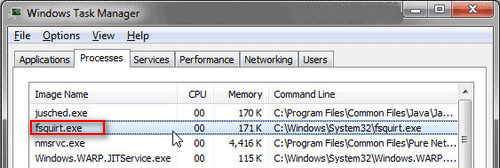
You may find fsquirt.exe as an executable file in Windows 10 File Explorer or as a Windows process (also called a task) in Task Manager. The usual size of fsquirt file is about 14.95 MB.
Is fsquirt.exe Safe or Not
The fsquirt.exe is developed by Microsoft and it’s written in C, C++, and Assembly. Many Windows users are worrying about its security when first saw fsquirt.exe in their computers. In this part, I’ll discuss on – is fsquirt.exe safe or not and can you remove it.
- In general, fsquirt exe is a normal file/Windows process that won’t pose any harm to your system. The suffix .exe added to it indicates that this is an executable file.
- In rare cases, the executable can also harm your system.
Pay attention to the fsquirt.exe file location & size.
The file location is the first thing that can help you figure out the security of fsquirt.exe Windows 10, Windows 8, Windows 7, or Windows XP.
- If fsquirt.exe is located in C:\Windows\System32, C:\Windows\ServicePackFiles\i386, or C:\Program Files\Bluetooth Suite\AdminService.exe, it is possibly a legitimate Windows process. The file size may be 219,648 bytes, 128,000 bytes, 196,608 bytes, 261,120 bytes or 193,024 bytes.
- If it’s located somewhere else or the file size is strange, it’s likely a virus, malware, or Trojan.
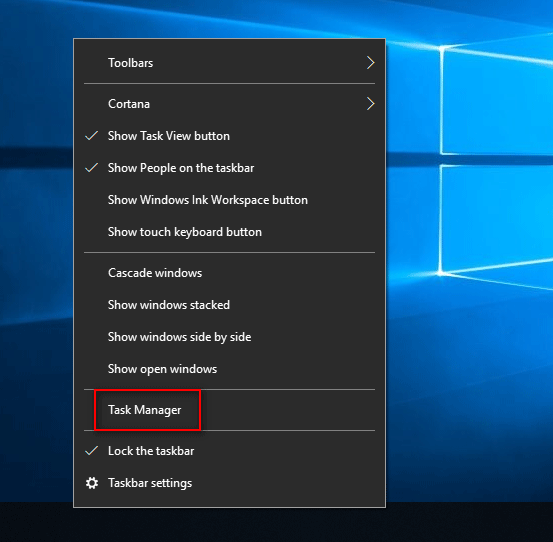
Some malware or virus tend to disguise itself as fsquirt.exe, for instance, Virus:Win32/Neshta.A which is detected by Microsoft and PE_NESHTA.A which is detected by TrendMicro. You should open Task Manager (by pressing Ctrl + Alt + Delete or right clicking on taskbar) to check the fsquirt.exe process carefully in order to determine if it’s a threat to your system.
Windows 10 Taskbar Not Working – How To Fix? (Ultimate Solution)
Should You Remove/Delete fsquirt.exe
In general, the non-system processes running on your computer can be stopped. But it may affect your system performance.
- If fsquirt.exe is a virus or Trojan, you should go to delete or remove it.
- If it belongs to a valid Windows operating system file or a trusted application, you should keep it free.
According to the statistics online, only 8% of people remove fsquirt.exe, so you’re not advised to delete it unless you can confirm it’s a virus. In that case, you should get a professional antivirus program to help you kill the virus completely.
fsquirt.exe errors & fixes.
There are some common errors related to fsquirt.exe.
- exe failed.
- exe not found.
- Cannot find fsquirt.exe.
- Windows cannot find ‘fsquirt’.
- exe is not running.
- exe Application Error.
- Error starting program: fsquirt.exe.
- Faulting Application Path: fsquirt.exe.
- exe is not a valid Win32 application.
- exe has encountered a problem and needs to close. We are sorry for the inconvenience.
How to fix fsquirt.exe?
- Perform malware scan and remove virus.
- Clean the hard disk with sfc /scannow and cleanmgr.
- Run DISM to repair your OS without data loss.
- Use special programs and tools to analyze fsquirt.exe Windows process further.
User Comments :