
There come some new features in Windows 10 Build 18932 and they are the Eye Control, Notification and Your Phone App. And in the following part, we will show some detailed information on these new features.
Windows 10 Build 18932 Brings Some New Features
A new Windows 10 Build 18932 has been released and this new Windows 10 Build 18932 comes in some new features including the Eye Control, Notification and Your Phone App.
The Eye Control in Windows 10 Build 18932 allows users to track work. The Notification in Windows 10 Build 18932 helps users to receive notifications within Windows. And the Your Phone App in Windows 10 Build 18932 allows users to interact with notifications they receive on Android phones.
These updates bump Windows 10 from build 18922 to 18932 which is from the 20H1 branch, representing the Windows 10 update that will be available in the first half of next year.
And in the following part, we will simply show some information about the Eye Control in Windows 10 Build 18932, Notification in Windows 10 Build 18932 and Your Phone App in Windows 10 Build 18932.
The Eye Control in Windows 10 Build 18932
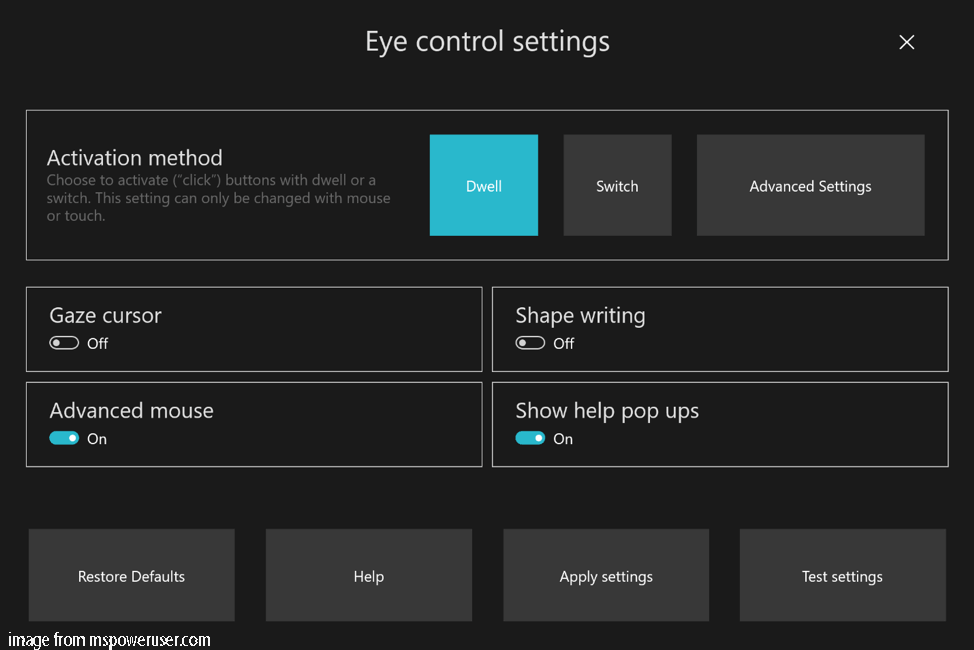
There are some improvements in the Eye Control feature. The Eye Control is generally thought of as assistive technology of Microsoft. In addition, it is a productivity tool, too. In the Windows 10 Build 18932, there are three main improvements.
- The Drag and Drop of Eye Control feature enables you to combine clicks and drags with Shift and Ctrl modifier keys.
- The Pause feature completely hides the Eye Tracker UI, allowing users to watch full-screen video without the UI interface.
- At last, Microsoft has launched an open-source Gaze Interaction Library in the Windows Toolkit and updated some settings so as to manage the Eye Control in Windows 10 Build 18932.
Next, we will show another feature – Notification in Windows 10 Build 18932.
Notification in Windows 10 Build 18932
Microsoft has collected the problems and suggestions from the several Windows 10 versions ago and is trying to provide better Attention control ability. The Focus Assist, which has been introduced in the past version Windows 10 May 2019 Update, will automatically forbid the Notification once it is launched so as to avoid distracting. But some users say the Notification Settings is difficult to be found, and it always causes confusion.
So in order to solve this problem, the Windows 10 Build 18932 has made some improvements.
- When you receive multiple notifications overlapping, the new page adds inline options to turn off the App’s notification or go to the App’s Notification Settings.
- After you have gone into the App’s notification settings, you will see that Microsoft has added some pictures to help to explain the impact of these settings.
- If you want to mute the App’s notification, you don’t have to go to the old sound Control Panel any longer. Microsoft has added top options in the Notification & Action Settings.
And in the following part, we will show some improvements in the Your Phone App in Windows 10 Build 18932.
Your Phone App in Windows 10 Build 18932
Microsoft has brought some new features to the Your Phone App including the ability to allow one-click and sync notification.
- Enable touch function.
- Phone Screen Integrated Notification function.
- It can also support more Android devices, such as Samsung S10e, etc.
- The notification sync feature can be available in all users.
It also has some other features and we don’t list all of them. When the new Windows 10 Build 18932 is available, you can get more detailed information.
Final Words
To sum up, this post has demonstrated some new features of the Windows 10 Build 18932. And they are the Eye Control, Notification and Your Phone App in Windows 10 Build 18932. This post has simply introduced some improvements in these new features.
User Comments :