
On May 16, Microsoft released Windows 10 Insider Preview Build 18898 (20H1) to Windows Insiders in the Fast ring. This update brings improvement for Task Manager and also gives some changes as well as known issues. Now, let’s go to see some details about this Windows 10 update.
Microsoft Launches Windows 10 Build 18898 to Insiders
This update makes Windows 10 from build 18895 to build 18898. Like its predecessor that was made available to testers on May 10, Windows 10 Insider Preview Build 18898 is also from the 20H1 branch, which means the update is expected to arrive in the first half of 2020.
Windows 10 is being developed as a service, that is, it receives new features on a regular basis. Currently, Microsoft has rolled our 6 major updates, such as November Update, Anniversary Update, Creators Update, Fall Creators Update, April 2018 Update, and October 2018 Update. The May 2019 Update will start rolling out later this month.
If you are a member of Windows Insiders in the Fast ring, you can go to Settings > Update & Security > Windows Update, check for new updates and then upgrade to the Insider Preview Builder 18898. Later, you will find some changes in this new build.
Windows 10 Task Manager Improvements
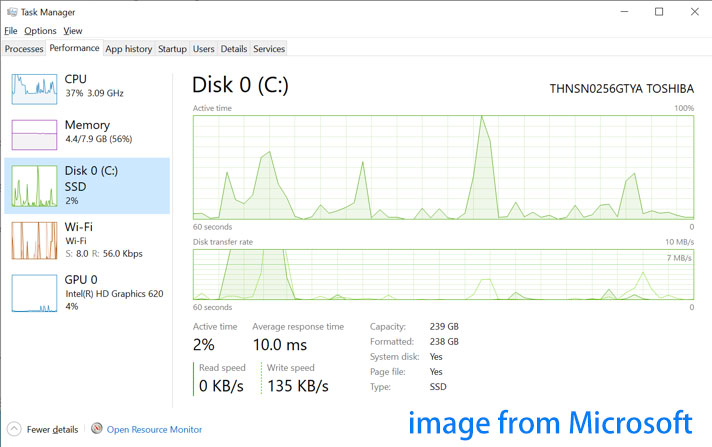
In this new build, there is a brand new feature to Task Manager: you can know if a disk is a solid-state drive or a slower mechanical hard drive by going to the Performance tab.
For most Windows 10 users, this new Task Manager feature probably will not a big difference. But according to the announcement post from Microsoft, if you are one of the users who cram their system full of drives and can’t remember which is which, the ability that Task Manager can show drive type in Windows 10 is particularly helpful.
And you can easily see if a given drive is an SSD or HDD at a glance while troubleshooting. Suppose that you have an SSD, now Task Manager will show you “SSD” under the disk in Performance, as shown below.
Some Bug Fixes
Windows 10 Insider Build 18898 also brings some general changes, improvements, and fixes for PC. Now, let’s see them.
- A pcshell.dll issue in recent builds resulting in a high hitting explorer.exe crash.
- An issue in recent builds resulting in a high hitting DWM crash.
- An issue where updated Japanese Input Method Editor (IME) settings would be never applied in certain desktop bridge apps, probably resulting in prediction candidates being shown even after they have been disabled in the IME settings.
Known Issues
Additionally, Microsoft has given a few known issues that are listed here:
- Older versions of anti-cheat software used with games may cause PCs to crash. Before attempting to update Windows, ensure your games are the latest version.
- Taskbar search results will not be visible (just a dark area) until you restart searchui.exe when using remote desktop to connect to an enhanced session VM.
- On certain devices, night-light doesn’t turn on until after a restart if fast startup is enabled.
- Some Realtek SD card readers are not functioning properly.
- When dragging the emoji and dictation panels, there’s a noticeable lag.
- More…
The End
The new update improves Task Manager (making you are able to see drive type) and brings some bug fixes, but there are around 11 unknown issues that could be enough to scare away you. We suggest not upgrading to this new build at once.
It is so early in the update’s development and considering the lack of exciting new features, Windows 10 Insider Preview Build 18898 is meant for experienced testers of pre-release software.
About The Author

Position: Columnist
Vera has been an editor at the MiniTool Team since 2016, with over 9 years of experience in technical writing. She specializes in topics such as disk and partition management, data recovery, and PC backup and restore, helping users troubleshoot and resolve a wide range of computer issues.
User Comments :