
Apparently, Windows 10 May 2020 update is a major update for Windows 10, the constantly-evolving operating system of Microsoft. It was planned to be rolled out on May 12. But Microsoft delayed it due to zero-day vulnerability.
Please go to the home page to get a tool for protecting your system.
Windows 10 May 2020 Update Is Delayed
The next Windows major update is Windows 10 May 2020 update (also known as Windows 10 20H1, Build 19041.207); it was supposed to be released officially on May 12, 2020. However, Microsoft finally decides to delay it because of the zero-day vulnerability. The Windows 10 May update is planed to be released in May for all the existing devices.
Windows Patches Zero-day Vulnerability, But Windows Still Vulnerable.
2004, instead of 2003, is used by Microsoft to refer to Windows 10 May update for the sake of avoiding confusion with Windows Server 2003.
The delivering of new Windows 10 update is generally divided into 3 phases:
- Offer the new update to OEMs (Original Equipment Manufacturers).
- Deliver the preview build to developers; they can test it and find problems.
- Finally roll out the Windows update to the mainstream users.
Windows 10 20H1 Review
Like any previous update, the Windows 10 May 2020 update contains a lot of new features and improvements. I will show some of them to you in the following content.
Change 1: Reserved Space becomes optional.
You may still remember that Microsoft added a controversial feature to Windows 10 version 1903 in January last year; it requires at least 7GB of space. This is great since it can simplify the Windows Update process and stop errors caused by lack of space.

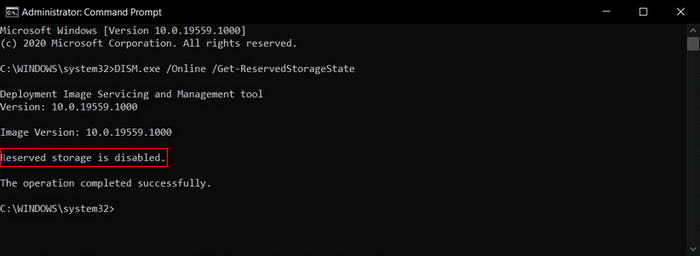
Some users cannot accept that the new Windows update will consume additional storage, so they decide not to upgrade to the new version of Windows. Taking this into account, Microsoft finally decides to make the Reserved Space an optional feature. Users of Windows 10 version 2004 or newer can go to disable Reserved Storage manually by using DISM tool if they don’t like it. (How to fix when DISM failed?)
Change 2: icons and logo are modified.
The new Windows 10 May 2020 update includes a new set of icons (over 100) for Microsoft’s first-party apps and services: File Explorer, Notepad, Office, Paint, Windows logo, and so on. This is to cater for the “Fluent Design” philosophy and get more consistency between Windows 10 and Windows 10X.
Change 3: Cloud download feature is added.
Another new feature you can find in an Insider Preview Build for the first time is Cloud download; it’s included in Reset this PC.
When you run into serious system problems, you can go to restore the PC back to its default state. But the question is many users’ Windows installation media required for system recovery is lost. With the Cloud download feature, you can reinstall Windows 10 from a system image which is kept online in Microsoft servers.
Change 4: video playback performance is improved.
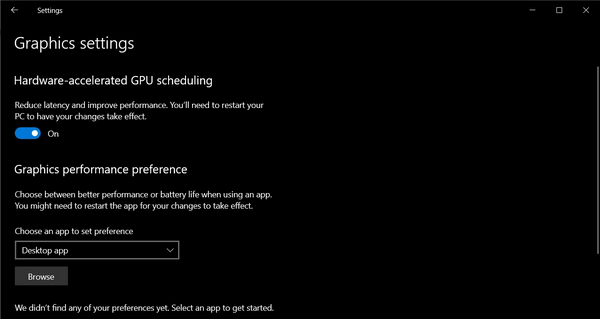
The new Windows 10 May update in 2020 is said to be an amazing update for gamers. Microsoft added the Windows Display Driver Model (WDDM) 2.7 so as to improve the video performance, video output, and the refresh rate on multi-monitor setups.
Change 5: Windows Search is smarter than before.
Microsoft also optimized the Windows Search feature in the new 20H1 update; the files will only be indexed while users are not using the PC actively. In this way, the performance of the low-end systems with HDD storage will be improved as a whole.
In addition to these 5 changes mentioned above, there are also other optimizations:
- Give support to 10th-generation Intel processors and Ryzen 4000 series.
- Stop supporting the 32-bit version of Windows 10. (The Windows 10 64-bit should have at least 32GB of internal storage.)
- Fix some issues found in the previous versions.
User Comments :