
Do you know about the latest Windows 10 version? Are you planning to upgrade your system to Windows 10 1909? Please read the following content before you do anything; it will introduce the features of this new update and list the specific requirements.
MiniTool Solution provides powerful tools for managing both Windows and Mac systems.
The Windows 10 1909 Is Now Available on MSDN
The codename of the new version of Windows is 1909 (also known as 19H2). Of course, the Windows 10 1909 brings some new features to users to improve the productivity.
Though the official release of the new Windows 10 update is not out, the consumer and business editions of it are now available on MSDN; developers and enthusiasts can go to download them easily so as to test the new features and provide feedback. Actually, the Slow and Release Preview ring Insiders has already been tested. Improving the performance and stability are the main focuses of Microsoft.
How to Get Access to Windows 10 19H2 in Advance
You can join the Windows Insider Program as long as you have a Microsoft account or Azure Active Directory account; this will enable you to download and use Windows 10’s November update before its official release.
Otherwise, you’ll need to wait until sometime in November (as the name suggests) to finally get the Windows 10 1909 update.
Highlights of Windows 10 1909: Faster Download & Install
One of the biggest highlights of the Windows 10 November update will be fast download and installation. It will only take you a few minutes to download & install the new Windows update on the devices.
Please read this post if you find some files and folders disappeared from your PC after the Windows update had been finished:

This is really exciting news for more than 9 million Windows 10 devices users.
New Features in Version 1909
- Control the notifications easily: there are some changes on notifications to make it easier to configure and manage from an app or website.
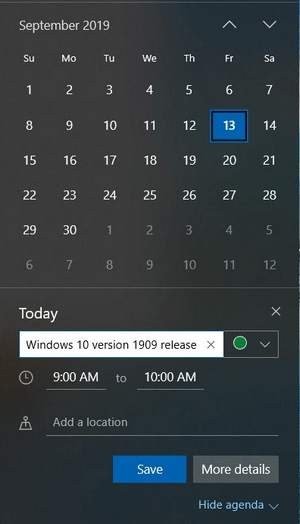
- Create events directly: you don’t need to open the Calendar app anymore to create events; instead, you can just do it through the Calendar flyout on the Taskbar.
- Activate lock screen via voice commands: the third-party digital assistants allow users to activate above the lock screen by using the voice commands.
- Use Windows Search to power search box: the search box in File Explorer will be powered by Windows Search. In this way, the OneDrive content will be integrated better online.
- Learn the state of FN key: the location of FN key on the keyboard can be determined easily with narrator and other assistive technologies. Besides, these technologies help to tell the state of FN key – whether it’s locked or not.
- Preview more information in Start menu: if you hover over the navigation pane in the Start menu with your mouse, it will expand automatically to show you more information about the icons; in this way, you can select the one you want more conveniently.
Practical skills on how to improve the Windows 10 performance!
Requirements for Windows 10 November Update
Hardware Requirements
CPU support:
- Xeon E-22, Atom, Pentium, and Celeron CPUs, and Intel’s 10th generation Core processors are now supported.
- All Team Red’s 7th-generation processors are included in AMD support. Athlon, Opteron and EPYC are selected.
- The existing 2nd-gen support also includes the 3rd-gen Ryzen.
System Requirements
- Screen resolution: 800 x 600.
- RAM: 1GB (for 32 bit operating system), 2GB (for 64 bit operating system).
- Graphics: Microsoft DirectX 9 or later with WDDM 1.0 driver.
- Free hard disk space: as for Windows 10 1809 and earlier systems, there must be at least 16 GB space (for 32 bit OS) and 20 GB space (for 64 bit OS). However, for Windows 10 1903 and later systems, there must be more than 32GB of free space since the new Reserved Storage feature will take 7GB of disk space for storing updates, programs, and files.
Microsoft Increases The Windows 10 Minimum Storage Requirement.
Do you like Windows 10 1909?
User Comments :