
The Windows 10 People Bar seems to be a feature that is not so popular in Windows 10, but that doesn’t mean it isn’t useful. In contrast, it can do a lot of things for you. Now, I’m going to show you the exact functions of People Bar in Windows 10.
A new feature called People Bar has been added to Windows 10 since Windows 10 build 16184. After that, you can find a new People button on the taskbar notification area. The main functions of Windows 10 People Bar can be summarized as follows:
- Share photos
- Make plans for dinner
- Get an answer from a friend or coworker
- And so on
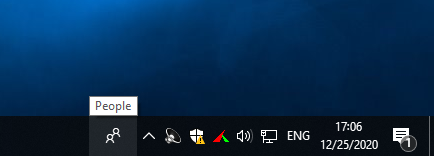
As a result, it is able to gather the people you care about most to the center of your experience, making your connections with them closer and more conveniently.
Besides, it is also considered as the message center across multiple platforms.
What’s more, it is keeping up to date with YouTube videos.
What Can Windows 10 People Bar Do for You
Send Messages by Drag and Drop
As I have mentioned, the People Bar (also called My People) is a message center which enables you to pin contacts to taskbar; in this way, you can send messages and files to them in an easier and quicker way than before.
- You can click on the icon of someone to send messages.
- You can also drag the contents directly to the icon of certain people and then drop.
The most popular supported services including:
- Outlook
- Skype
- Discord
- Telegram
FYI: a third-party application is needed for the using of Discord and Telegram.
All in all, People Bar allows you to jump to any service that has details of people who are pinned to the taskbar. It’s not necessary to open a lot of applications to make things organized.
Watch Videos Directly
It may seem strange to put YouTube clients on the taskbar. Yet, myTube! has made it and done a good job. You can subscribe the channel you are interested in, and pin it to the task bar. Then, you are able to watch videos directly by clicking on the icon. It’s rather convenient to watch videos in the People Bar than in the myTube! application.
Copy and Paste Content Conveniently
Recently, Windows has been devoting itself to develop a universal cloud clipboard, which will work across devices. If this is realized, it will simplify our way of working. Actually, the Fall 2018 Update of Windows 10 has realized the first major steps. Yet, the ordinary situation is: you need to copy on one device and paste it on another with the help of a third-party application (install it on both devices).
Here comes the Copy Space, which is suitable for iOS, Android, and Windows 10. The synchronization is realized through OneDrive. People Bar helps you to copy and paste content conveniently and quickly by integrating this.
How to recover deleted files from OneDrive?
There are still more functions of People Bar waiting to be discovered.
How to Use People Bar
The new People button has been added and placed to Windows 10 taskbar notification area since build 16184. After upgrading your system to Windows 10, you’ll find the People Bar appears by default. The icon is placed in the taskbar; you can open it anytime you want.
Should I upgrade to Windows 10?
After clicking on the Get started button, you will see the following window.
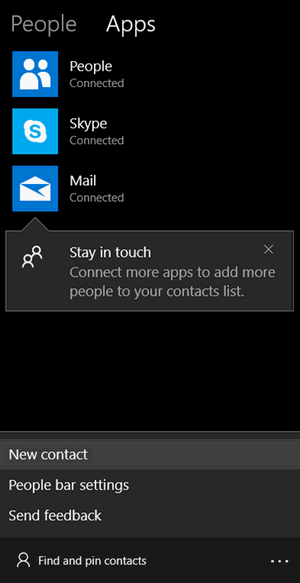
You may choose to pin at most 3 of your contacts to the taskbar so that you can contact with them easily the next time (the contacts will be ordered by alphabet). A quick way to find your desired contact is clicking on the Find and Pin contacts.
There’s another way to achieve this:
- Select an option from People, Skype or Mail.
- Search for the target contacts you want to pin.
- Select the contact.
- Click to Pin to taskbar or Pin to start.
Certainly, you can remove People Bar in Windows 10 if you don’t like it.
User Comments :