
What should you do if Windows Update keeps offering or installing the same updates over and over in Windows 10/7? How annoying it is! Fortunately, you can try these solutions in this post to easily get rid of the trouble. These methods offered by MiniTool are proved to be helpful.
Windows 7 or Windows 10 Keeps Installing the Same Update
Microsoft always releases some updates including security patches and features updates to bring stability to the operating system and optimize your system. If you haven’t installed these updates, Microsoft always reminds you, which is very annoying. Also, how annoying is when you constantly get a reminder about the same update!
This situation usually happens if Windows Update fails to install updates successfully and the system cannot detect the installed or partially installed updates. But sometimes the system automatically installs the same updates as soon as you restart the PC even though there is a successful Windows update installation.
In this case, it feels that Windows 10 keeps installing the same updates over and over. Similarly, you will find Windows 7 keeps installing the same updates. Fortunately, you can get rid of the trouble by following these solutions below.
Fix: the Same Windows Update Keeps Trying to Install
Use Windows Updates Troubleshooter
This can be a simple way to fix your issue. Just follow these steps:
Step 1: Open Windows Settings and choose Update & Security.

Step 2: In the Troubleshoot window, find Windows Update and choose Run the troubleshooter.
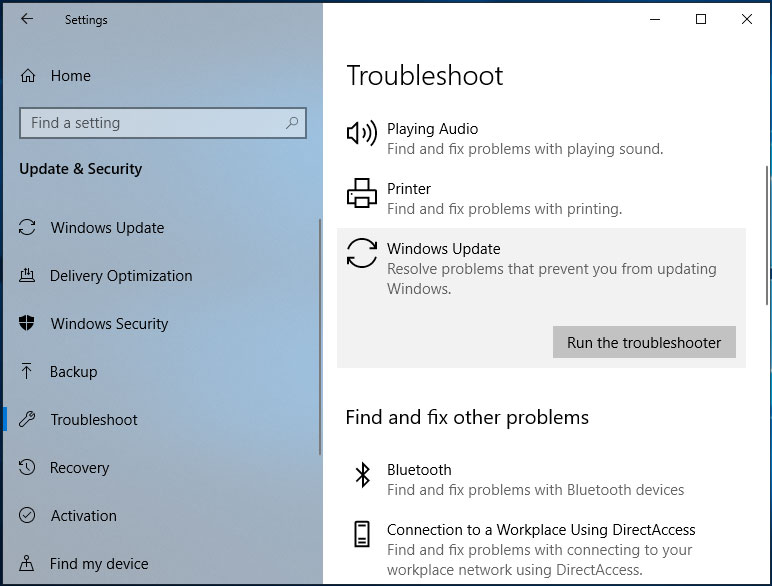
Step 3: Then this tool starts detecting problems. After finishing the scan, click Apply this fix.
If Windows 10 Update keeps installing the same updates over and over after the fix, try another method.
Delete the SoftwareDistribution Directory
The SoftwareDistribution folder in the Windows operating system is located in the Windows directory and it is used to temporarily store update files. Sometimes some problems with this folder can cause various updates errors, including this issue – Windows 10 or Windows 7 keeps installing same updates over and over.
To fix this issue, you need to delete this folder.
Step 1: Run Command Prompt as administrator.
Step 2: Type these commands in turn and press Enter.
net stop wuauserv
net stop bits
Step 3: Go to C:\Windows\SoftwareDistribution and delete all the contents in it.
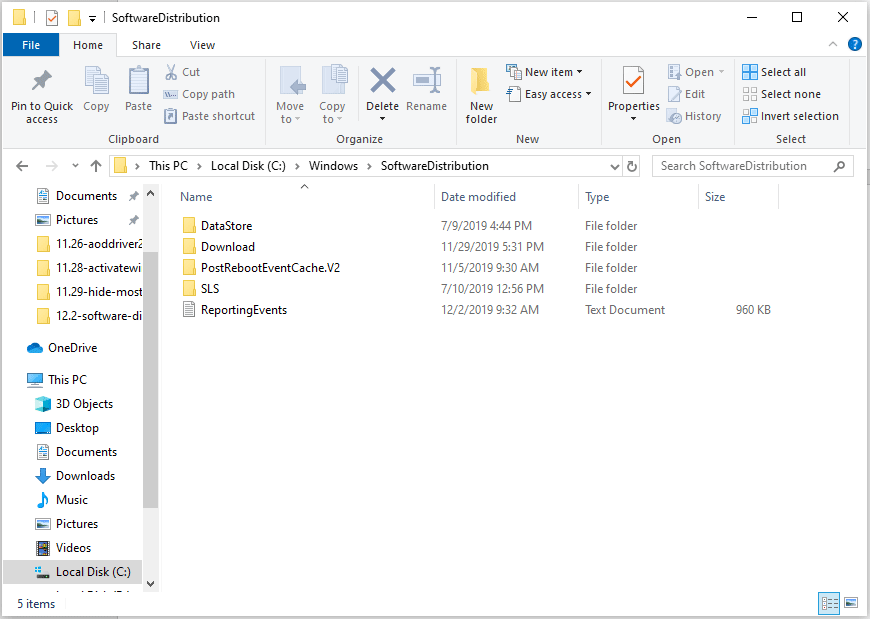
If some files are in use, restart your PC and try to delete the folder again.
Step 4: Run these two commands one by one and press Enter.
net start wuauserv
net start bits
Remove the Problematic Update
If you find the same Windows update keeps trying to install, probably the update isn’t installed completely. To fix the problem of constantly installing the same update, you should remove the problematic update.
Step 1: In Windows 10, go to Settings > Update & Security.
Step 2: Click View update history and note down the update that keeps installing again and again.
Step 3: Click Uninstall updates and right-click the problematic update to uninstall.
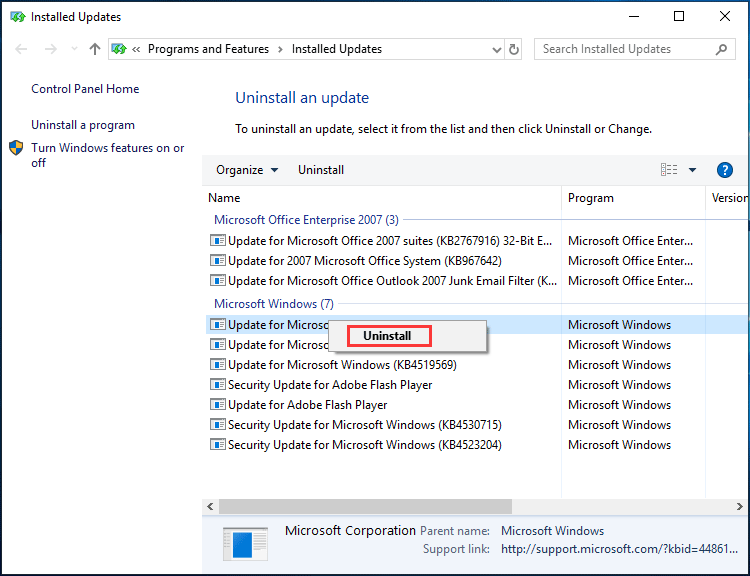
Alternatively, you can go to Control Panel > Programs and Features > View installed updates and then uninstall the update.
Run an SFC Scan
If Windows 10 keeps installing the same update, perhaps the issue is related to corrupted system files. To get rid of the error, you can perform an SFC scan.
Step 1: Open Command Prompt as administrator.
Step 2: Input SFC /scannow and press Enter.
Step 3: Wait patiently until the scan finishes.
Some users recommend downloading and installing Windows update via Windows Update Catalog, checking for updates manually, reinstalling .NET Framework, etc. If these ways above don’t work for you, you can also have a try.
Now, follow these solutions to fix your issue if Windows 10 Update keeps installing the same updates over and over. Hope they can be helpful for you.
About The Author

Position: Columnist
Vera has been working at the MiniTool Team for over 10 years as a technical editor and content writer. She mainly focuses on disk and partition management, data recovery, Windows backup and restore, and PC troubleshooting. Through in-depth software testing and hands-on experience, she has helped users solve a wide range of computer problems and better protect their data on Windows devices.
User Comments :