
Microsoft is always trying to create a single operating system that can run on tablets, smartphones and PCs before, but the Windows 10 tablet model is very different from the Windows 10 traditional desktop. Now, Microsoft is running an experiment that provides roughly the same layout for Windows 10. You can read this post from MiniTool.
Windows 10’s New Look for 2-in-1 PCs
If you are interested in this topic – Windows 10’s new look for 2-in-1 PCs, keep reading this post.
Since the birth of Windows 10, it has been the goal for Microsoft to create a single operating system that can run on tablets, smartphones and PCs.
However, the tablet model of Windows 10 is still markedly different from the traditional desktop of Windows 10.
In tablet mode, the Windows 10 Taskbar doesn’t display app icons, which makes switching between apps a little tricky. The handy File Explorer icon is also hidden.
Right now, Microsoft is trying to offer roughly the same layout for Windows 10, whether 2-in-1 PC like its flagship Surface Book, being used as a tablet or desktop.
Microsoft explains that the new tablet layout is designed to allow users with convertible PCs to switch between a tablet and a PC without too much disruption.
Windows Insider Team of Microsoft says this new experience will let you who are entering the tablet state keep the familiar desktop experience uninterrupted.
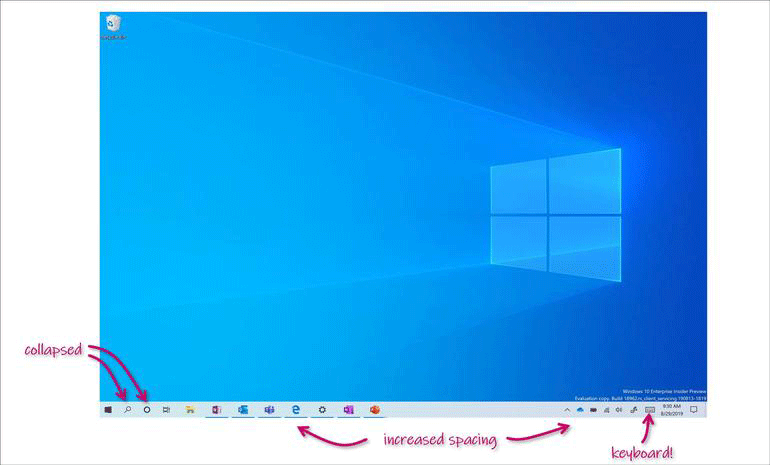
The new tablet of Windows 10 has much the same layout as the desktop mode, except that the space between Taskbar icons has increased, and an icon has replaced the Taskbar search box. Meanwhile, File Explorer will also be changed to a touch-optimized layout when it is selected.
Currently, the new look tablet layout is being tested under the Insider program by you who are running early builds of Windows 10. The modified look has been provided to a small number of you who are running Windows 10 build 18970, which was released on the Insider Fast Ring.
You need to trigger the new tablet layout with the two-in-one device as a tablet, such as detaching the keyboard or folding it under the screen. You can still use the existing Windows 10 tablet mode, but you must enable it manually through the Action Center.
There is also a new way to reset a Windows 10 PC in build 18970. If you choose “Reset this PC” from the Recovery section of the Settings menu, now you can download a fresh copy to reinstall Windows instead of using Windows files that are saved on the drive to do this work.
When the new “Cloud download” option is installed on the device, it will reinstall the same Windows 10 version, build and edition.
Bottom Line
To sum up, this post has shown you much information about Windows 10’s new look for 2-in-1 PCs. As you know, at first, the tablet model of Windows 10 is still markedly different from the traditional desktop of Windows 10. Right now, there is roughly the same layout for Windows 10 offered by Microsoft, whether 2-in-1 PC is being used as a tablet or desktop.
User Comments :