
When you run the most common version of Win10 —version 1803, you will receive a note that you need to upgrade to 'the next version of Windows’- Windows 10 version 1903. Don’t be bullied. You have three choices to do. Click MiniTool to get more information.
Windows Pushes You to Upgrade to Version 1903
Microsoft presses you to update Win10 version 1803 to version 1903. On the surface, the reason is that after November 12, the version 1803 patch will stop and the laggards still remain in the “old” version. But the truth does not seem like this.
If you are using version 1803, like most Windows 10 users, recently you may have started seeing announcements in Windows Update like the following picture:
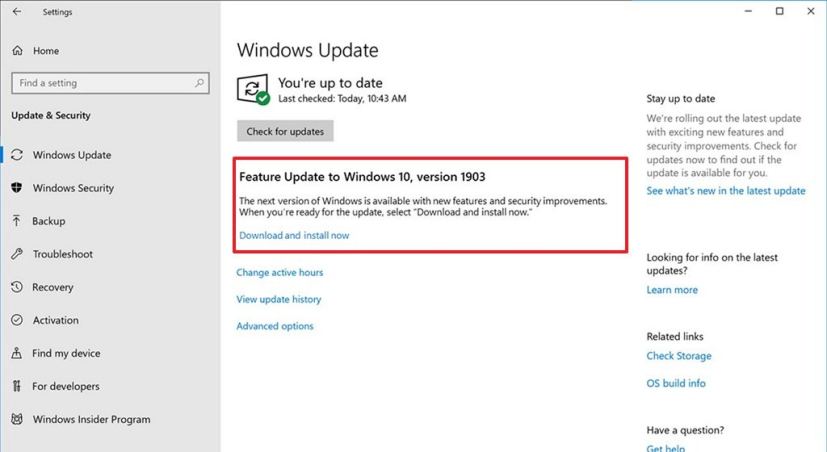
Although you can click Download and install now, you had better consider it before making the leap. Why has Microsoft itself not recommended version 1903 for business deployment? You need to think about it.
So don’t be bullied to make a decision that is good for Microsoft, but can bring problems for you. It can be confusing that Windows pushes you to upgrade to version 1903. The new version of 1903 may already be waiting for those who click the wrong button.
If your Win10 version 1903 has been downloaded, but not yet installed, you don’t need to worry about that. You just need to go to the folder C:\Windows\SoftwareDistribution and delete all the files. Then reboot Windows and you’ll be back to the devil ye ken.
Here Are Three Choices for You
If you are running Win10 version 1803, here are three simple choices for you.
Stick with 1803
Microsoft promises that the latest cumulative update for Win10 1803 will be released on Patch Tuesday, November 12. Unless there are major errors in the update, new patches are usually not expected until Patch Tuesday, December 10 during normal events.
Why do many people want to stick with 1803? This is because it is stable by Win10 standards at least. These people don’t think the benefits of the feature improvements in Win10 1809 and 1903 worth the possible pain. You can wait every month, and the next and next-next versions of Windows will become more and more stable.
Move to Win10 Version 1809
Win10 1809 has gradually stabilized after launching. Microsoft will keep releasing patches until May 12, 2020s the main benefit of upgrading to Win10 version 1809. Microsoft is working hard to achieve long-term stability in 1903, instead of releasing a new version every six months as usual.
It’s easy to upgrade version 1803 pro to version 1809. Here are the steps:
Step 1: Use an Admin account, click Start, Settings and Update & security. Then click Advanced Options.
Step 2: In the top two boxes, you should choose Semi-Annual Channel and 120.
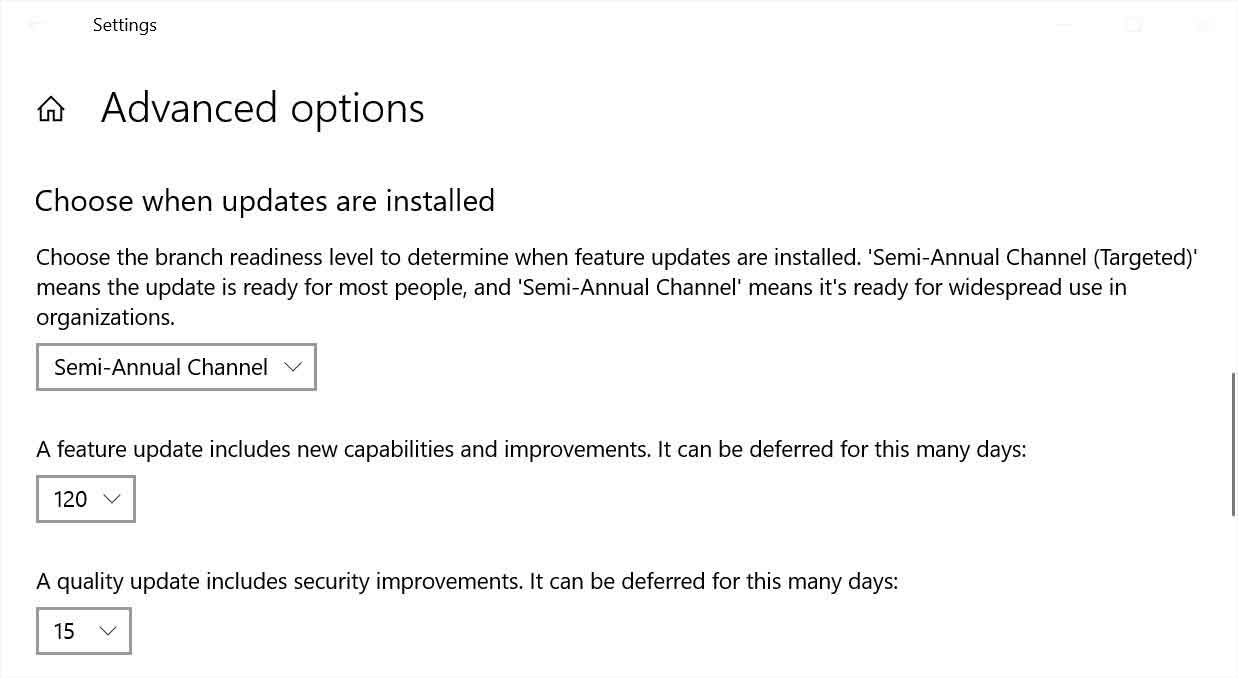
Step 3: Don’t do anything or don’t click Check for updates. You just need to use your computer as usual and it will upgrade to version 1809 sooner or later.
Gulp and Install Win10 Version 1903
If Windows pushes you to upgrade and the new version has no problems, then stick to it. Version 1903-slash-1909 will become the most stable Win10 version with the advent of Service Pack 1. If you want to upgrade to Win 10 version 1903, here are two suggestions.
- Maybe there is no Download and install now. Don’t force it. There must be some reasons for Microsoft isn’t pushing 1903 on your computer.
- When you try to make changes, do not click Check for Updates or Download and install now. You need to use Update Assistant to help you.
Final Words
You’re never done it before, which is one of the reasons why you are stressful when Windows pushes you to upgrade. Microsoft is constantly changing the definitions, details and rules. Although most people upgrade to 1903 without problems, many people have encountered some troubles.
User Comments :