
After you install the Windows 10 October 2018 Update, you may encounter ZIP file issue in October 2018 Update. If your deleted files caused by this issue are important, you can just read this post to learn how to recover them.
ZIP File Issue in October 2018 Update
The Windows 10 October 2018 Update has been released for some days. And we all know that a new matter is not always perfect.
Take this Windows 10 October 2018 Update as an example. After users install it on their computer, they encounter different kinds of issues, such as Windows update deletes files, and some HP computer users face Blue Screen of Death issue.
Of course, Microsoft has take measures to fix these issues. However, some users who has already installed the October update before it was pulled have reported that there is another serious issue which is needed to note: .ZIP file issue October 2018 Update.
What is this issue about?
It is a potentially damaging issue which is related to .Zip files. When you overwrite files with duplicate names, there is no prompt. Thus, it will cause zip files loss issue.
Recently, Microsoft has noted this issue on its Answers forum, and then it describe this issue in detail as follow:
With the Windows 10 October 2018 Update, if you copy or move files from a .ZIP file (without first “extracting” the contents) in to a new destination folder that contains duplicate filenames or is write-protected, you don’t get a “Do you want to replace these files” prompt. It will appear that the files were overwritten, when in fact the copy action for those files is not executed and files have not been overwritten.
From the above post, you can discover that Microsoft is going to issue a fix for the underlying problem by early November.
During this period, you need to be very careful when you have to deal with your zip files in your daily life and work.
How to Fix ZIP File Issue in October 2018 Update
You may want to ask this question: how to manage my zip files carefully to avoid data loss issue? In fact, it is not a very difficult question: you just need to fully extract your zip folder carefully before you copy files to the final destination path.
The above situation is an ideal situation. If you delete your important zip files by mistake, is it possible to recover them?
Here, we will tell you that there is more than one way to do this job.
We know that you are excited now for you need to recover your deleted zip files. Thus, we will show you these ways as follows:
Way 1: Restore zip files from the Recycle Bin
You can just open the Recycle Bin on your computer and then locate the zip files you want to recover. After that, you can right-click on the file you choose and select Restore option to recover them.
However, there is one thing you need to pay attention to: the selected file will be restored to its original path. Thus, you’d better rename of file with a same name on the same path. Otherwise, another data loss issue will happen.
Way 2: Restore files from Temporary File Directory
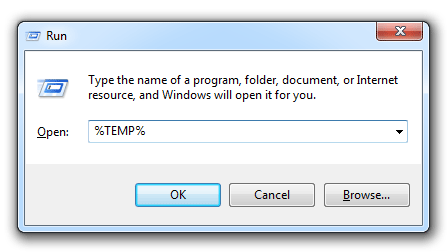
Step 1: Press Windows logo + R keys to open the Run command box.
Step 2: You need to type %temp% into the box and then click on OK to open the Temp folder containing temporary files.
Step 3: Then, you need to locate the file or folder you want to recover. After that, you need to choose Move to and choose a location or folder to move the file into on the ribbon.
Problems like this have already lead to some complain. Hope Microsoft can solve these issue as soon as possible.
About The Author

Position: Columnist
Stella has been working in MiniTool Software as an English Editor for more than 8 years. Her articles mainly cover the fields of data recovery including storage media data recovery, phone data recovery, and photo recovery, videos download, partition management, and video & audio format conversions.
User Comments :