
With the rapid advancement of artificial intelligence (AI), cybercriminals are leveraging AI-powered hacking tools to exploit vulnerabilities in Windows systems. These sophisticated attack scans bypass traditional security measures, so it is critical to adopt advanced protection strategies.
AI-powered hacking refers to cyberattacks enhanced by machine learning (ML) and AI algorithms. In this guide, we’ll explore how AI-powered cyber threats work and provide actionable steps to avoid AI-powered hacking.

How Do AI-Powered Cyberattacks Work?
How do AI-powered cyberattacks work? The following are the details:
- Personalized Phishing: Cybercriminals can use personalized messages and impersonation to make you believe that the message they are sending is genuine.
- Deepfake Content: Hackers can send deepfake videos. These videos may even look like they are from someone you trust, asking for information and/or money.
- CAPTCHA Cracking: AI algorithms can crack CAPTCHAs. They can steal sensitive information by hacking into any account that is only protected by CAPTCHA.
- Brute Force Attacks: AI can crack passwords and gain access to your network or system through brute force.
- Keystroke Monitoring: Another way AI can pose a threat is through keystroke monitoring. Some AI tools can actively record the different keys you type on your keyboard and steal your passwords with nearly 95% accuracy.
How to Protect Your Windows PC from AI-Powered Attacks
How to safeguard your Windows PC from AI-powered hacking? Here are 8 essential tips.
1. Keep Windows and Software Updated
AI-powered attacks often exploit outdated software. Thus, you should ensure your Windows system and software are updated. You can update Windows in Settings and update installed software in Microsoft Store.
2. Use AI-Enhanced Antivirus Solutions
Traditional antivirus may not detect AI-powered threats. Switch to next-gen security tools such as Microsoft Defender for Endpoint. You can use it for AI threat detection. You can also search for some third-party antivirus programs.
3. Enable Multi-Factor Authentication (MFA)
AI can crack weak passwords, but MFA adds an extra layer of security. Thus, you should use Microsoft Authenticator to safeguard your PC and avoid SMS-based 2FA. Besides, consider using hardware security keys.
4. Be Aware of AI-Generated Phishing Attacks
AI can craft highly convincing phishing emails and fake websites. Protect yourself by:
- Verify sender email addresses before clicking links.
- Use AI-powered email filters.
- Never download attachments from unknown sources.
5. Disable Unnecessary Remote Access Features
AI-powered bots scan for open RDP (Remote Desktop Protocol) and other remote access tools. Secure your system by:
- Turn off Remote Desktop unless needed.
- Use a VPN for remote access.
- Change default RDP ports to reduce automated attacks.
6. Limit User Privileges
AI malware often escalates privileges to spread across systems. You should limit users privileges by:
- Run daily tasks as a standard user.
- Set User Account Control (UAC) at the highest level.
7. Use AI to Safeguard
Hackers can use AI against you, but you can also use AI to strengthen your security against hackers. AI has both good and bad sides, and you can use this technology to your advantage. Use AI capabilities to enhance different aspects of your security system, such as threat detection, incident response, automated compliance audits, and more.
8. Back Up Your Data Regularly
Ransomware powered by AI can encrypt files in seconds. Ensure recovery by:
- Use File History or other backup programs for backups.
- Store backups offline or in a cloud service.
- Test backups periodically to ensure they’re functional.
Speaking of backup software, MiniTool ShadowMaker has been popular for many years and develops many functions more than backup, such as file backup, data sync, disk cloning, universal restore, system backup, etc.
Try this software and a 30-day free trial version is available for you. It is highly recommended to prepare an external hard drive to store your backup and insert it into your device before launching the software.
MiniTool ShadowMaker TrialClick to Download100%Clean & Safe
Step 1: After installing MiniTool ShadowMaker, launch it and click Keep Trial.
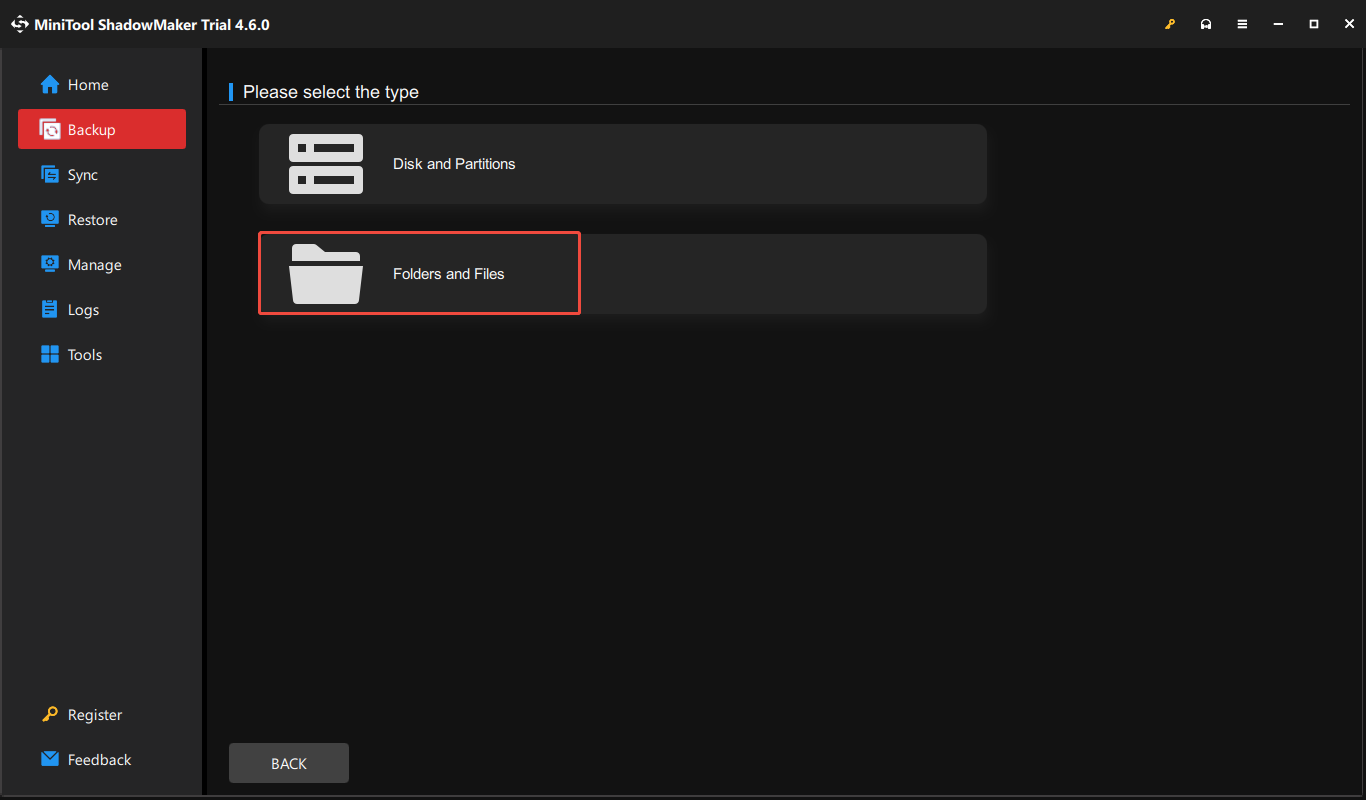
Step 2: In the Backup tab, click the SOURCE section where you can find the system-related partitions that have been selected by default. To back up data, you can click Folders and Files.
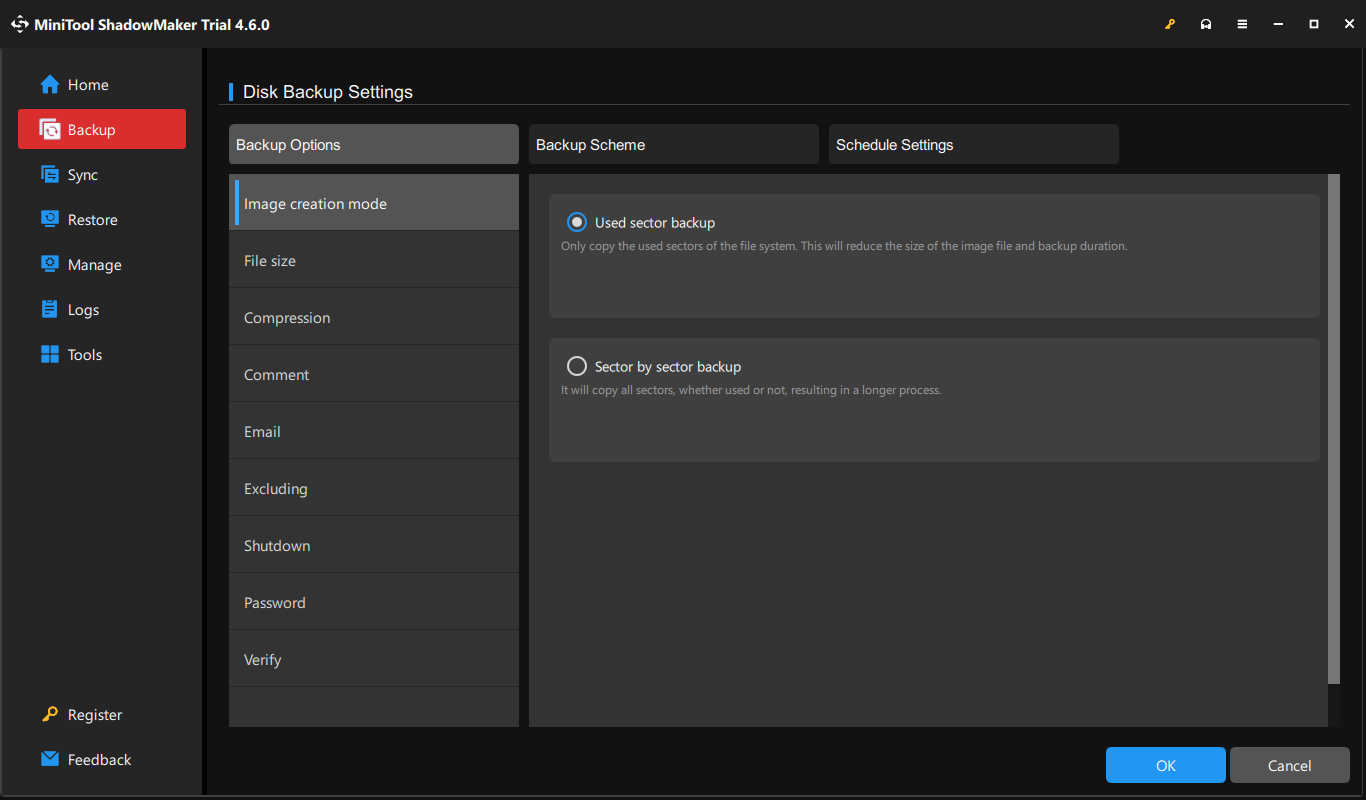
Step 3: Click the DESTINATION section to choose where to store the backup. If you want to configure the backup settings, you can click the Options feature to manage your backup schedules and schemes. Otherwise, you can configure its image creation mode, file size, compression, password protection, etc.
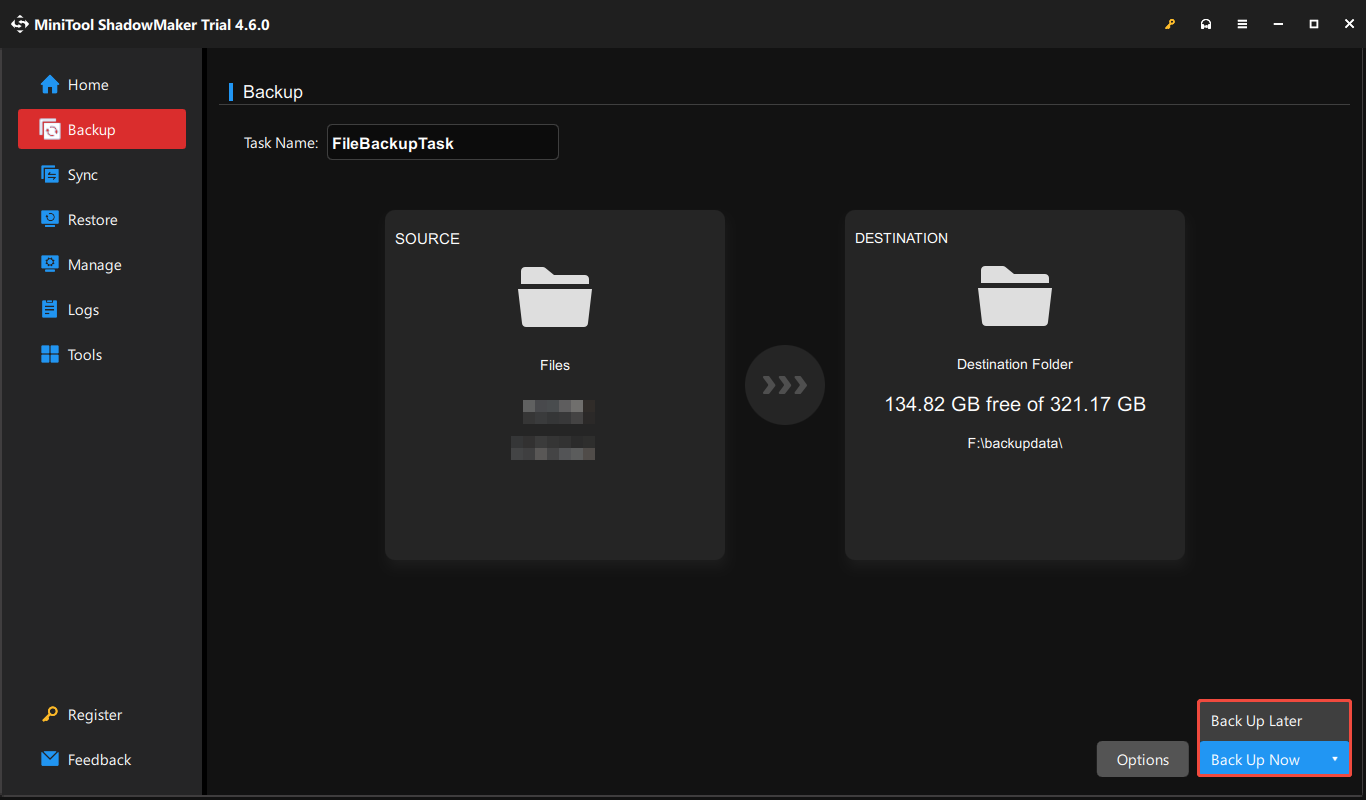
Step 4: When you make everything all right, you can click Back Up Now to immediately perform the task or choose Back Up Later to start it later. The pending tasks will be displayed in the Manage tab.
Conclusion
AI-powered hacking poses a serious threat to Windows users, but by implementing these security measures, you can significantly reduce your risk. Besides, it’s highly recommended to use MiniTool software to back up the Windows PC to protect data.
User Comments :