
What is Microsoft Defender for Endpoint? Is Microsoft Defender for Endpoint free? What is Microsoft Defender for Endpoint Plan 1/2? How to deploy Microsoft Defender for Endpoint? To find answers to these questions, go to this post from MiniTool. Let’s look through the detailed overview of this service.
What Is Microsoft Defender for Endpoint?
Microsoft Defender for Endpoint, formerly called Microsoft Defender Advanced Threat Protection, is an enterprise endpoint security platform. It is designed to offer protection to enterprise networks to prevent, detect, investigate, and respond to advanced threats.
As an industry-leading and cloud-powered endpoint security solution, Microsoft Defender for Endpoint can prevent file-less malware, ransomware, and other complicated attacks on iOS, Android, Linux, macOS, and Windows.
Defender for Endpoint uses some technologies (including endpoint behavioral sensors, cloud security analytics, and threat intelligence) built into Windows 10 and Microsoft’s robust cloud service to offer enterprise-level protection.
Microsoft Defender for Endpoint Advanced Features
Microsoft Defender for Endpoint has 5 core features that are highly beneficial to any organization. Let’s look through them.
- Core Defender Vulnerability Management: Microsoft Defender for Endpoint can discover, prioritize and remediate misconfigurations and vulnerabilities in real-time.
- Attack Surface Reduction: Microsoft Defender for Endpoint reduces the attack surface area to reduce your organization’s risk. This set of features also includes network protection, web protection, exploit protection, etc.
- Next-generation Protection: Microsoft Defender for Endpoint can help to catch all types of emerging threats to keep the network secure.
- Endpoint Detection and Response (EDR): Microsoft Defender for Endpoint can analyze any suspicious thing. It can create an alert in the system for your team to review and respond once it detects a potential threat. Data is stored for 6 months for you to identify trends and view the start time of the attack
- Automated Investigation and Remediation: The AIR feature can help drastically reduce the number of alerts.
To keep computer (especially your server operating system) data safe, you can run a server backup software – MiniTool ShadowMaker to back up important files and folders automatically.
MiniTool ShadowMaker TrialClick to Download100%Clean & Safe
Microsoft Defender for Endpoint Plan
Microsoft offers two plans – Microsoft Defender for Endpoint Plan 1 and Plan 2. What are included in these plans?
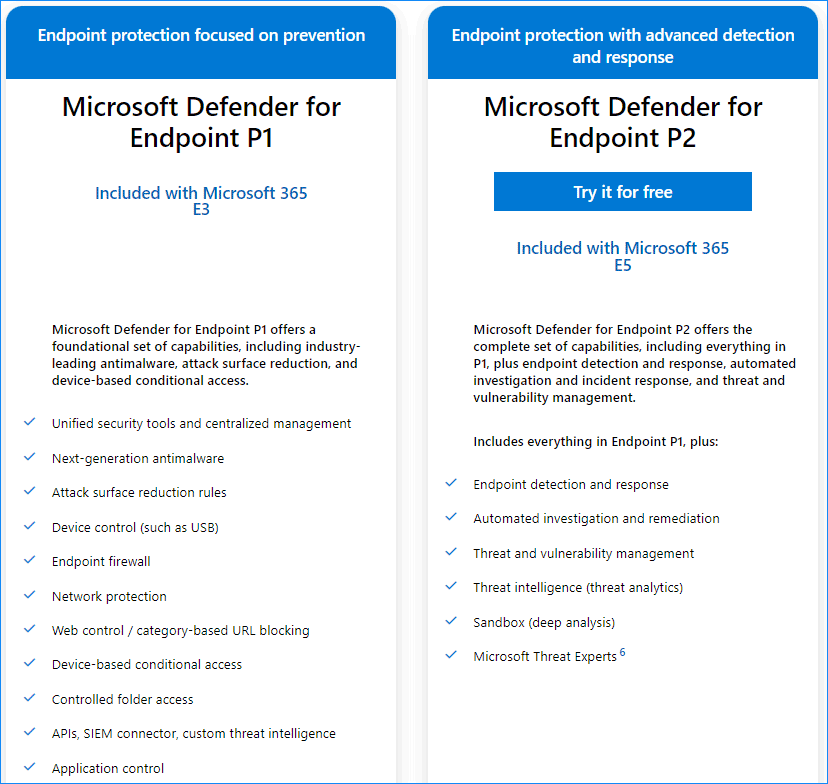
Plan 1 offers next-generation protection, attack surface reduction, manual response actions, centralized management, security reports, APIs, and supports for iOS, Android, macOS, and Windows 10 devices.
Microsoft Defender for Endpoint Plan 2 includes all the capabilities in Plan 1 and has additional features, for example, Core Defender Vulnerability Management, device discovery/inventory, threat analytics, endpoint detection and response, automated investigation and response, advanced hunting, etc.
Plan 1 is available as a separate subscription for education and commercial users and it is included as part of Microsoft 365 E3/A3. Microsoft Defender for Endpoint Plan 2 can also be available as a standalone subscription and is included as part of Windows 10/11 Enterprise E5/A5, Microsoft 365 E5/A5/G5, Microsoft 365 E5/A5/G5/F5 Security, and Microsoft 365 F5 Security & Compliance.
Microsoft Defender for Endpoint Pricing
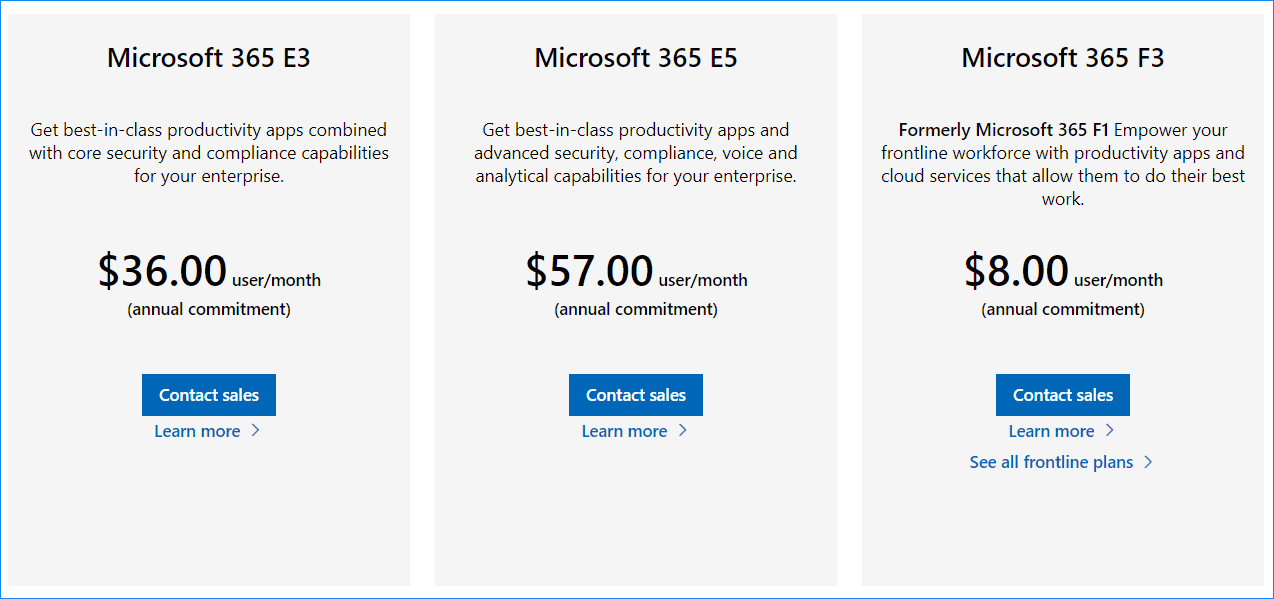
Is Microsoft Defender for Endpoint free? In terms of this question, Microsoft offers a free trial and you can try Microsoft Defender for Endpoint P2. Of course, some different pricing plans are also offered and you can go to this website https://www.microsoft.com/en-us/microsoft-365/compare-microsoft-365-enterprise-plans to know much.
Microsoft Defender for Endpoint Deployment
After knowing so much information about this service, how to deploy Microsoft Defender for Endpoint to offer enterprise-level protection? This is not easy and you can follow three phrases – prepare, setup, and onboard. To know the details, you can follow the guide of Microsoft Defender for Endpoint deployment.
Bottom Line
That’s the basic information on Microsoft Defender for Endpoint. Hope it can give you a simple understanding of this service. If your organization needs it, just try its trial version or join a paid plan.
About The Author

Position: Columnist
Vera has been working at the MiniTool Team for over 10 years as a technical editor and content writer. She mainly focuses on disk and partition management, data recovery, Windows backup and restore, and PC troubleshooting. Through in-depth software testing and hands-on experience, she has helped users solve a wide range of computer problems and better protect their data on Windows devices.
User Comments :