
What should you do if you get the error “can’t connect securely to this page” in Windows 10? Microsoft Edge or Internet Explorer often shows this error. If you are encountering the issue, refer to this post from MiniTool to get some methods to easily fix it.
Microsoft Edge or Internet Explorer Can’t Connect Securely to This Page
When browsing websites in Internet Explorer or Microsoft Edge, you may always encounter some issues. In our previous posts, you can know some common errors, for example, Microsoft Edge Critical Error, Internet Explorer has stopped working, INET_E_RESOURCE_NOT_FOUND, etc.
Besides, another error often happens. In the browser, some web pages can’t open and you may receive the message “cannot securely connect to this page” or “can’t connect securely to this page”. From the following screenshot, you can know much information about the error.
This may be because the site uses unsafe or outdated TLS security settings. Additionally, perhaps network driver glitches or other network-related settings are also the reasons for the error. But don’t worry and you can follow these methods to easily fix it.

Fixes for Can’t Connect Securely to This Page Windows 10
Enable TLS Protocols
If the website is unable to connect securely, the most common cause is the incorrect configuration of TLS protocols. By default, these protocols are enabled on Windows. But you may encounter the error if some third-party software or any user has disabled the protocols.
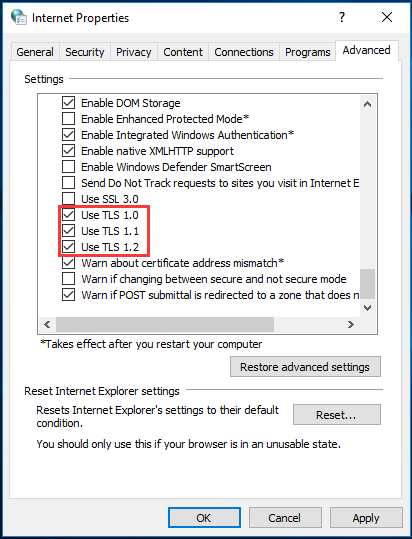
So, make sure TLS 1.0, TLS 1.1 and TLS 1.2 are enabled
Step 1: Input Internet Options to the search box and click it.
Step 2: After opening Internet Properties, go to Advanced and ensure these boxes are checked – Use TLS 1.0, Use TLS 1.1, and Use TLS 1.2.
Step 3: Make sure the option of Use SSL 3.0 is disabled since it can cause problems and let things worse.
Step 4: Save the change.
Enable Mixed Content
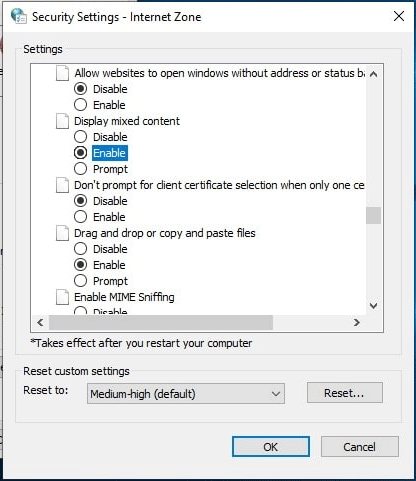
If the website you are visiting is having the content of mixed nature – HTTP and HTTPS, IE or Microsoft Edge can’t connect securely to this page. In this case, you need to enable the display mixed content option to fix this issue.
To do that, follow the given instructions:
Step 1: Also, open the Internet Properties window via searching for internet options.
Step 2: Under the Security tab, click Custom level, scroll down to find Display mixed content, and choose Enable.
Step 3: Click OK to save the change.
Reset Browser Data and Cache
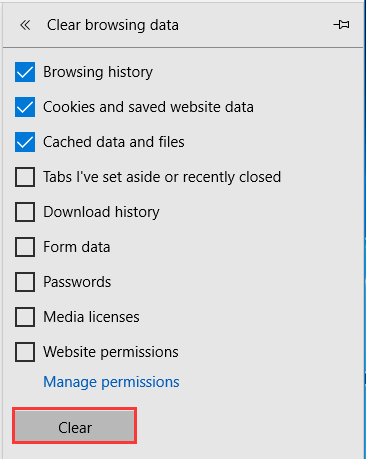
If there is corrupted or unwanted data in your browser to conflict with its operations, “can’t connect securely to this page” may appear in Microsoft Edge. To fix this issue, you can clear the data in Edge.
Step 1: Run this browser, click the three horizontal dots, and choose Settings.
Step 2: Click Choose what to clear.
Step 3: Choose Browsing history, Cookies and saved website data as well as Cached data and files, then click Clear.
Change DNS Address
Here is another solution to fix your issue and that is changing the DNS address.
Step 1: Press Win + R, input ncpa.cpl and click OK.
Step 2: Right-click your network and choose Properties.
Step 3: Double-click Internet Protocol Version 4 (TCP/IPv4).
Step 4: Set the Preferred DNS server to 8.8.8.8 and Alternate DNS server to 8.8.4.4.
Bottom Line
This post shows you how to easily fix “can’t connect securely to this page” in Windows 10. If your browser like Edge or IE displays this error message, try these solutions to easily fix it.
About The Author

Position: Columnist
Vera has been working at the MiniTool Team for over 10 years as a technical editor and content writer. She mainly focuses on disk and partition management, data recovery, Windows backup and restore, and PC troubleshooting. Through in-depth software testing and hands-on experience, she has helped users solve a wide range of computer problems and better protect their data on Windows devices.
User Comments :