
Problem: Edge Automatically Deleting Downloads
Edge is a high-performance, feature-rich browser developed by Microsoft, which allows you to browse the web and download various types of files. Files downloaded from Edge are stored on your computer’s hard drive, by default in the Downloads folder. However, sometimes you may encounter a situation where Edge automatically deletes downloads.
This problem may arise due to various factors related to the browser or other underlying causes. Before fixing the issue, you may be wondering: How to recover deleted downloads? Here are some feasible methods.
How to Recover Deleted Downloads on Microsoft Edge
Way 1. Check the Recycle Bin
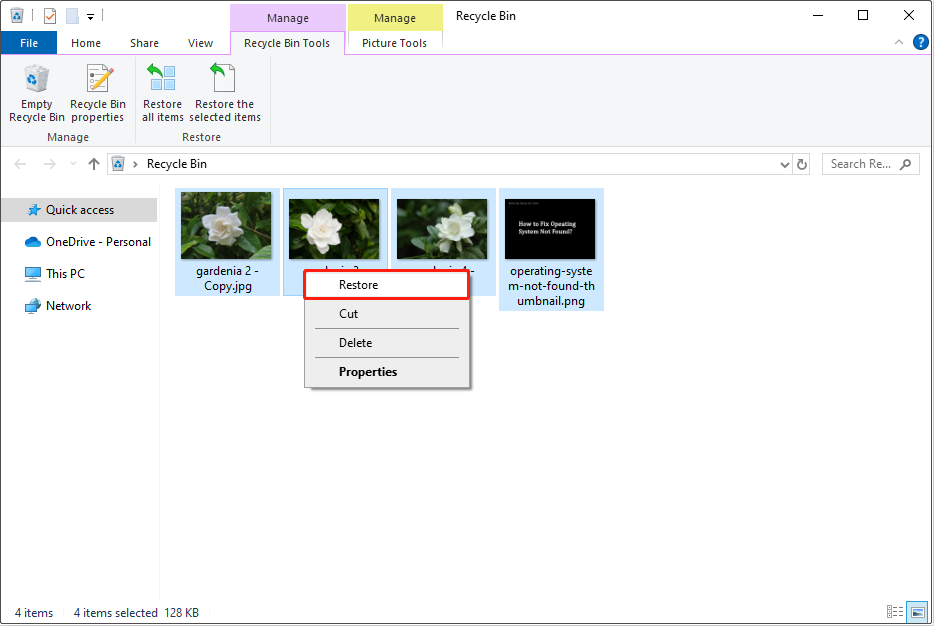
Files removed from the Downloads folder or other folders on your computer hard drive should be stored in the Recycle Bin temporarily. This allows you to recover files that have been deleted by retrieving them from the Recycle Bin.
First, double-click the Recycle Bin icon on your desktop to open it. Second, browse and then select the required downloads. Next, right-click on them and choose the Restore button. After that, these items should be restored to the Downloads folder.
Way 2. Check the Edge Download History
If you have emptied the Recycle Bin or the Recycle Bin is corrupted, you can try to re-download the deleted items from the Edge download history.
First, open Edge, and press the Ctrl + J key combination to bring up the Downloads icon. Second, click the three-dot icon from the pop-up window and choose Open downloads page. Third, find the wanted download file and right-click it to choose Copy download link. Now, you can paste the link to a new tab and re-download the file.
Way 3. Check the Quarantined Items Folder
If the downloaded files are not secure, they may be quarantined by Windows Defender and become invisible. In this case, you can go to the Quarantined Items folder and check if they are there.
- Type Virus & threat protection in the Windows search box, and then open it.
- Choose Protection history.
- Click the drop-down menu next to All recent items, and choose Quarantined Items.
- If the files you’re looking for are present and you’re confident they’re secure, then you can restore them.
Way 4. Use MiniTool Power Data Recovery
If you cannot recover your downloaded files by using the approaches above, the files may be deleted permanently. In this case, you need to seek help from professional data recovery software to recover them.
MiniTool Power Data Recovery, 100% safe and green file recovery software, can help you recover a diversity of files, including documents, images, videos, audio, emails, and so on. You can download its free edition and employ it to recover 1 GB of files for free.
MiniTool Power Data Recovery FreeClick to Download100%Clean & Safe
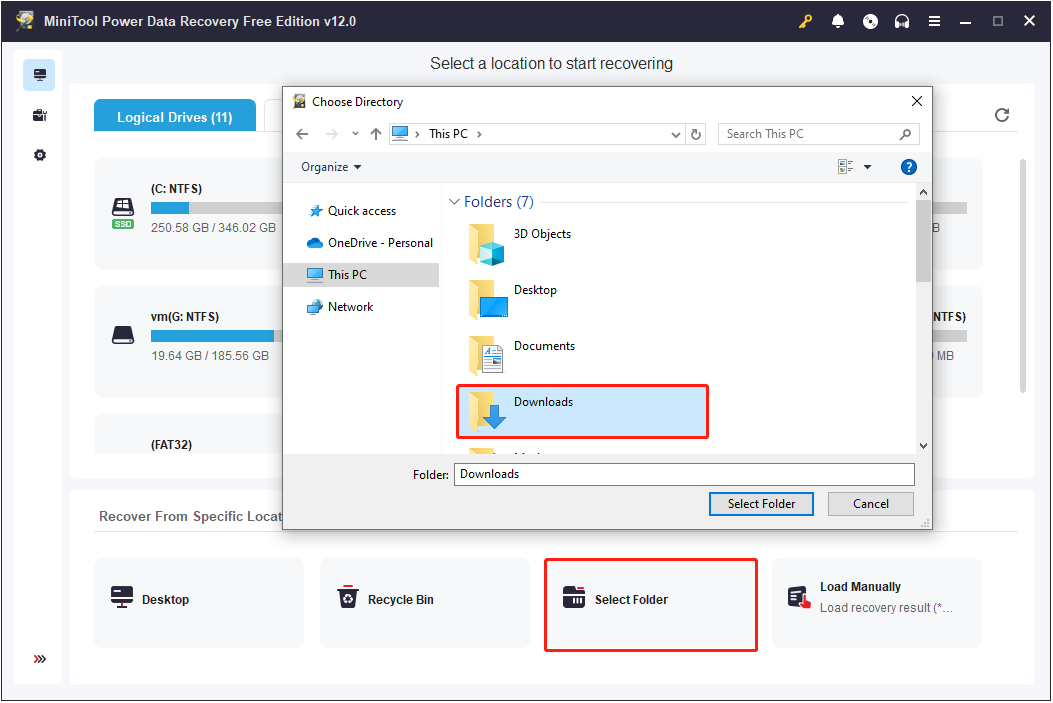
Launch MiniTool Power Data Recovery. When you see its home page, double-click Select Folder and choose the Downloads folder to scan for deleted downloaded files.
Once the scan is completed, you can make use of the Filter and Search features to locate the needed files. During this process, you are required to tick the checkboxes next to the needed items. Finally, click the Save button and choose a location separate from the Downloads folder to store the recovered files.
How to Fix Edge Removing Downloads Automatically
After recovering your files, now you can take some measures to stop the automatic deletion of downloaded files from happening again.
Fix 1. Repair Microsoft Edge
A malfunction of the Edge browser itself may cause the downloaded files to disappear automatically. Repairing Edge may help resolve the issue.
Press the Windows + I key combination to open Settings, and then select Apps. Next, find and click Microsoft Edge and choose Modify > Repair.
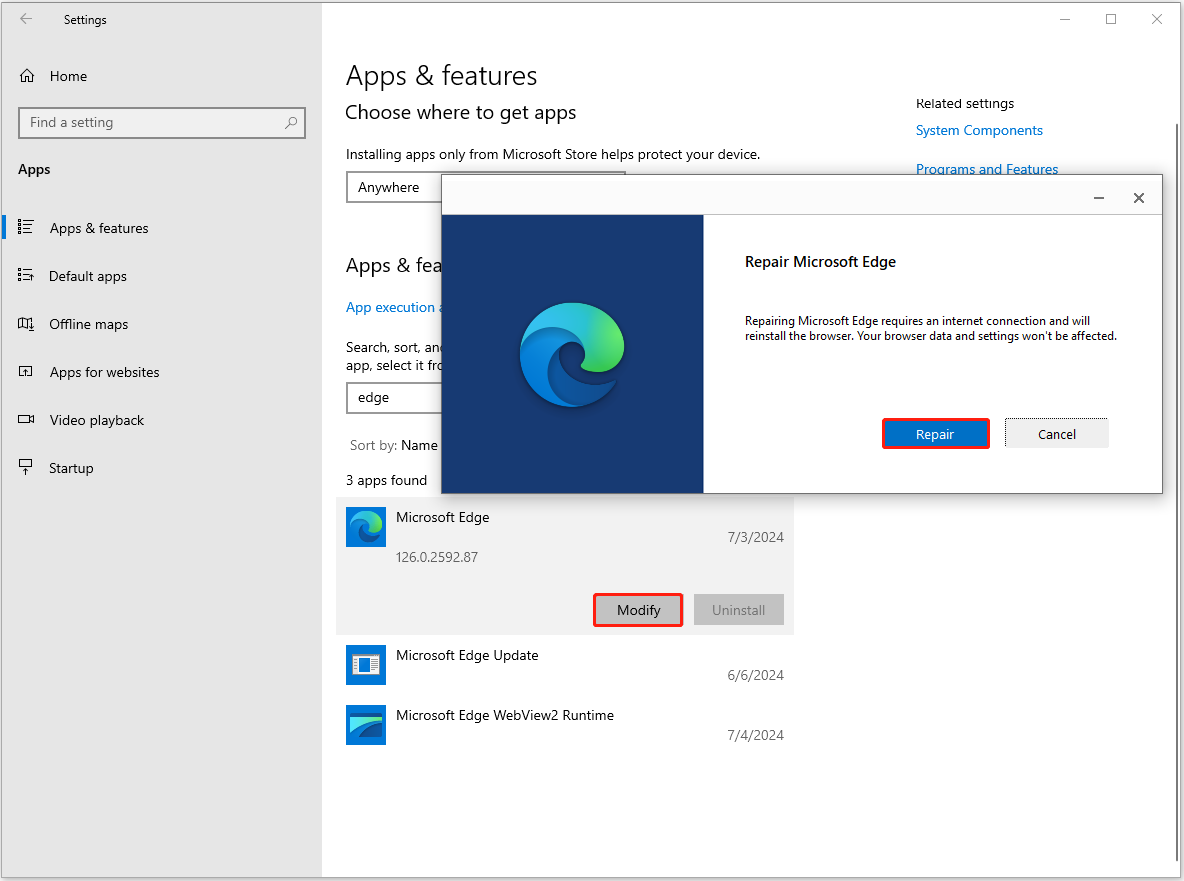
Now you should wait until the repair process ends.
Fix 2. Reset Edge to Default Settings
Incorrect Edge browser settings may affect file downloads or cause downloaded files to become corrupted or disappear. To address it, you can reset Edge to its default settings.
In Edge, click the three-dot icon and choose Settings. In the search box, search for reset settings. Finally, click Restore settings to their default values, and then hit Reset.
Fix 3. Disable Antivirus (Not Recommended)
Occasionally, antivirus software mistakenly identifies safe files as threats and quarantines or deletes them. This may be the reason for the automatic deletion of the files downloaded from Edge. In this case, you can disable your antivirus temporarily and verify if the issue persists.
Note that we do not recommend you disable antivirus permanently as this may expose your computer to virus or malware threats.

Bottom Line
It can be annoying encountering the Edge automatically deleting downloads issue. But you can get your files back and fix this problem by applying the methods above. For the safely of your files, it is suggested to back up files regularly by using reliable PC backup software, MiniTool ShadowMaker.
About The Author

Position: Columnist
Shirley holds a bachelor’s degree in English and has been an editor at the MiniTool Team for many years. She specializes in IT-related content, with a focus on data recovery, file backup, disk management, and other technical topics. She is committed to delivering clear, accurate, and practical solutions to help users resolve common computer issues.
User Comments :