
As you can see from the composition of the file name, the avipbb.sys is a type of system file. Developed by Avira GmbH for the Windows Operating Systems, the avipbb.sys is related to the AntiVir Desktop. This post tells you how to fix when the avipbb.sys error appears on your computer.
It’s quite a normal thing to come across different types of errors on a Windows computer. Some errors can be fixed easily while others like avipbb.sys can make you upset since it’s a tough problem for beginners and even some experienced users.
Avipbb.sys Error Appears Now And Then
What are SYS files exactly? Indeed, they are third-party device drivers or critical system files and they are an essential part of the Windows operating systems. The faulty hardware and corrupt device driver files are two main reasons for causing SYS error. Certainly, the appearance of avipbb.sys error will lead to a series of critical system errors, resulting in a blue screen of death (BOSD).
How to recover data after BSOD?
Common Messages of Avipbb.sys Blue Screen Error
Under what circumstances will the avipbb.sys error occur? In fact, you might be stuck in the blue screen failure when you do the following things:
- Start your computer.
- Open a program on computer.
- Try to use a specific function in a computer program.
- …
The following error messages may occur in Windows XP, Vista, 7, 8, and 10, indicating an avipbb.sys error:
- A problem has been detected and Windows has been shut down to prevent damage to your computer. The problem seems to be caused by the following file: Avipbb.sys.
- Your PC ran into a problem and needs to restart. We’re just collecting some error info, and then we’ll restart for you. If you would like to know more, you can search online later for this error: avipbb.sys.
- STOP 0x0000000A: IRQL_NOT_LESS_EQUAL – avipbb.sys
- STOP 0×00000050: PAGE_FAULT_IN_NONPAGED_AREA – avipbb.sys
- STOP 0x0000001E: KMODE_EXCEPTION_NOT_HANDLED – avipbb.sys
How to Fix the Blue Screen Error
When you see the avipbb.sys error, you must know clearly that there is something wrong with your computer and you need to pay enough attention to it. If the blue screen of death error is not fixed in time, other serious issue may be brought, making your computer malfunction.
Thus, I provide the following solutions to help you fix Avipbb.sys error on Windows 10.
Solution 1: Restart Your PC
Restarting computer seems pretty easy, but it is indeed a useful and easy way to fix many computer problems. You are advised to restart your computer immediately when seeing the avipbb.sys error. If this works fine for you, no other troublesome solutions are needed. If it fails, please turn to the following solutions instead.

Solution 2: Fix the Corrupted Registry Entries
The corruption of the registry entries connected to the avipbb.sys is a common factor for causing avipbb.sys error. Though you can edit the Windows Registry to fix the error in this case, you’re advised to back up the registry in case of accidents.
- Hold Windows button and R button at the same time to open Run dialogue window.
- Type regedit into the Open textbox and press Enter button.
- Choose Yes in the prompt window.
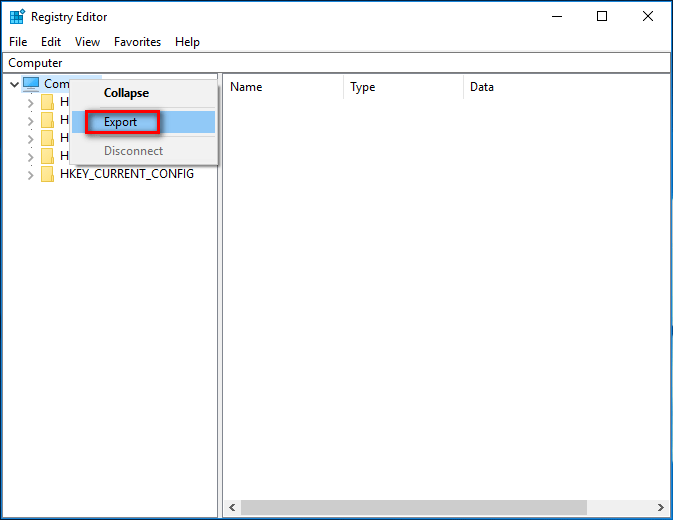
- Right click on the Computer option in the left panel.
- Choose Export from the pop-up menu.
- Choose a proper storage path for the exported file and give it a file name.
- Click on the Save button to confirm.
Then, you should ask professionals to help you edit the corresponding registry since this is a dangerous task.
Apart from these two solutions, you can also try the following methods for fixing avipbb.sys error:
- Install latest Windows updates.
- Update drivers of computer to the latest version.
- Reinstall the programs that are installed lately.
- Perform a virus scan.
- Check disk for errors.
- Run System File Checker.
- Turn to System Restore.
User Comments :