
When using or installing a certain app in Windows, you may get an error message related to gdiplus.dll, for example, gdiplus.dll is missing, gdiplus.dll not found, etc. How can you get rid of the error? In this post from MiniTool, you can find some effective methods to fix the issue.
Gdiplus.dll Error
Gdiplus.dll file is a component of the Microsoft Graphics Device Interface Library and it is used to handle graphics components for images, games, etc.
When running games or some graphics software, you may get some gdiplus error messages and one common error is: “This application failed to start because gdiplus.dll was not found. Re-installing the application may fix this problem”.
Or the error message says “The program can’t start because gdiplus.dll is missing from your computer. Try reinstalling the program to fix this problem”.
Well then, what should you do to get rid of the error? Try these solutions below now.
Fixes for Gdiplus.dll Missing or Not Found Error
Reinstall the Program
If the gdiplus error appears when running the program, you can choose to uninstall and reinstall it. Program reinstallation can delete the corrupted .dll file and restore it. Then, you can use the program properly.
Perform System Restore
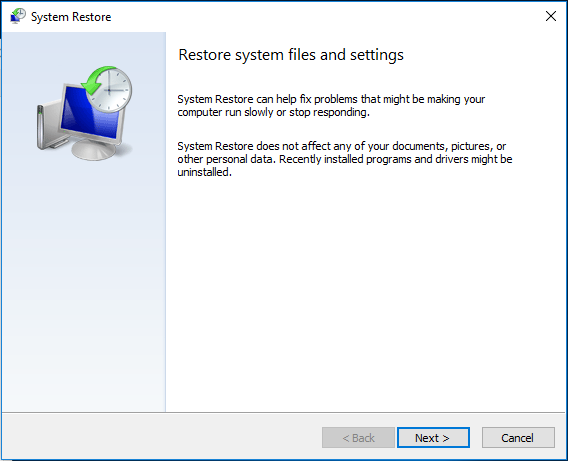
If the gdiplus.dll error is caused by a change that is made to a configuration or an important file, perhaps System Restore can help you.
If you have a system restore point, you can go to type restore point to the search box in Windows 10 and click Create a restore point. Under the System Protection tab, click System Restore to start the restore by following the on-screen instructions.
Run a Virus or Malware Scan
The gdiplus.dll is missing error may be caused by a virus or malware infection on your computer since it can damage the .dll file. So, you can perform a scan for the system to remove the virus or malware with an antivirus program like Malwarebytes.
Scan System Files
Perhaps the gdiplus.dll file and other system files are corrupted, leading to gdiplus.dll not found. To fix the issue, you can run System File Checker (SFC) to repair corrupted system files.
Step 1: Open Command Prompt as administrator.
Step 2: Type sfc /scannow and press Enter.
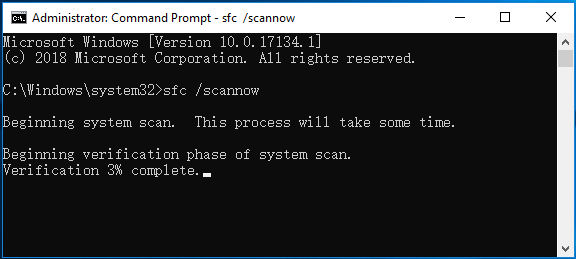
After the scan is completed a few minutes later, restart your PC and run the app to see if the gdiplus.dll error is resolved.

Re-register the Gdiplus.dll File
If the gdiplus.dll file is not correctly registered, you can use Microsoft Register Server, a command-line tool to register it to fix the error.
Step 1: Also, run Command Prompt with administrative rights.
Step 2: Type regsvr32 /u gdiplus.dll to unregister the .dll file and press Enter.
Step 3: Type regsvr32 /i gdiplus.dll to register the file and press Enter.
Upgrade the Graphics Card Driver
The gdiplus.dll issue may be triggered by corrupted or old graphics card driver. If you get the error when running a game, upgrading the driver may solve the issue.
Step 1: Check your graphics card model and manufacturer details by typing dxdiag to the Run window and going to the Display tab.
Step 2: Go to the manufacturer’s website and download the latest driver.
Step 3: Install the driver to your computer to see if the issue is fixed.

In addition to these solutions, there are some other methods you can try, for example, update Windows 10, fix the Windows Registry, perform a clean install, etc. If you are bothered by the error – gdiplus.dll is missing or gdiplus.dll not found, try to fix it by following the methods above now.
About The Author

Position: Columnist
Vera has been working at the MiniTool Team for over 10 years as a technical editor and content writer. She mainly focuses on disk and partition management, data recovery, Windows backup and restore, and PC troubleshooting. Through in-depth software testing and hands-on experience, she has helped users solve a wide range of computer problems and better protect their data on Windows devices.
User Comments :