
Have you ever encountered the Not Enough Resources bug when you play God of War: Ragnarök? If you are, you come to the right place. In this post, MiniTool provides all the potential solutions to fix the God of War: Ragnarök Not Enough Resources bug.
God of War: Ragnarök is an action-adventure game developed by Santa Monica Studio and published by Sony Interactive Entertainment. It is also one of the most popular games.
However, some players of this game encounter an error that bothers them a lot – the God of War: Ragnarök Not Enough Resources bug. Below is a picture of this error that came from a user on Reddit.
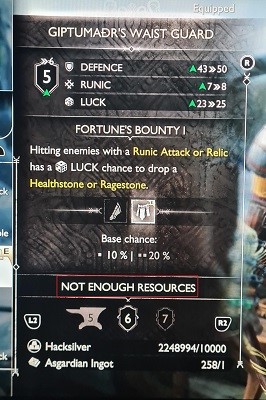
What may cause this bug? Here are some of the most likely reasons:
- Insufficient Hacksilver.
- Corrupted files on games cache.
- Glitches in the game.
- Poor Internet connection.
- Outdated game version.
![[Fixed] How to Fix the Hogwarts Legacy Error Code WB4000001?](https://images.minitool.com/minitool.com/images/uploads/2023/03/hogwarts-legacy-error-code-wb4000001-thumbnail.jpg)
Solution 1. Restart the Game
Restarting can fix many basic errors in games, software, and devices. So, if you encounter the God of War: Ragnarök Not Enough Resources bug, you can try restarting the game to fix this error.
If restarting the game is unable to help you fix this error, you can try restarting your device to fix this error.
Solution 2. Earn More Hacksilver
If you don’t have enough Hacksilver, you may encounter the God of War: Ragnarök Not Enough Resources bug easily. In this case, you can try earning more Hacksilver to fix this error. To do that, you can complete side quests, sell all unwanted items, defeat enemies, and reduce spending Hacksilver on unnecessary items.
Solution 3. Check the Internet Connection
Sometimes, a poor Internet connection can also cause the Not Enough Resources bug in God of War: Ragnarök. To avoid this, you’d better check your Internet connection. Here’s what you can do:
- Restart your router or modem.
- Switch from Wi-Fi to Ethernet, or vice versa.
- Reduce the number of devices that are connected to the same Internet as the game.
- Move the router or modem closer to your gaming device.
![[9 Fixes] Hogwarts Legacy Missing Component Error](https://images.minitool.com/minitool.com/images/uploads/2023/03/hogwarts-legacy-missing-component-error-thumbnail.jpg)
Solution 4. Clear the Game Cache
Sometimes, the temp files in your game cache may also cause the Not Enough Resources bug in God of War: Ragnarök. In this case, you can try clearing the game cache to fix the God of War: Ragnarök Not Enough Resources bug. Here’s the way:
- Launch the game.
- Then navigate to Settings.
- Next, select Clear Cache.
- Once done, all the temporary files or data can be removed.
If this does not work, you can try clearing the console’s cache data to fix this error. Here’s the guide:
- Switch off your console and wait for the light on top to turn off.
- Unplug all the cables from your PlayStation and wait for a few minutes.
- Now, plug all the cables back in and turn on the console.
- Run God of War: Ragnarök and see if the issue gets fixed.
Solution 5. Update the Game
Patches and updates released by developers may fix bugs and glitches in a game. So, if you encounter the God of War: Ragnarök Not Enough Resources bug on your device, you can try updating to the latest version to fix this error. To avoid this, you can check for them regularly and download them if available.
Solution 6. Delete and Reinstall the Game
You can also try reinstalling the game to fix the God of War: Ragnarök Not Enough Resources bug. However, you’d better back up important data before you try this way, or you may lose your game data and settings. To back up your console’s data, you can refer to these posts:
Solution 7. Contact Customer Support
If all the above solutions unable to fix the Not Enough Resources bug in God of War: Ragnarök, you can try contacting God of War: Ragnarök’s customer support to get further help. Meanwhile, you can go to report your errors on Reddit, Twitter, Facebook, and other social media and see if anyone else has encountered the same error as yours.
If you have any needs, such as cloning the system, managing disks, or recovering data, MiniTool Partition Wizard will be your good choice.
MiniTool Partition Wizard FreeClick to Download100%Clean & Safe
Bottom Line
This post provides seven solutions to fix the Not Enough Resources bug in God of War: Ragnarök. You can try them to fix this error on your own.
If you are interested in MiniTool Partition Wizard and want to know more about it, you can visit MiniTool Partition Wizard’s official website by clicking the hyperlink. MiniTool Partition Wizard is an all-in-one partition manager and can be used for data recovery and disk diagnosis.
About The Author

Position: Columnist
Charlotte is a technology columnist with a strong focus on the Windows operating system, specializing in disk management, backup, and data recovery. She is passionate about analyzing computer errors, identifying root causes, and delivering practical solutions. In her free time, she stays updated on the latest developments in computer systems and hardware while continuously learning new technologies to broaden her expertise. Her writing style is clear and easy to understand, making complex technical topics accessible even to users with limited computer knowledge.
User Comments :