
It is a pity to hear that you encountered the KB5030310 failed to install issue. KB5030310 brings many new features and fixes to Windows 11. For example, the update addresses a series of issues that will affect Microsoft Excel, search box tooltip, sleep mode, iCloud Calendar, and Contacts.
If you want to know more details, you can read this post: Windows 11 KB5030310: Key Features from 23H2, Offline Installer.
To make sure you can enjoy these new updates, the post provides some useful measures to resolve the issues with Windows 11 update KB5030310. Let’s see how to work for that.

Fix KB5030310 Failed to Install
Fix 1: Run Windows Update Troubleshooter
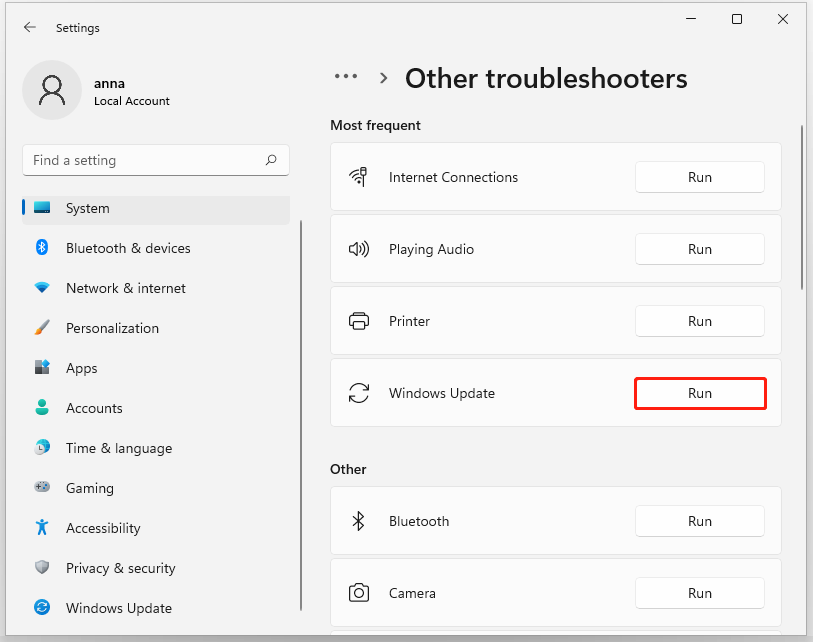
When you find the Windows 11 update KB5030310 issues, the first thing you can do is run the Windows updates troubleshooter, which is designed to fix the related update errors.
Step 1: Go to Start > Settings > System > Troubleshoot > Other troubleshooters.
Step 2: Click Run next to Windows Update.
Fix 2: Use SFC and DISM Scans
System file corruptions can trigger “KB5030310 failed to install” and you perform SFC and DISM scans to check and repair that.
Step 1: Type Command Prompt in Search and run it as an administrator.
Step 2: Type sfc /scannow and press Enter to execute the command.
Step 3: After the command finishes, you can execute this one – DISM /Online /Cleanup-Image /RestoreHealth.
Fix 3: Disable Antivirus and Firewall Temporarily
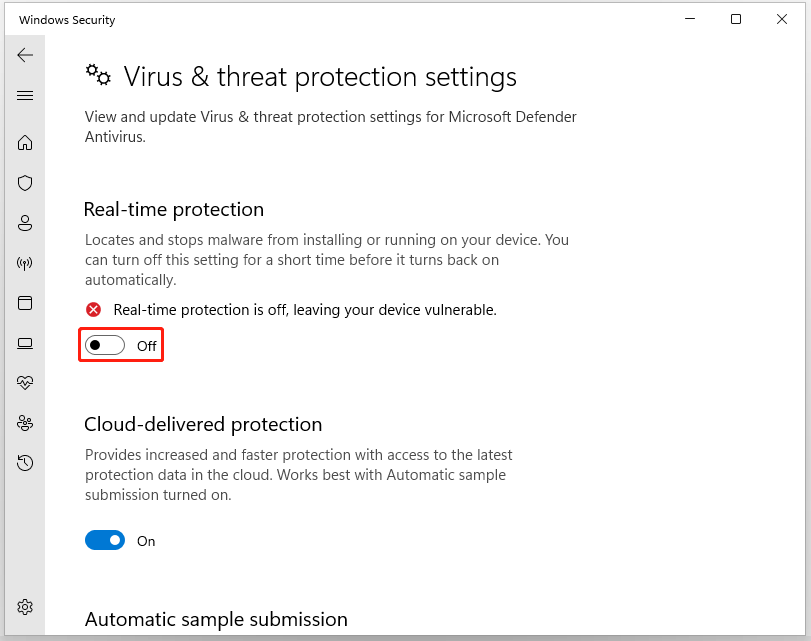
Software conflicts can be another reason for KB5030310 not installing. So you can try to disable your antivirus or firewall temporarily when you failed to install KB5030310.
Step 1: Go to Settings > Privacy & security > Windows Security > Virus & threat protection.
Step 2: Click Manage settings under Virus & threat protection settings and turn off the Real-time protection toggle.
Fix 4: Update Windows in a Clean Boot State
Another method is to install the Windows update in a Clean Boot in which your Windows boots with a minimal set of drivers and startup programs.
Step 1: Type msconfig in Search to open System Configuration and go to the Services tab.
Step 2: Check the Hide all Microsoft services option and click Disable all.
Step 3: In the Startup tab, click Open Task Manager and disable those startup programs that may interfere with Windows.
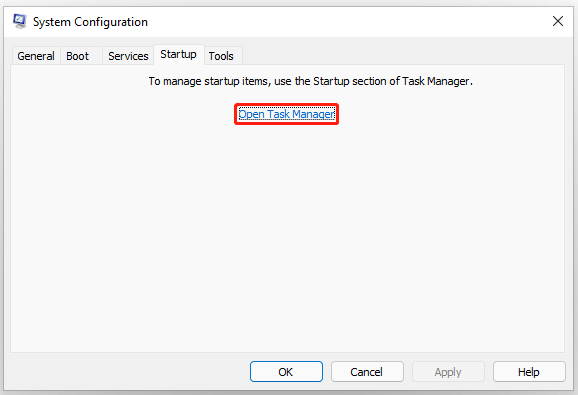
Then close the window and restart your computer to try Windows update again.
Fix 5: Use Installation Media
Of course, you can try to manually download and install KB5030310 from the Microsoft Update Catalog. However, if the KB5030310 failed to install issue was triggered by the current Windows installation issue, you may need to perform a repair installation to fix that.
Before you do that, it is important to backup data in case of data loss in this process. MiniTool ShadowMaker, as one backup software free, can guide you to easily perform data backup and recovery, such as file backup or Windows backup. More backup sources are allowed with this tool.
Besides, the Clone Disk feature can help you clone SSD to larger SSD or move Windows to another drive. You can download and install the program by clicking the following button.
MiniTool ShadowMaker TrialClick to Download100%Clean & Safe
To perform a repair installation of Windows 11, you can read this post for a reference: How to Repair Your Windows 10/11 Computer from USB.
Bottom Line:
After these solutions, you may have resolved the KB5030310 failed to install issue. Hope this article is useful for you.
User Comments :