
Is there any safe way to transfer your important and sensitive files? What if the sensitive files are lost during the transfer process? What should you do to protect these sensitive and important files? In this post on MiniTool, we outline several tips for sharing sensitive files and data recovery and backup tips to protect your data safely.
The Necessity for Understanding the Importance of Safe File Transfer
Before exploring the tips for sharing sensitive files safely, it’s crucial to recognize the reasons you should be mindful of how you handle or save sensitive information. Exchanging digital files has become a vital aspect of our everyday activities. Whether it’s delivering materials to a client or distributing documents among colleagues, file sharing offers a practical way to transfer information.
However, with the increase in cyber threats and hacking incidents, it’s important to ensure that our file sharing is done securely. The primary danger is that sensitive information can be compromised. Unidentified individuals may gain unauthorized access to files that are stored in insecure places. This could result in identity theft, financial losses, or even damage to one’s reputation.

4 Tips for How to Share Sensitive Files on Windows
Are you concerned that your sensitive files might fall into the wrong hands? How to securely share sensitive files? By securely sharing your files, you can minimize the chances of that occurring. Below are some steps you can follow to share sensitive files safely on your Windows PC.
#1. Encrypt Your File
Encryption serves as the most effective method for securely sharing files. This process renders the file unreadable until it is decrypted, allowing access only to those possessing the encryption key. Consequently, file encryption is an excellent way to safeguard your data, even in the event it ends up in the wrong hands.
Typically, encryption occurs at two layers: full disk encryption and file-based encryption. The latter addresses the limitations of disk encryption. File-based encryption targets specific files instead of encrypting the entire disk, making it stronger as it offers an extra layer of security that requires more effort to compromise.
Additionally, you may want to learn how to share encrypted files with others.

#2. Remove Metadata from Your Files
Each time a file is created or edited, metadata bout the file is attached. In certain situations, such as sharing a sensitive file, you may want to delete this information to safeguard your privacy. Here’ the way to remove metadata from a file:
Step 1. Press Windows + E to open File Explorer and find your file.
Step 2. Right-click on the file you want to share and select Properties.
Step 3. Go to the Details tab and, at the bottom, click Remove Properties and Personal Information.
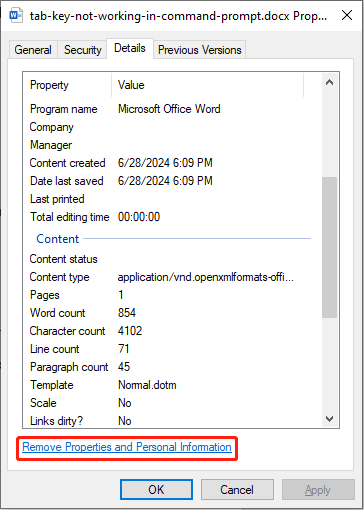
Step 4. In the pop-up window, to strip all metadata from your file, select Create a Copy With All Possible Properties Removed and click OK.
#3. Password-protect Your Files & Use a Password Manager
Password-protecting files is an effective way to safeguard your data. By adding this layer of security, it becomes harder for unauthorized individuals to reach your files. When a file is password-protected, you must provide a password to access it.
However, recalling intricate or stronger passwords for every file or folder may prove challenging. Therefore, utilizing a robust and free password manager can help maintain strong security.
#4. Use a Robust and Simple File Sharing Program
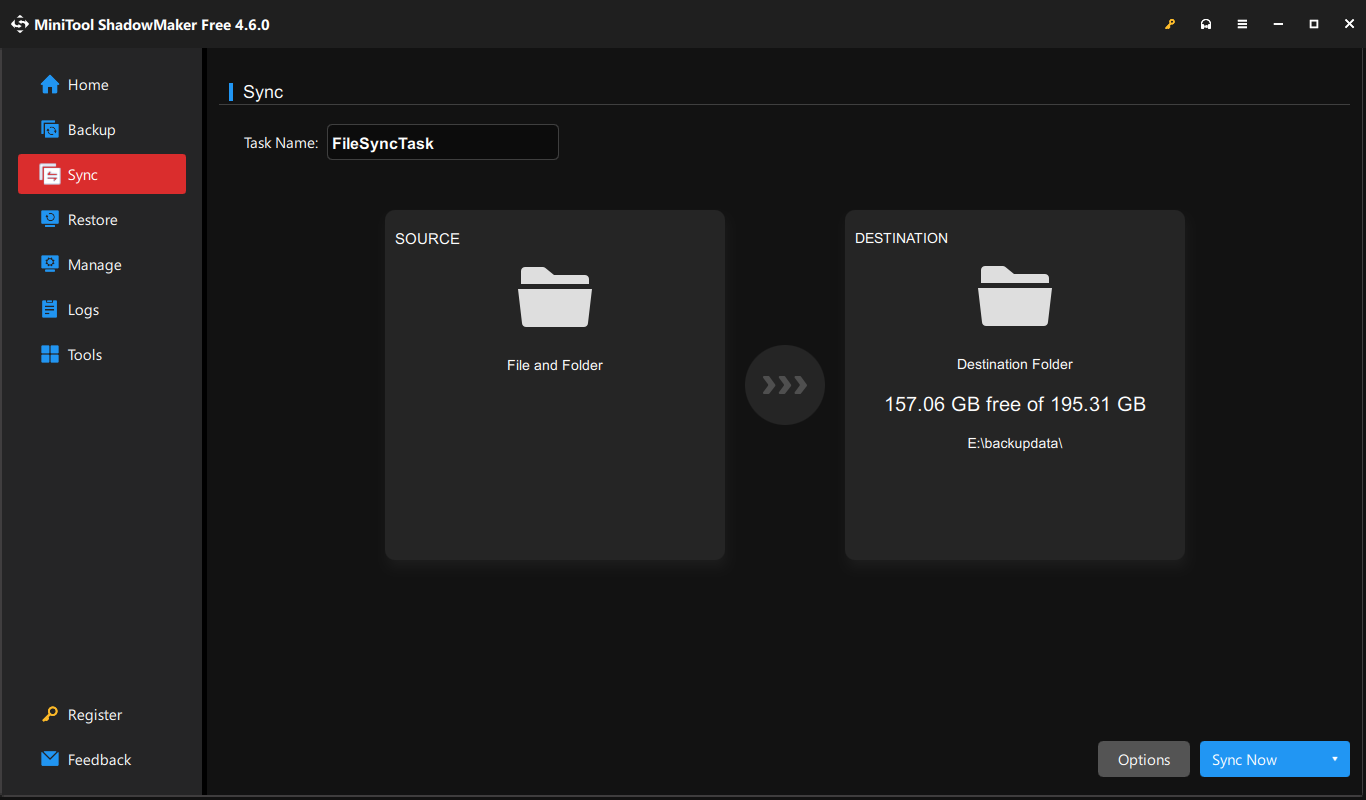
Several file sharing programs save your file on their servers and provide you with a link that you can distribute for others to download your file. What is the best file sharing app? MiniTool ShadowMaker is worth considering.
It is file sync software that allows you to sync files to a secondary hard drive instead of using the cloud. Furthermore, MiniTool ShadowMaker can quickly sync large files and provides the option to sync files to shared folders.
MiniTool ShadowMaker TrialClick to Download100%Clean & Safe
Bonus Tip: Recover Your Lost/Deleted Sensitive Files
Suppose you may inadvertently delete your sensitive files or file lost while sharing your sensitive files, we recommend MiniTool Power Data Recovery, a safe and robust file recovery tool, to help you recover your sensitive files with 100% security and confidentiality.
MiniTool Power Data Recovery is specifically created to recover files from different data storage devices such as USB drives, SD cards, hard drives, and memory cards, among others. This file recovery software is effective for recovering data of any file type without harming your original files.
MiniTool Power Data Recovery FreeClick to Download100%Clean & Safe
Bottom Line
We hope that the tips for sharing sensitive files included in this post can enhance your confidence in secure file sharing. If you what to recover your sensitive files, you can trust our product.
User Comments :