
If someone says something that violates the guidelines of Discord, you can either report the person to the moderator of the Discord server or report to Discord directly. This post introduces both ways. MiniTool software provides users computer tips and solutions and offers a set of useful free tools like free data recovery software.
Designed for gamers, Discord server is a great place for gamers to chat and change thoughts. Each Discord server has community guidelines and rules that regulate everyone’s activity. If you find someone breaks the rule and posts some harassing, teasing or scamming content in Discord server, you may want to report the issue. By reporting someone on Discord, you can keep the server clean and safe.
As for how to report someone on Discord, you can check the 2 ways below.
How to Report Someone to Discord Server Moderator
Every Discord server has a server moderator who may be the owner of the server or someone else the server community chooses. The server moderator can remove harassment messages and ban the target user. You can talk to the moderator privately for what you want to report. They may require you to provide evidence for inappropriate content.
You can click the name of someone and check the role of him/her. If the role is Moderator or Admin, then you can report someone to the moderator. If you see a crown next to the name of a person, then he/she is the server owner, you can also report the issue to the owner.
If you are the owner of the Discord server, you can block someone on Discord.
The type of messages you can report in Discord server include: harassment, spam messages, IP rights violation, virus distribution, threatening another user, etc.
However, if the moderator or owner of the Discord server doesn’t take action on your report, you can also report the issue directly to Discord own Trust & Safety team.

How to Report Someone to Discord Trust & Safety Team
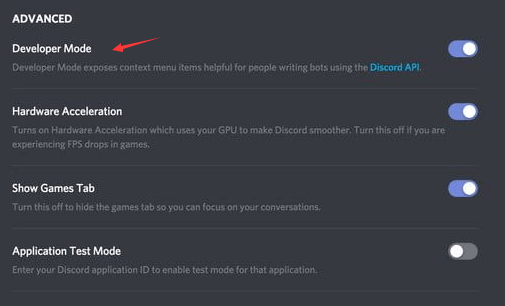
Step 1. Turn on Developer Mode
- Open Discord app on your Windows or Mac computer or open the browser version. And log into your Discord account.
- Click the gear-like Settings icon to open Discord settings.
- Click Appearance in the left panel.
- Then you can find Developer Mode under Advanced in the right window. Turn on Developer Mode.
Step 2. Get the user ID of the person you want to report
You can right-click the username of the target person and click Copy ID. Paste the copied ID to a safe place for easy access later.
Step 3. Get the message link
Locate the message you want to report, hover the target message and click the three-dot icon to click Copy Message Link.
Step 4. Report someone to Discord
Then you can send all the needed information to Discord Trust & Safety Team to report the user. You can explains which rule you think that user breaks.
How to Kick Someone on Discord
If you want to kick someone out of a Discord channel, you must be the administrator. You can use this way to remove someone from the channel. Check how to do it below.
- Go to the target Discord channel.
- Locate the user you want to kick in the user list.
- Right-click the username of that person and click Kick.
- Confirm the action by clicking Kick again.
Bottom Line
As for how to report someone on Discord, you can use the two ways above.
User Comments :