
When using an HP printer to print documents, it may ask for a password. You may ask: why is my HP printer asking for a password? How to get rid of this situation? Don’t be panic and you can go to find some useful troubleshooting tips from this post on the MiniTool website.
HP Printer Asking for Password
HP printers are popular with users and perhaps you also buy such a printer to connect it to your PC for file printing. (Related article: 14 Best All-in-one HP Printers to Buy | HP Printer Setup) However, when you attempt to print a file or document, the printing process doesn’t always run smoothly.
You may encounter some common issues & errors, for example, HP printer says out of paper but has paper, HP printer not printing, printer in error state, and more. Today, we will talk about another issue – HP printer asking for password.
To be specific, the printer asks you to type into a password when you try to view the properties of the network printer or print a file. If there is no permission, you can see the error message “Access Denied” on the desktop screen.
Perhaps you ask: why is my HP printer asking for a password? A possible reason is the printer is attached to a Wi-Fi network that may be secured using WPA or other encryption types. Besides, if you are asked for a password when using a standard network printer in Windows, a username and password are required.
But don’t worry and you can try to fix this issue by following the solutions below.
Fixes for HP Printer Asking for Password
Run Printer Troubleshooter
In Windows, there are some troubleshooters for you to fix some issues. If your printer asks for a password, you can also run a troubleshooter to fix it.
Step 1: Go to Control Panel and view the items by Category. (Related article: How to Open Control Panel in Windows 11/10/8/7? [7 Ways])
Step 2: Click Hardware and Sound > Devices and Printers.
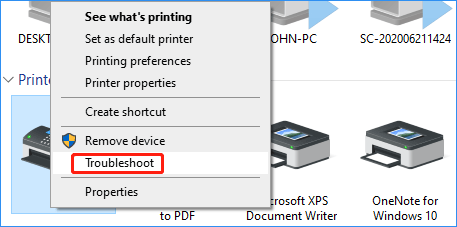
Step 3: Right-click on the problematic HP printer and choose Troubleshoot.
Step 4: The tool will automatically fix the printer issues it has detected.
Uninstall and Reinstall Your HP Printer
Here is what you should do:
Step 1: Find your HP driver via Control Panel (as mentioned in method 1).
Step 2: Right-click your HP printer and choose Remove device. Click Yes to confirm the operation.
Step 3: In the Device and Printers interface, click Add a printer. Follow the on-screen instructions to finish the operations.
Run HP Print and Scan Doctor for Windows
HP gives a professional program called HP Print and Scan Doctor that can be used to diagnose possible printer issues. If you run into the issue of HP printer asking for password, you can also download this tool from the HP website and launch it to have a try.
Print a Network Configuration Page to Get a Password
Sometimes typing in an HP printer Wi-Fi password cannot fix your issue and you need to print the setting page. If your printer has a control panel with a menu, go to the network settings or network setup menu to print a network configuration page. Then, you can see the standard username and password information for your printer.
If there is no menu, use the printer control panel buttons. For most printers, you can press & hold the Cancel button for 3 to 5 seconds.
Bottom Line
That’s all the information about the topic of HP printer asking for password. Just try these fixes mentioned above. If you have any other methods, leave a comment to let us know. Thanks.
About The Author

Position: Columnist
Vera has been working at the MiniTool Team for over 10 years as a technical editor and content writer. She mainly focuses on disk and partition management, data recovery, Windows backup and restore, and PC troubleshooting. Through in-depth software testing and hands-on experience, she has helped users solve a wide range of computer problems and better protect their data on Windows devices.
User Comments :