
You may find this post since you encounter a specific error – MOM.Implementation Windows 10. What if MOM.Implementation is missing or Windows could not load MOM.Implementation? To get rid of the error, ask MiniTool for help and some effective methods are introduced.
MOM.Implementation Windows 10
What is MOM.Implementation? It is an annoying error and often appears every time you start your computer. According to users, you may encounter some similar issues:
- Implementation is missing in Windows 10: This error may be caused by problematic drivers.
- ATI could not find MOM.Implementation: It is usually related to update issues.
- AMD Catalyst net framework error: This issue may be related to problems with .NET Framework.
- Could not load MOM.Implementation: It can be triggered by certain startup applications. The specific error message is “Could not load file or assembly ‘MOM.Implementation’ or one of its dependencies. The system cannot find the file specified”.
What if you encounter one issue in Windows 10? Try to fix it by following the methods below.
MOM.Implementation Fix
Install the Latest Catalyst Control Center and .NET Framework
Since Catalyst Control Center is dependent on .NET Framework, you can keep updating .NET Framework to fix the problem. To get the latest .NET.Framework, you can go to the Microsoft website and then install it on your computer.
Besides, you can update Catalyst Control Center and display drivers. Just go to the AMD’s website, look for the latest drivers that are compatible with the Windows operating system, download and then install them.
Alternatively, you can use a professional driver update tool to do this work. IObit Driver Booster can be recommended.
Disable Catalyst Control Center from Startup
According to users, some apps can cause MOM.Implementation error in Windows 10 PC and the common reasons for this are Catalyst Control Center and GU Options. To fix the issue, you should stop these two programs from starting with your PC.
Follow these steps below to do this work:
Step 1: Open Task Manager in Windows 10 firstly.
Step 2: Go to the Startup tab, find Catalyst Control Center and GU Options, and then click Disable to disable them one by one.
Step 3: Restart your PC and see if MOM.Implementation is resolved.
Roll back to an Older Version of the AMD Driver
If there is an AMD driver issue, the MOM.Implementation Windows 10 error can occur. Since Windows 10 can automatically update the driver, the error like this often appears. To fix it, you can roll back to an older version of the AMD driver.
Step 1: Go to Device Manager via the Start right-click menu.
Step 2: Expand Display adapters, right-click your AMD driver, and choose Properties.
Step 3: Under the Driver tab, click Roll Back Driver and then follow the guide on the screen to finish the task.
Remove Catalyst Control Center
MOM.Implementation Windows 10 error can be caused by Catalyst Control Center. To fix this issue, you can uninstall it from your computer. You can do this work via Control Panel or use a professional uninstaller.
Perform a Clean boot
The “Could not load file or assembly MOM.Implementation” error may be caused by third-party applications that may interfere with the system during startup. The solution is to perform a clean boot by following these steps.
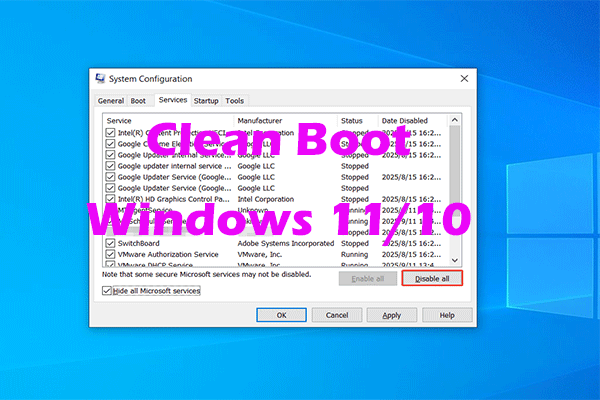
Step 1: Open the Run box, type msconfig, and click OK.
Step 2: Under Services, check Hide all Microsoft services and click Disable all.
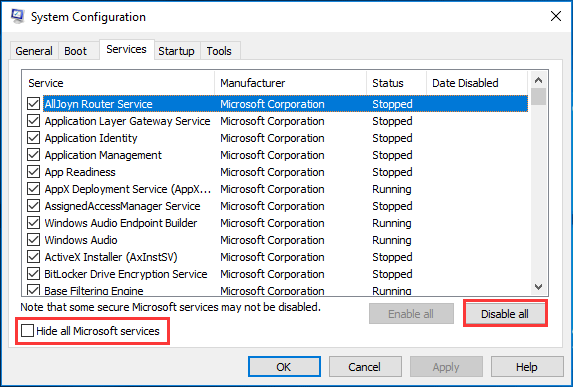
Step 3: Under Startup, click Open Task Manager.
Step 4: Disable all the startup applications in Task Manager.
Step 5: Return to System Configuration, save the change.
Other Solutions to MOM.Implementation Windows 10
- Remove the problematic update
- Update your system
- Download AMD FirePro Control Center
Bottom Line
Are you bothered by MOM.Implementation Windows 10 error? Now, try these solutions mentioned above and you can easily get rid of the error.
About The Author

Position: Columnist
Vera has been working at the MiniTool Team for over 10 years as a technical editor and content writer. She mainly focuses on disk and partition management, data recovery, Windows backup and restore, and PC troubleshooting. Through in-depth software testing and hands-on experience, she has helped users solve a wide range of computer problems and better protect their data on Windows devices.
User Comments :