
What Is Planck Creator SSD
Planck Creator SSD is a compact external solid-state drive designed for mobile content creators. It is advertised as one of the world’s smallest SSDs optimized for use with smartphones, tablets, laptops, and more.
Here are its key features and performance:
Design & Size
Planck Creator SSD is smaller than AirPods. It acts as a “phone-first” drive targeting mobile filmmakers and creators. It is compatible with gimbals and various shooting equipment without bulky cables. The following are its dimensions and weight:
- Dimensions: 17mm (W) x 50mm (L) x 7.8mm (H)
- Weight: 10g
Capacity
Planck Creator SSD is available in 1TB and 2TB capacities. You just need to choose it according to your needs. Planck Creator SSD 2TB is $ 296.65 and Planck Creator SSD 1TB is $ 160.85 in the official Planck website. However, 1TB is out of stock now.
Performance
This SSD provides sequential read and write speeds of up to 1050 MBps, making it ideal for high-resolution video workflows without the risk of dropping frames. It also supports recording stunning Apple ProRes video at up to 4K at 120Hz directly.
Additionally, the 1TB model and the 2TB can hold approximately 35-40 minutes or 70-75 minutes of 4K/120Hz ProRes 422 HQ footage severally.
Compatibility
Planck Creator SSD is a compact USB-C 3.2 Gen 2 drive, pre-formatted with exFAT for cross-platform use. It offers broad compatibility, used in many devices, including:
- Smartphones: iPhone (15 and above) and Android (Samsung, Google Pixel, etc.)
- Tablets: iPads and Android tablets
- Laptops and desktops: macOS, Windows, and Linux
- Gaming consoles: PlayStation and Xbox
Thermal Control
This SSD has advanced thermal management for extended use, though some warmth is expected.
Durability
This SSD features a shockproof aluminum and Polycarbonate (PC) plastic design.
- Drop resistance: Up to 3 meters
- Water resistance: Sealed design with water-resistant components (excluding USB port)
Accessories
Planck Creator SSD comes with a specialized accessory kit tailored for mobile creators, including:
- A silicone bumper that protects against drops and manages heat.
- A USB-C extender, ensuring the SSD fits securely, even with a thick phone case or camera holder.
- A keychain holder for easy portability.
- Ten grey label stickers to help you organize your projects.
Additionally, this SSD also offers a 3-year warranty.
Planck Creator SSD Advantages and Disadvantages
In this section, I summarize the main advantages and disadvantages of Planck Creator SSD:
Advantages
- Extremely portable: Weighs only 10 grams and fits directly into USB-C ports. It is the world’s smallest SSD, which fits in a pocket and disappears in the palm.
- Durable design: Water-resistant (excluding USB port) and shockproof (up to 3 meters), making it rugged for field use.
- High capacity: Up to 2TB is sufficient for massive 4K projects.
- High-speed performance: Delivers up to 1050 MBps, supporting 4K 60/120fps ProRes recording on iPhones.
- System compatibility: Works across iPhone, iPad, MacBook, and other USB-C devices.
- Workflow efficiency: Allows direct recording, eliminating the need for phone-to-computer transfers.
- Stable connection: Secure connection with no wobble while shooting handheld.
- Workflow integration: If you purchase a PlanckBank (extension hub) and pair it with two Planck Creator SSDs, it will work well for easy transfer, charging, and multi-drive management.
Disadvantages
- Cost & availability: This SSD is targeted at professionals who require seamless workflows, rather than average users who just need to back up photos. Therefore, Planck SSD price is a little high for average users.
- Case compatibility: Although the SSD is it is compatible with many phones, it may not fit thicker protective cases, requiring an included adapter or removal of the case.
- Physical vulnerability: The small size makes it easy to misplace. Furthermore, the USB-C connector is exposed and not water-resistant, requiring caution.
- Phone power drain: When this SSD is connected to your smartphone for extended recording sessions, it will deplete smartphone batteries more quickly.
How to Back Up Your Data to Planck Creator SSD
Not only can you use Planck Creator SSD as an extended storage for your phone or game console, but also use it to store your PC file backups.
To do that, it is highly recommended to use MiniTool ShadowMaker. This PC backup software can help you perform file backup and system backup with ease.
Here’s how to back up data:
Step 1. Connect the Planck Creator SSD to your computer. If your computer has a Type-C port, simply connect it. If not, use the USB-C extender to make the connection.
Step 2. Download and install MiniTool ShadowMaker. Then, launch this software.
MiniTool ShadowMaker TrialClick to Download100%Clean & Safe
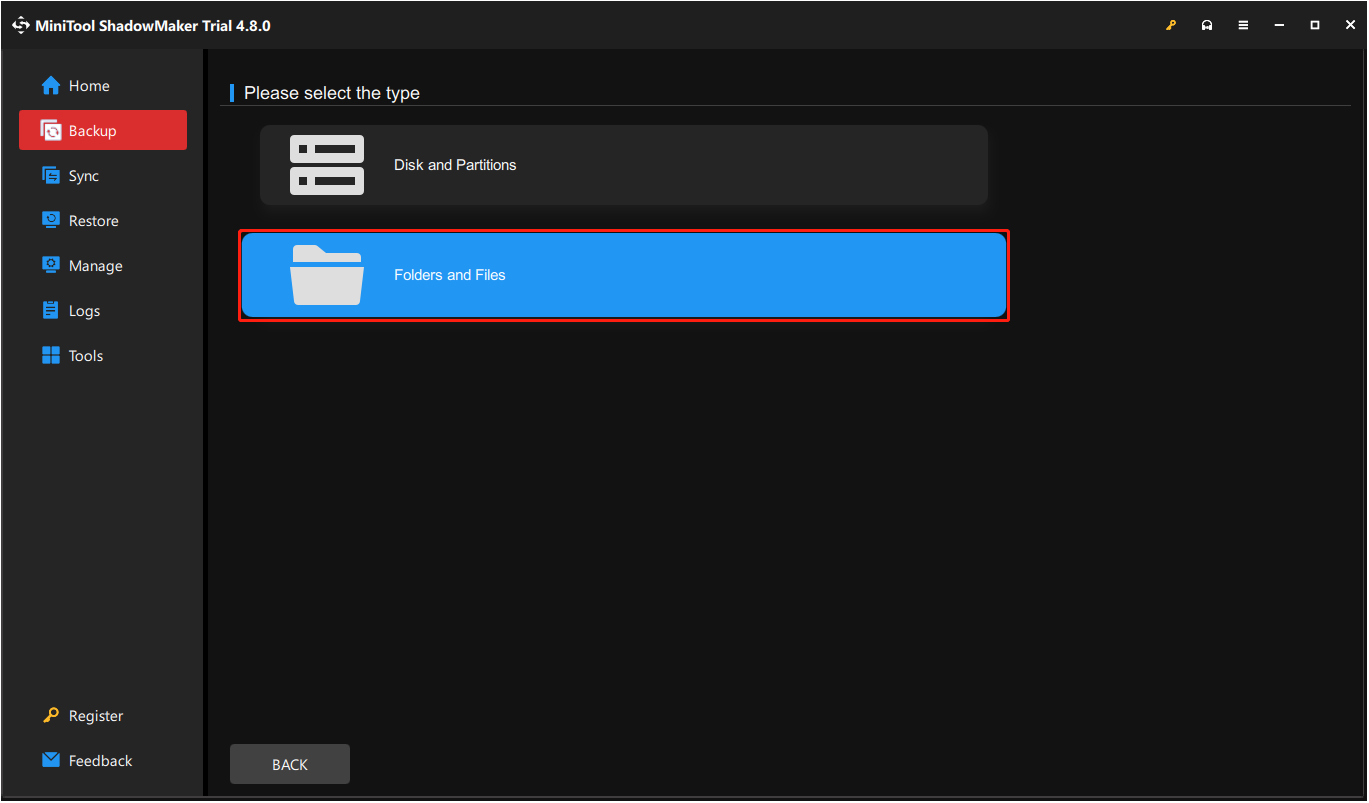
Step 3. Select Backup from the left panel, go to SOURCE, and choose Folders and Files.
Step 4. Choose the files that you want to back up and click OK.
Step 5. Go to DESTINATION, choose a location to store the backup files, and click OK.
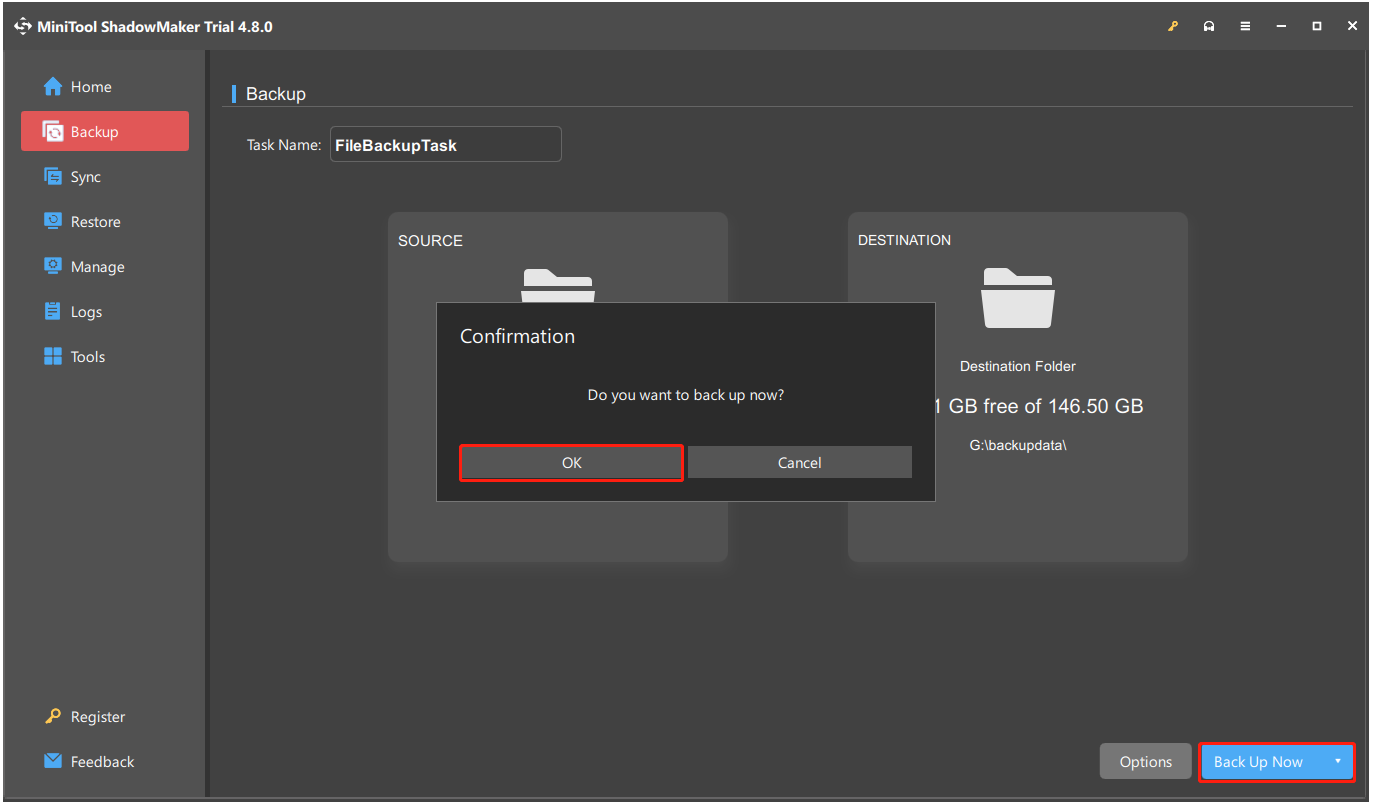
Step 6. Click Back Up Now and OK to start the backup operation immediately.
To Sum Up
This post provides a full guide on Planck Creator SSD. Here, you can learn about its key features, performance, advantages, and disadvantages, as well as how to back up data to this SSD.
Moreover, if you encounter issues or have any suggestions while using MiniTool ShadowMaker, please contact us via [email protected].
Planck Creator SSD FAQ
In addition to this SSD, Crucial T500 and WD Black SN850X are also reliable as they offer high-quality and durable NAND memory.
1. Ensure that the product's appearance matches that of a genuine item.
2. Assess whether the price is reasonable.
3. Verify the serial number on the manufacturer's website.
4. Use CrystalDiskInfo to check if there are discrepancies in reported model and capacity.
About The Author

Position: Columnist
Charlotte is a technology columnist with a strong focus on the Windows operating system, specializing in disk management, backup, and data recovery. She is passionate about analyzing computer errors, identifying root causes, and delivering practical solutions. In her free time, she stays updated on the latest developments in computer systems and hardware while continuously learning new technologies to broaden her expertise. Her writing style is clear and easy to understand, making complex technical topics accessible even to users with limited computer knowledge.
User Comments :