
About the 3DS SD Card
The 3DS SD card is a small and portable memory card utilized for data storage on the Nintendo 3DS handheld gaming device. This is where all games, their progress, downloaded demos, full games, and additional digital content like photos and videos are kept.
Like any other storage device, it is vulnerable to data loss. Since the 3DS model lacks its own storage capacity, even the slightest issue can corrupt or damage your saved games and other digital content.
Possible Causes for Data Loss From the 3DS SD Card
You may wonder: Why did my 3DS SD card encounter data loss? Here, we list several potential triggers for this issue:
- Inadvertently delete the files from a 3DS SD card while removing unnecessary items.
- Accidentally formatted the 3DS SD card.
- Unplugging the memory card from the system unexpectedly during file transfers.
- Corruption of the 3DS SD card.
- The 3DS SD card that has been used in compromised devices or connected to infected computers may fall victim to malware.
- Incorrect ejection leads to the 3DS SD card file system errors.
How to Recover 3DS SD Card Data on Windows
After knowing the reasons for the data loss from a 3DS SD card, let’s dive into the methods to carry out a 3DS SD card data recovery.
Method 1. From Nintendo e-Shop
The simplest way to recover lost data from a 3DS SD card is to redownload the data from the Nintendo e-Shop.
- Sign in to your Nintendo account using your Nintendo Network ID.
- Click on Nintendo eShop under Digital Purchases.
- Navigate to Manage eShop Content, download the saved data onto your computer, and transfer it to your 3DS SD card.
If you do not have data backed up on the Nintendo e-Shop, you will need to employ data recovery software to restore your data from the 3DS SD card.
Method 2. Via Third-Party Data Recovery Software
There are many 3DS SD card data recovery tools available in the marketplace, allowing you to recover files on your own without needing to send the card to a recovery or repair service. Which tool is the best choice? MiniTool Power Data Recovery stands out as a top recommendation.
It’s been trusted by millions globally for over 20 years and can recover various types of files from SD cards across all brands. This free data recovery is fully compatible with common file systems, such as NTFS, FAT32, FAT16, and others.
You can easily download this free data recovery software on a Windows 11/10/8/8.1 computer and recover up to 1 GB of files for free.
MiniTool Power Data Recovery FreeClick to Download100%Clean & Safe
Step 1: Connect the 3DS SD card to your computer and launch the MiniTool data recovery tool. Check if the 3DS SD card is visible under Logical Drives; USB-connected devices will show a USB icon. If it doesn’t appear, click the Refresh button to refresh the device list or reconnect the SD card. After locating your 3DS SD card, click the Scan button to start scanning for files.
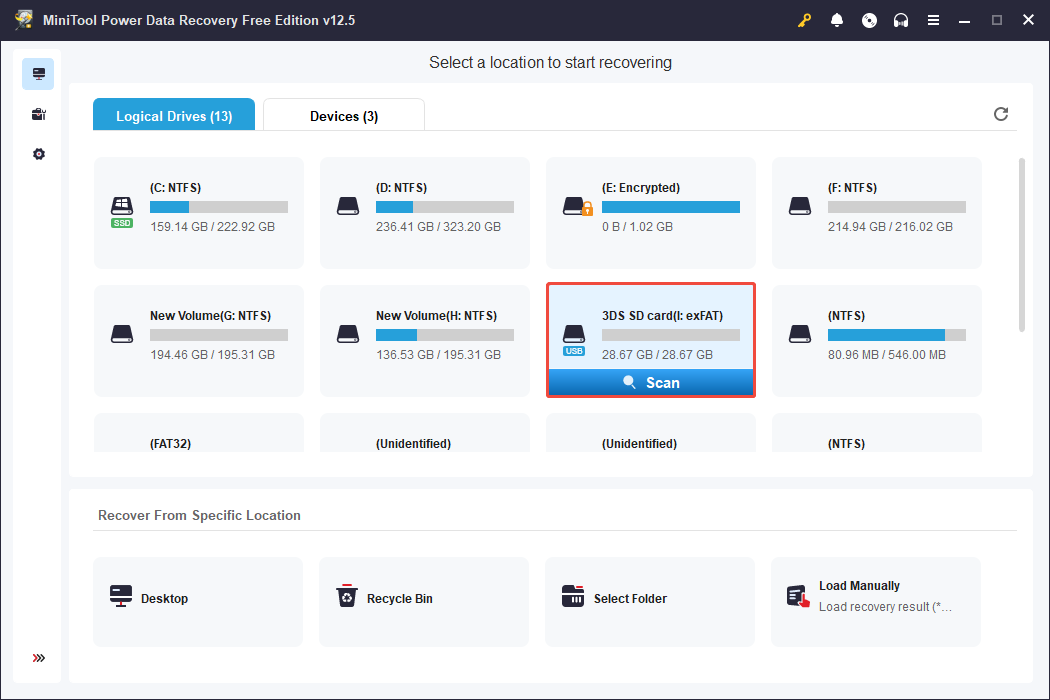
Step 2: After the scanning process, you can use the following features provided by MiniTool Power Data Recovery to find the desired files:
- Path: Browse files by their folder structure.
- Type: View files grouped by type, like documents, photos, videos, etc.
- Filter: Set the filters, such as file type, size, or modified date, to narrow down unwanted files.
- Search: Quickly find files using keywords.
- Preview: View files before recovering to confirm they’re what you need.
Step 3: After selecting the files you want to recover, click the Save button and choose a location to save the recovered data. It is worth noting that you should not save the recovered files in the original location to avoid data overwriting. Next, click the OK button to recover files.
As the free version of this data recovery tool allows you to recover 1 GB files at no cost, if you want to recover more files, you can upgrade to the advanced version of MiniTool Power Data Recovery.
MiniTool ShadowMaker TrialClick to Download100%Clean & Safe
Bottom Line
Hope you successfully recover 3DS SD card data by following the solutions mentioned above. Additionally, you can contact a professional data recovery service. Anyway, wish you get your game files back and enjoy your game!
User Comments :