
Sysdll_win64_retail.dll is a dynamic link library (DLL) file related to the FIFA 17 application. When that file gets missed or corrupted, a series of issues and errors will happen about that application. To resolve this issue, you can read this article on MiniTool Website for troubleshooting.
What is Sysdll_win64_retail.dll Missing Error?
Sysdll_win64_retail.dll is related to managing the functionality of the FIFA 17 software and this DLL file is not an essential Windows file. When it is missing or corrupted, the application can’t run well.
The sysdll_win64_retail.dll missing error can be caused by many reasons. For example, you may mistakenly delete the DDL file and try to recover it. In this way, you can go to the recycle bin to check if the file is still there.
Besides, forced PC shutdown and virus & malware infiltration can damage the sysdll_win64_retail.dll file, leading to the sysdll_win64_retail.dll not found error.
Of course, many viruses can disguise themselves as a third-party DDL file; if your antivirus finds this file as malicious, it’ll quickly quarantine it and stop running.
No matter which one is the culprit, we recommend you to use MiniTool ShadowMaker, this free backup software, to back up your important files or systems in advance so that your missing DDL files can be quickly recovered.
And at the same time, even in the face of malicious DDL files, a system-included backup plan can help you protect all your data stored in it.
MiniTool ShadowMaker TrialClick to Download100%Clean & Safe
Related articles:
- How to Fix the Libxml2.dll Is Missing or Not Found Error?
- Msvcr110.dll Is Missing or Not Found? Try the 11 Methods!
- Fix Ftd2xx.dll Not Found or Missing Error – What Is Ftd2xx.dll?
How to Fix Sysdll_win64_retail.dll Missing?
Method 1: Fix Corrupted System Files
When you find sysdll_win64_retail.dll is missing, you can run an SFC scan to check for the file corruptions.
Step 1: Input Command Prompt in Search and run it as an administrator.
Step 2: Then input sfc /scannow and press Enter to execute the command.
When the verification finishes, you can close the window and restart the computer.
![CHKDSK vs ScanDisk vs SFC vs DISM Windows 10 [Differences]](https://images.minitool.com/minitool.com/images/uploads/2020/03/chkdsk-vs-scandisk-vs-sfc-vs-dism-thumbnail.jpg)
Method 2: Re-register the Sysdll_win64_retail.dll File
You can try to re-register the sysdll_win64_retail.dll file to see if the sysdll_win64_retail.dll not found error can be fixed.
Still, run Command Prompt as an administrator and when the window opens, please type and run the following command – regsvr32 SYSDLL_WIN64_RETAIL.DLL.
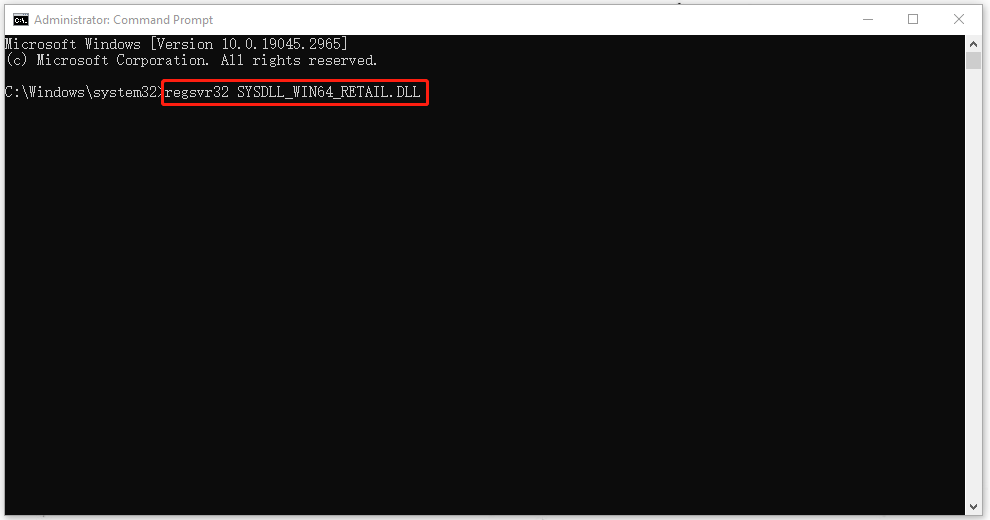
Then wait for a while until the registration is complete, restart your PC.
Method 3: Reinstall the Program
Since this sysdll_win64_retail.dll file is related to the FIFA 17 software, you can try to uninstall and reinstall the program to fix “sysdll_win64_retail.dll missing”.
Step 1: Open Control Panel and choose Uninstall a program under Programs.
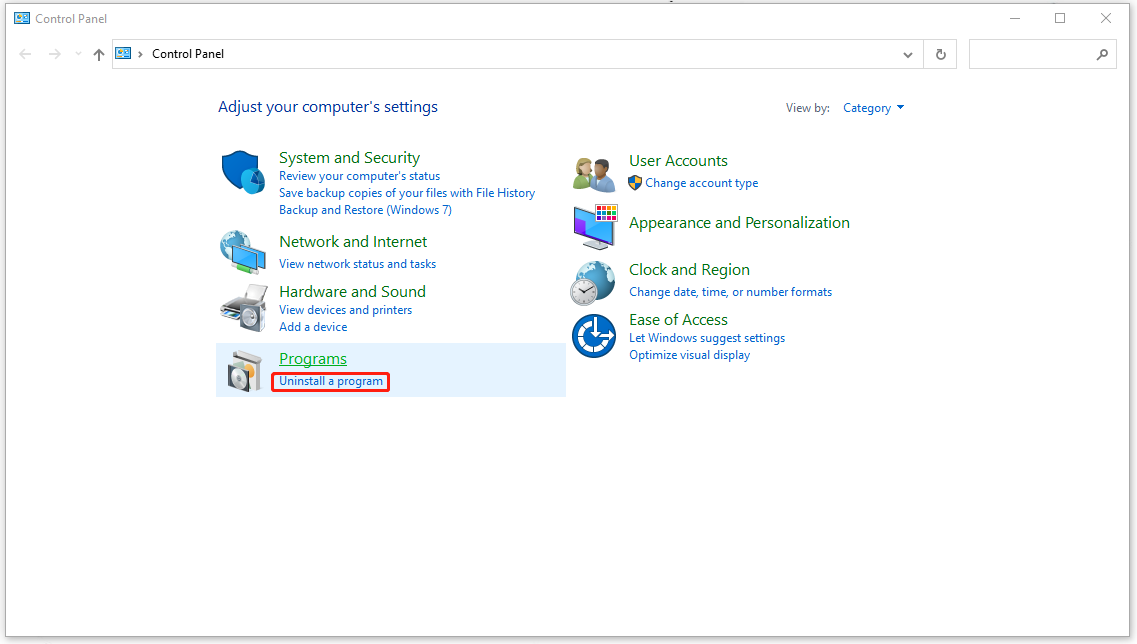
Step 2: Locate and choose the FIFA 17 software to uninstall it.
After that, you can go to the official source to download and install the program.
Method 4: Run a Malware Scan
Apart from the sysdll_win64_retail.dll missing issue, if you find there are some abnormal signs presented on your system, you can run a full scan to check for viruses.
Step 1: Go to Start > Settings > Update & Security > Windows Security > Virus & threat protection.
Step 2: Click Scan options from the right panel and click Full scan and then Scan now.
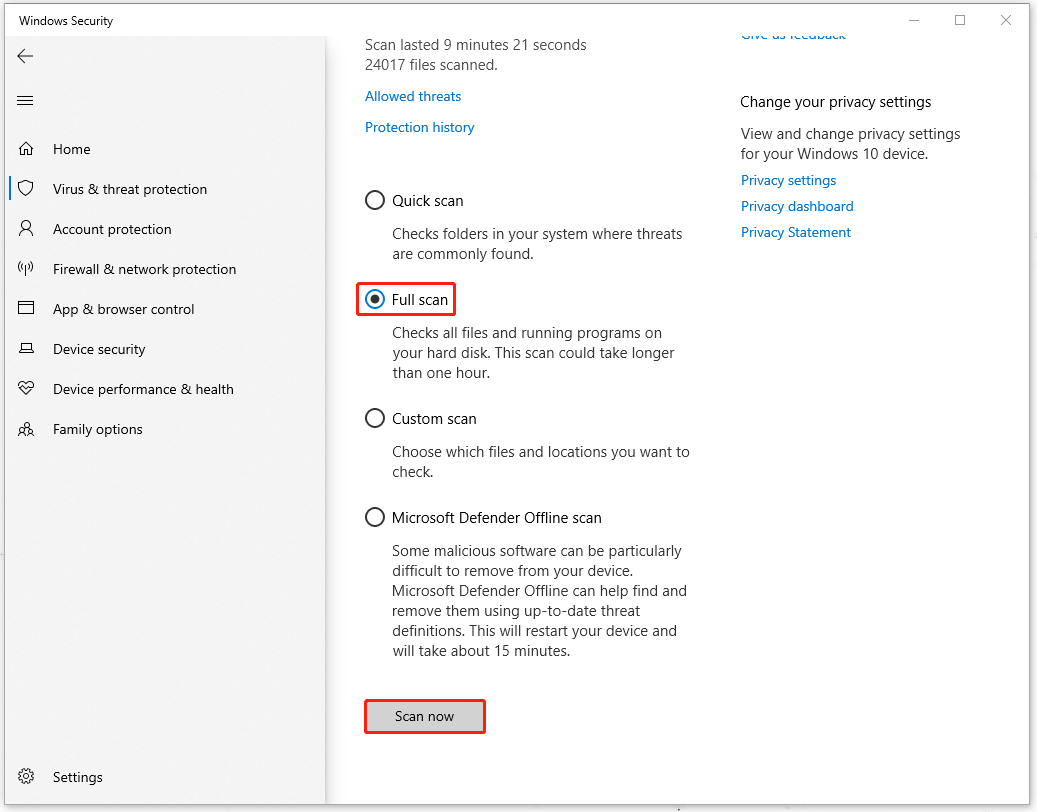
If it finds any threats, you can choose to quarantine or remove them; If no threats are found, you will be informed that your device is secure.
Bottom Line:
This article has told you how to fix the sysdll_win64_retail.dll missing error. Hope this post is useful for you.
User Comments :