
This essay from MiniTool unit mainly teaches you 3 methods to check PSN friends list: from PSN account online, via PlayStation application, and through PSN system on PlayStation consoles.
What Is PSN Friends List?
PSN friends list is a list of PSN (PlayStation Network) users that you have added as your friends in the online world. Just like in the real world, a friend in your PSN can communicate with you when you feel lonely, help you when you are in trouble, support you when you need to do a task, and so on.
How to Check PlayStation Friends List on PC?
It is easy to check your PSN friends list online. Just sign in to your PSN account at playstation.com and you can check your PlayStation Network friends list in the several sections showed below.
How to Check PlayStation Friends List on PC?
- Find the PSN Friend List in Account Profile
- Check PS4 Friends List in Account Friends
- View PlayStation 4 Friends List from Messages
- Find PSN Friends List Down
1. Find the PSN Friend List in Account Profile
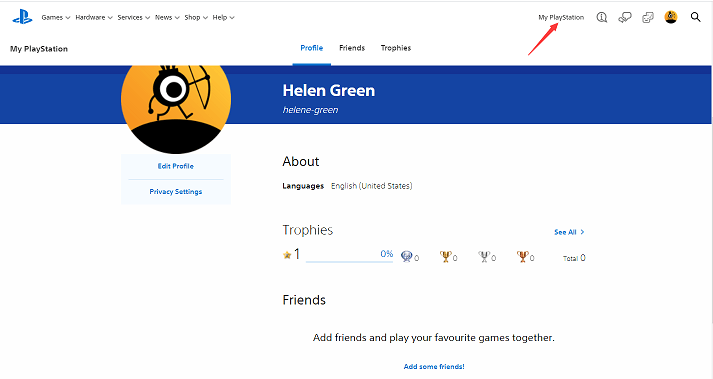
After you successfully signed in your PSN ID, just click My Playstation on the upper right. Then, you will be redirected to the profile page. There in the right section under the Friends title, you can see all your friends.
2. Check PS4 Friends List in Account Friends
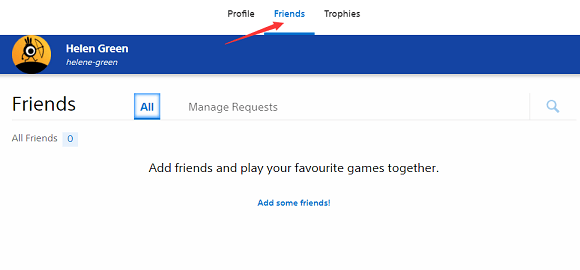
Or, you can further move to the Friends tab by clicking on the upper menu.
3. View PlayStation 4 Friends List from Messages
Click on the Messages icon on the upper right and you can see the friends who have sent a message to you. There, you can see your friends list, not all your PSN friends, but the friends you recently chatted with.

4. Find PSN Friends List Down
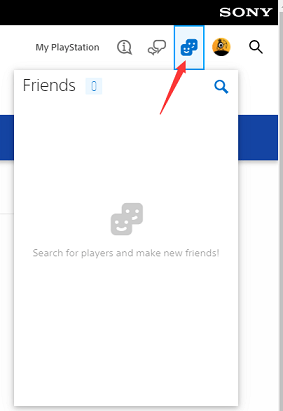
Or, you can directly check your friend list in the drop-down triggered by clicking the Friends icon in the upper right area.
How to Check PSN Friends List on Mobile Devices?
If you are on the way somewhere and want to check the friends list of your PS4 account, is it possible? It is possible to have a look at your friends list through one of the mobile devices that you are taking with you, smartphone, tablet, iPad, etc.
How to Check PSN Friends List on Cell Phones?
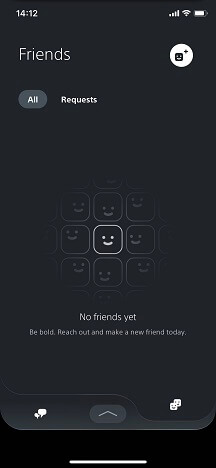
In such situations, you have to rely on the PlayStation App. Just download and install it from Google Play or Apple Store. Next, sign in your online ID (PSN account). Then, tap the Friends icon on the top right to see your friends list.
How to Check PSN Friends List on PlayStation Console?
Similarly, sign in to your PSN account on your machine, PS4, or PS5. Then, select the Friends icon on the lower menu. On the next screen, you can see all your friends listed in the right area.
PSN Friends List Not Loading After Update Firmware
After upgrading to the PlayStation 4 firmware update 8.00, many users have reported a friends list issue saying that “cannot load” with error code WS-44369-6 or WS-37505-0. “My PSN friends list disappeared!” someone complains that his friends not showing up. However, this seems to be a server-side problem instead of a local error. So, the only thing you have to do is to wait until Sony release a patch for this issue.
About The Author

Position: Columnist
Helen is a tech writer with over 10 years of experience. She specializes in creating easy-to-follow guides for video editing, media file conversion, and computer performance. Helen doesn't just write—she tests every software herself and listens to feedback from users and experts. Her goal is to make complex programs simple so that everyone can solve their tech problems with confidence.
User Comments :